15
14
TV System TV System PALPAL
16:916:9
Pan&ScanPan&Scan
Screen RatioScreen Ratio
4:3 Handing4:3 Handing
Press key to select PAL/SECAM/NTSC
Video
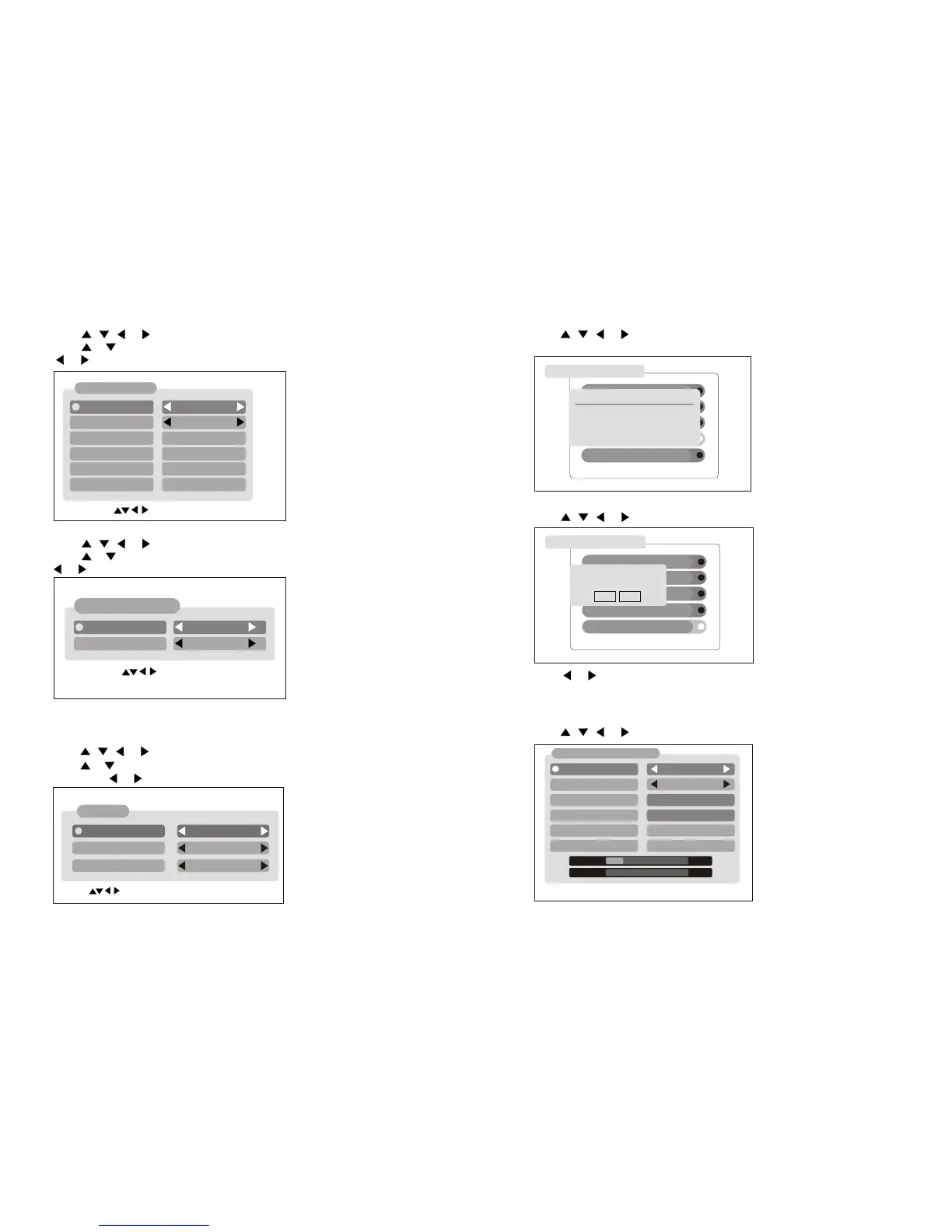
Press , , or button to select Video ,Then press OK button.
Press or button to select TV System , Screen Ratio or 4:3 Handing ,
Then press or button to set it .
VideoVideo
2. Channel Search
Channel Search
Press , , or button to select Channel Search ,Then press OK button.
AreaArea
FrequenyFrequeny
Band WidthBand Width
ModeMode
Scan ModeScan Mode
AustraliaAustralia
Pross LEFT/BIGHT key to Soloct Froquency. Pross LEFT/BIGHT key to Soloct Froquency.
CCHH[[44] ]557 7..55MMHHZZ
AutoAuto
Manual ScanManual Scan
LevelLevel 15%15%
0%0%
QualityQuality
OSD Language: Control the language as to you preference.
OSD Transparency: Customise the OSD transparency.
Local TimeLocal Time
Time zoneTime zone
Summer timeSummer time
DateDate
MonthMonth
YearYear
TimeTime
GMT+1GMT+1
OnOn
2323
99
20062006
11:0611:06
Press OK Key to select Exit:BackPress OK Key to select Exit:Back
User Interface
Press , , or button to select User Interface ,Then press OK button.
Press or button to select Language or Transparency item, Then press
or button to change the language .
Press OK Key to select Exit:BackPress OK Key to select Exit:Back
OSD LanguageOSD Language
OSD TransparencyOSD Transparency
EnglishEnglish
35%35%
User InterfaceUser Interface
Local Time
Press , , or button to select Local Time ,Then press OK button.
Press or button to select Time zone or Summer time item ,Then press
or button to set it .
System Information
Press , , or button to select System Information ,Then press OK
button. You can see the receiver Hardware and Software update details.
System SetupSystem Setup
Local TimeLocal Time
User InterfaceUser Interface
Video Video
System InformationSystem Information
Factory ResetFactory Reset
11
22
33
44
55
System InformationSystem Information
NEC uPD61110NEC uPD61110
S/W Version: uPD61110 V3.02S/W Version: uPD61110 V3.02
h/W Version: 3.0h/W Version: 3.0
Last Update: 2006.11.06Last Update: 2006.11.06
Factory Reset
Press , , or button to select Factory Reset ,Then press OK button.
Press or button to select Yes or No, then press OK button.
Note: this action will erase all the date you have store in the receiver ,Be
sure that you want to perform this function before you proceed .
System SetupSystem Setup
Local TimeLocal Time
UserInterfaceUserInterface
Video Video
System InformationSystem Information
Factory ResetFactory Reset
11
22
33
44
55
All Date are Erasing
Are you sure?
All Date are Erasing
Are you sure?
YesYes NoNo
7MH7MH
ZZ
Scan ModeScan Mode
Auto ScanAuto Scan


 To Next Page
 Loading...