Panel Description
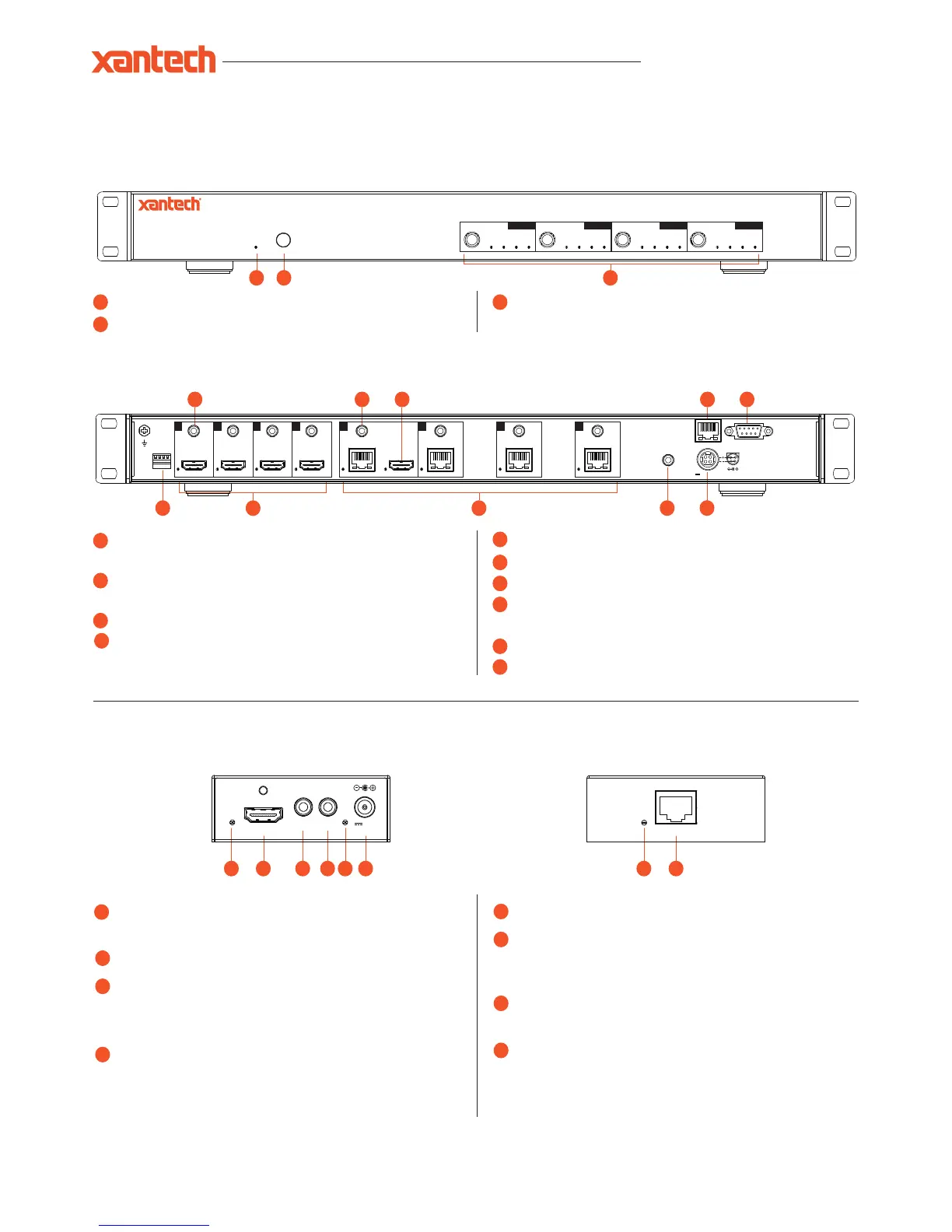
XT-HDBT-MX44-4K Front Panel
IR receiver window for matrix control
Power LED indicator - indicates if the unit is on or off
1
2
3
1 2
XT-HDBT-MX44-4K Rear Panel
IR output - connect to Xantech IR emitter for source control from
HDBT receivers
IR input - connect to Xantech IR receiver to transmit IR
to HDBT receivers
HDMI output - connect to a HDMI display
TCP/IP (RJ45) – connect to LAN for TCP/IP control of
Matrix
RS-232 Serial port for control by third party control devices
EDID DIP switch used to adjust HDMI input EDID settings
HDMI inputs - connect to HDMI source devices
HDBT output - RJ45 connector, connect to
XT-HDBT-EX70-4K-RX receivers
IR input for matrix control
Power port - use included 24V/3.5A DC power adaptor
4
5
9
10
9
6
7
11
3
HDMI output selection buttons 1-4. Press to scroll through
source inputs per HDMI output
12 13
8
12
13
HDMI Link LED - LED will be lit when an active HDMI connection
is detected.
HDMI Output - Connect to the HDMI input on local display device
IR input - Connect to Xantech 12V IR Receiver (sold separately).
Connection is used extend IR over the HDBaseT signal to control
device located at the XT-HDBT-SP14-4K splitter.
IR output - Connect to Xantech 12V Emitter (sold separately).
Connection is used to control the local source or display device
from Xantech IR Receiver connected at the XT-HDBT-SP14-4K
splitter.
Power LED indicator.
Power port - Connect Xantech 12V DC power supply only. Note -
HDBaseT extender kit can be powered from either the Transmitter
or Receiver by using the power over cable (POH) feature.
HDBaseT input - RJ45 connector. Connect to HDBaseT output on
XT-HDBT-SP14-4K splitter.
HDBaseT Link LED - LED will be lit when an active connection is
established with the XT-HDBT-SP14-4K.
XT-HDBT-EX70-4K-RX
16
17
18
19
21
22
23
16 18 19
20
22 2317
21
20
HDMI Out
Link
Power
IR IN IR OUT
12V
2A


 To Next Page
 Loading...