Need help?
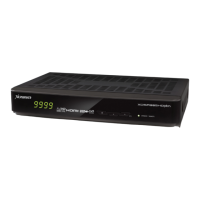
Do you have a question about the Xcruiser XDSR4000HD and is the answer not in the manual?
Switch the receiver between power on and standby modes.
Configure network connection via LAN, Wi-Fi, or 3G.
Power on and initial channel playback.
Enter and exit standby mode.
Navigate channels sequentially.
Adjust audio volume level.
Select channels using numeric keys.
Manage and display favorite channels.
Access Electronic Program Guide.
View, sort, and manage channel lists.
Access and navigate the main menu.
Manage, sort, and edit service lists.
Add, delete, and manage favorite channels.
Configure satellite dish and LNB settings.
Automated detection and scanning of services.
Assist with antenna alignment using guidance.
Set menu, audio, and subtitle languages.
Configure display and audio output settings.
Configure network type (Wired, Wi-Fi, 3G).
Set local time, GMT, and daylight saving.
Set password for menu and channel access.
Update receiver firmware using a USB drive.
Reset receiver to factory default settings.
Browse and play video files from USB.
Browse and play music files from USB.
Start, pause, and stop recording.
 System Memory
| main processor speed | 594 MHz |
|---|---|
| flash memory | 64 Mbits |
| DDR SDRAM | 1024 Mbits |
Tuner Specifications| tuner type | DVB-S / DVB-S2 |
|---|---|
| signal level | -65 to -25 dBm |
| LNB power vertical | +13V |
| LNB power horizontal | +18V |
| polarization current | Max. 400mA |
Video and Audio Decoding| video decoding | MPEG-2, MP@ML, MPEG-4 part 10/H264 |
|---|---|
| video resolution | 720 480P/I, 720 576P/I, 1280 720p, 1920 1080i, 1920 1080P |
| audio decoding | MEPG-1 layer I/II, Mpeg2 layerII, Dolby digital |
| sampling rate | 32, 44.1 and 48KHz |
Operating Environment| operation temperature | 0º ~ +45º |
|---|---|
| storage temperature | -10º ~ +70º |
| storage humidity | 5% ~ 95% RH (Non-Condensing) |
 Ports & Interfaces
| TV-SCART output | Video CVBS/RGB, Audio L/R |
|---|---|
| RCA output | Video CVBS, Audio L/R |
| S/PDIF output | Coaxial, Digital Audio or Dolby Digital Bit Stream Output |
| RS-232C transfer rate | 115.2Kbps, 9 pin D-sub Type |
| ethernet speed | 100M |
| USB slots | Two USB 2.0 |
| HDMI version | Ver1.3 Type A |
 Power
Power| input voltage | Free Voltage (100~240V AC, 50/60Hz) |
|---|---|
| power consumption | 20W MAX |
 Weight and Dimensions
| size (W x H x L) | 260mm x 54mm x 188mm |
|---|---|
| net weight | 1.6 ~ 2 KG |

 To Next Page