EasyManua.ls Logo

XDrum DD-450 - User Manual

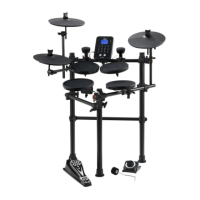
XDrum DD-450
32 pages
Print Icon
To Next Page IconTo Next Page
Loading...
00039164
Version 09/2015
XDrum
DD
-
450
Digital Drum Set
Users manual

Questions and Answers

Summary

Safety Information

FCC Compliance Warning

Details FCC compliance for digital devices and potential interference issues.

General Precautions

Provides essential precautions for safe operation, power, connections, cleaning, and handling.

Main Features

Core Features Overview

Details on voices, appearance, AFI, DBT, coach, and USB MIDI output.

Front Panel Controls and Display

Control Buttons and Display

Details the function of each button and the LCD display on the front panel.

Side Panel Connectivity

Interface Terminals

Describes the USB MIDI, AUX IN, AFI, PHONES, and DC IN terminals for connectivity.

LCD Display Interpretation

Display Elements and Functions

Explains the various indicators and information shown on the LCD screen.

Initial Setup and Connections

Connecting Pads and Pedals

Illustrates how to connect the drum pads, pedals, and triggers to the drum module.

Getting Started: Power and Setup

Power Supply and Management

Details how to connect the power, turn the unit on/off, and manage auto power off settings.

Quick Play Functions

Selecting Drum Kits and Voices

Guides on selecting drum kits and changing individual pad voices for desired sounds.

Mastering Playing Techniques

Drum Pad and Cymbal Techniques

Explains various playing techniques for pads, cymbals, and hi-hat for expressive performance.

Customizing Drum Kits

Preset vs. User Drum Kits

Explains the difference between preset and user drum kits and how to manage them.

Editing Drum Kit Settings

Details how to adjust overall drum kit volume and other parameters.

Editing Individual Pad Voices

Guides on changing the sound (voice) for individual drum pads.

Saving Custom Drum Kits

Saving Custom Kits

Instructions on how to save edited drum kits as user drum kits.

Playing Along with Songs and Metronome

Song Playback and Volume Control

How to select and play along with built-in songs, adjusting volumes.

Using the Metronome

Details on starting, stopping, and configuring the metronome for practice.

Recording Your Performances

Recording Setup and Start

Steps for entering record mode and starting real-time recording of drum performances.

Auto Fill In (AFI) Feature

AFI Function Activation and Use

Instructions on turning the AFI function on/off and triggering intros, fills, or endings.

AFI Trigger Behavior

Explains how AFI triggers respond based on accompaniment and playing status.

Coach Mode Training

Coach Mode Introduction

Introduces the Coach mode and its three exercise types: Quiet Count, Change Up, Beat Check.

Operating the Coach Mode

Guides on entering Coach mode, selecting types, and adjusting parameters.

Quiet Count Practice Mode

Details on practicing with quiet and count modes to improve timing and tempo.

Advanced Coach Mode Features

Quiet Count Mode Parameters

Explains the parameters for Quiet Count mode, including quiet and count types.

Change Up Practice Mode

Describes the Change Up mode for practicing rhythm pattern changes and beat accuracy.

Beat Check Training Mode

Beat Check Mode Operation

Instructions for using Beat Check mode to improve basic beat accuracy with scoring.

Double Bass Trigger (DBT) Function

DBT Function Activation

How to turn on the DBT function for generating continuous kick sounds.

Tempo Control

Tempo for Metronome and Songs

Guides on adjusting the tempo value for metronome and song playback.

Utility Mode: Pad Configuration

Pad Trigger Settings

Details on adjusting pad sensitivity, crosstalk, curve response, and retrigger cancel.

Utility Mode: Module Configuration

Module Settings Management

Explains settings for GM Mode response and Auto Power Off duration.

Personalizing AFI Styles

Downloading AFI Styles

Steps to download AFI MIDI styles from a computer using AFI Combiner software.

Troubleshooting, Messages, and Specs

Troubleshooting Common Issues

Lists common issues like no sound or connection problems with their resolutions.

Interpreting Prompt Messages

Defines the meaning of system messages displayed on the LCD, like REC FUL or FAC SET.

Product Technical Specifications

Provides detailed technical data including polyphony, instruments, tempo, and dimensions.

XDrum DD-450 Specifications

General IconGeneral
BrandXDrum
ModelDD-450
CategoryDrums
LanguageEnglish

Related product manuals