Need help?
Do you have a question about the XDrum DD-505 and is the answer not in the manual?
General advice on placing the drum set to prevent deformation, discoloration, or damage from environmental factors.
Instructions for using the AC adapter, including voltage matching, usage when not in use, and storm precautions.
Guidelines for safely handling and moving the drum set to avoid damage from physical shocks and excessive force.
Methods and precautions for cleaning the drum module, including recommended cloth types and prohibited cleaners.
Information on potential interference from digital circuitry and how to mitigate it by repositioning the instrument.
Details the layout and function of buttons, knobs, and the LED display on the front of the drum module.
Identifies and explains the connectors and ports located on the back of the drum module for various connections.
Details the connectors and ports located on the side of the drum module, specifically highlighting the headphone jack.
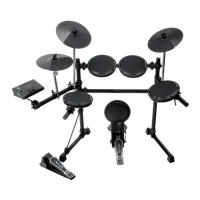
Instructions on connecting drum pads, cymbals, and pedals to the module's trigger input jacks for proper function.
Guides on connecting the drum module to external MIDI sequencers or sound modules for data transmission.
Instructions for connecting amplifiers or audio systems to the module's output jacks for sound playback.
Explains connecting external audio sources like CD players for playback mixed with drum sounds.
Details connecting stereo headphones to the module's headphone jack for private listening.
Instructions for connecting the AC adapter to the DC IN jack, including safety notes before powering on.
Steps to safely turn on the drum module after all connections are completed, noting initial display indicators.
Guidance on adjusting the overall output volume using the volume knob to a comfortable listening level.
How to choose between the 20 preset drum kits and 10 user-created kits.
Instructions on activating, setting tempo, and adjusting the volume of the built-in metronome for practice.
How to select and listen to the 50 preset songs included in the drum module.
Method for controlling the volume level of the song accompaniment using the [song/volume] button.
Procedures for changing the playback speed (tempo) of the preset songs using the [tempo] buttons.
Allows setting song tempo by tapping on a pad, detecting the tempo from multiple taps.
Feature to mute individual drum parts within a song by pressing the [drum off] button for focused practice.
Instructions on using the metronome's click sound independently of songs or other functions.
Explains how the pad lights guide the user during practice sessions with preset songs.
Guide to assigning specific percussion sounds to each pad to create custom drum kits.
How to individually control the volume level for each pad within a drum kit for balanced sound.
Instructions for saving custom drum kits to the unit's memory, noting the user kit number range.
How to fine-tune the responsiveness (gain) of each pad to playing dynamics, from soft to forceful hits.
Configure settings to prevent crosstalk between adjacent pads by setting an input value threshold.
Controls the reverb effect to add ambiance to the drum sounds, with options to turn it on or off.
Adjusts the pitch of individual drum voices (00-15) to alter their tone and timbre.
Instructions to restore the drum module to its original default settings, warning that all data will be lost.
 General
| Metronome | Yes |
|---|---|
| Display | LCD |
| Type | Electronic Drum Kit |
| Connectivity | MIDI Out |
| Dimensions | 80 x 48 x 36 cm |
| Power Supply | 9V DC |
| Connectors | Headphone Jack (3.5mm Stereo), MIDI-Out |

 To Next Page