Need help?
Do you have a question about the XDrum DD-501 and is the answer not in the manual?
Explains the function of each button, knob, and indicator on the front of the drum module.
Instructions for connecting drum pads, hi-hat, and foot pedals to the drum module.
Guide on connecting the AC power adapter to the drum module.
Steps for connecting the drum module to a computer via USB for MIDI data transfer.
Procedure for turning the drum module on and what to expect on the display.
Instructions on how to record user-created drum patterns.
How to adjust the overall volume level of the drum module while playing.
Steps to prepare the module for recording user patterns.
Procedure to restore the drum module to its original factory settings.
How to start the actual recording process for user patterns.
How to stop the recording process and save the recorded data.
 General
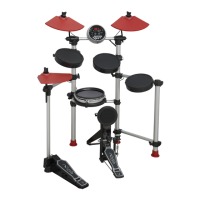
| Type | Electronic Drum Kit |
|---|---|
| Cymbals | 3 cymbal pads |
| Headphone Output | Yes |
| Aux Input | Yes |
| Kick Pedal | Included |
| Drum Module | DD-501 Module |
| Sounds | 108 |
| Presets | 10 preset kits |
| Songs | 40 |
| Connectors | MIDI Out |
| Connectivity | MIDI, USB |
| Power Supply | 9V DC |

 To Next Page