Adjust the pattern tempo
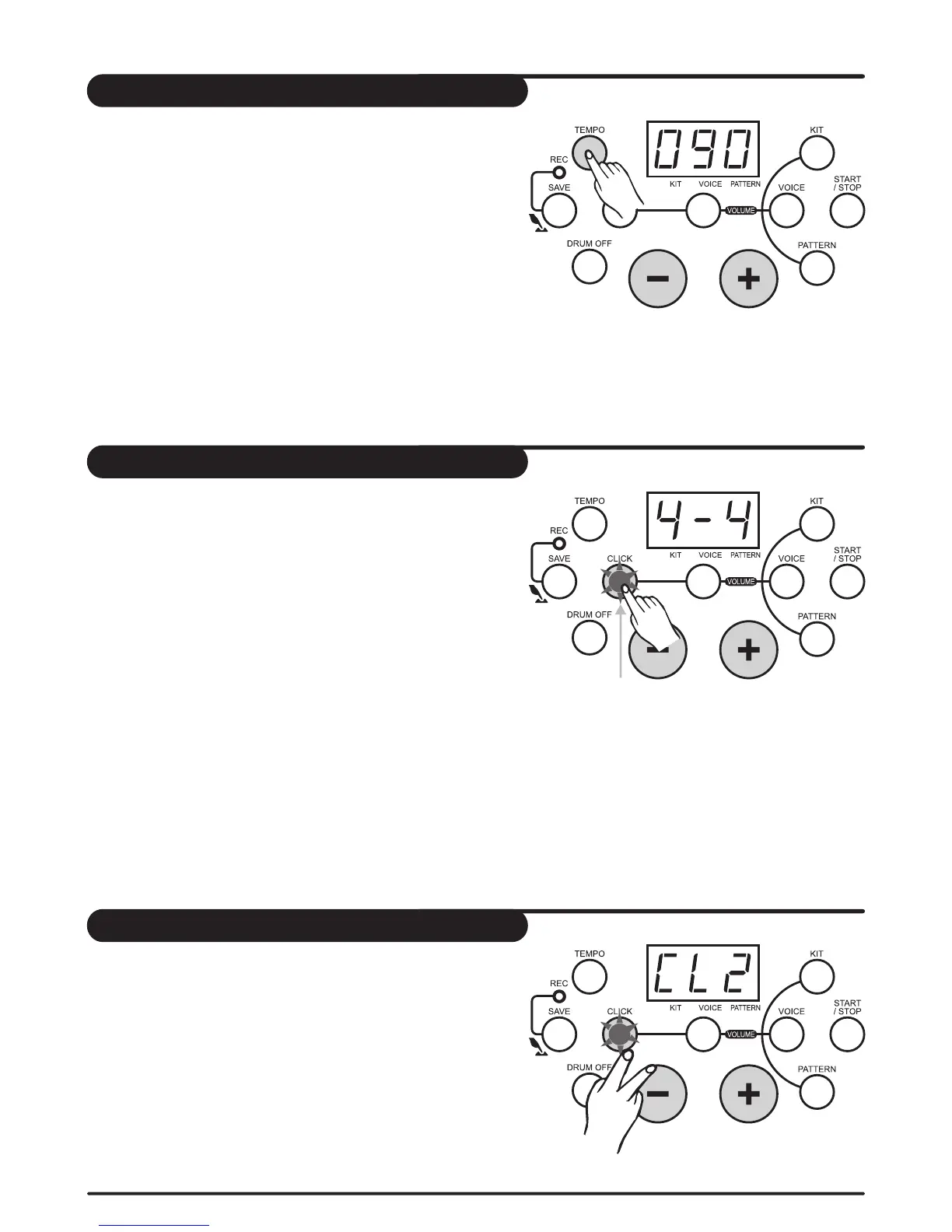
Press [tempo] button to enter tempo adjustment mode,
3-digit LED temporarily displays TEMPO value.
Press [+] and [-] button to change the tempo of click and
pattern playing (30-280, not in cycle).
Press [+] and [-] button at the same time, to reset to the
default value(the current pattern default tempo).
Click
Press [click] button to turn on/off click , 3-digit LED
displays the current time signature, and the click
indicator lights and flash, press [+] and [-] button to
change the current time signature. Press [click] button
again to turn off click.
9 kinds of time signature can be chosen (1/4, 2/4, 3/4,
4/4, 5/4, 6/4, 7/4,3/8, 6/8)
As pattern playing, the click indicator automatically
flash according the pattern beat, but the click sound
will not be turned on automatically.
click indicator
lights
Select a click sound
Press and hold [click] button, then press [+] or [-] button
to adjust the click sound, 3-digit LED temporarily
displays the current click sound 'CLX'.
The drum module supports 4 click sounds: metronome,
beep, cowbell and voice. When turn on the click , the
default sound is “metronome” .
press at
the same time
14


 To Next Page