7
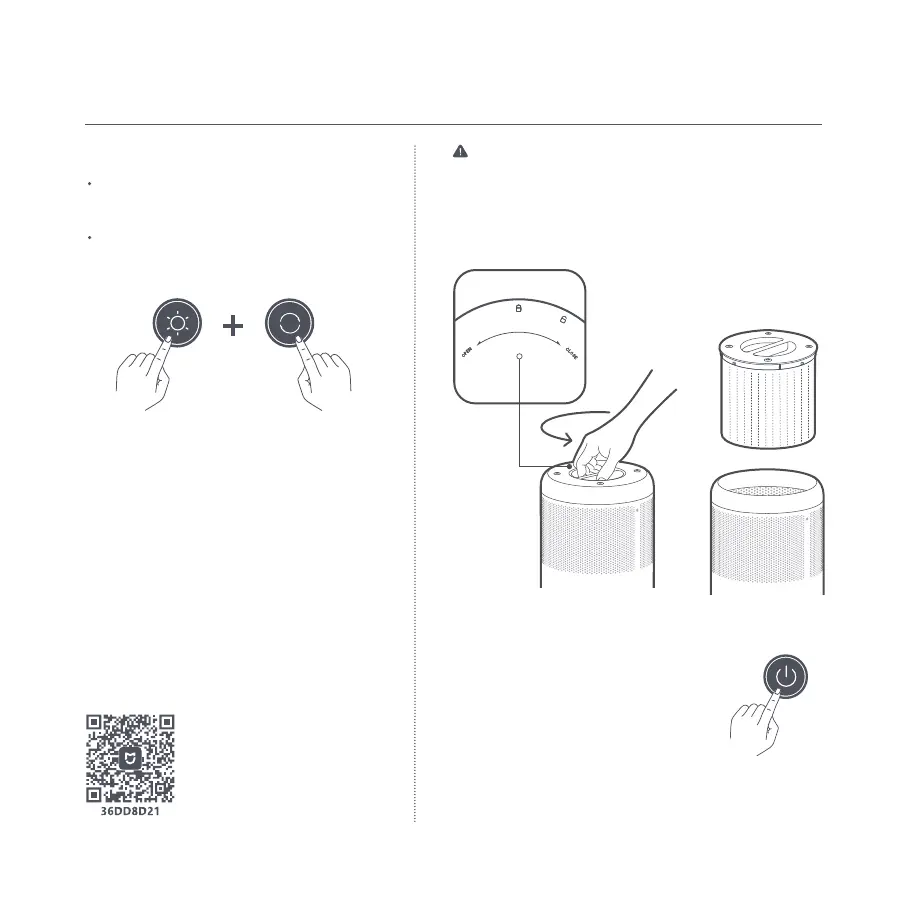
Enabling/disabling Wi-Fi
Care & Maintenance
Replacing the filter
Resetting the filter
Remove the old filter and install a new one correctly as
illustrated.
While the purifier is on standby, press and
hold the power button for 7 seconds. When
the filter is successfully reset, the purifier
will make a notification sound and the air
quality indicator will remain green for 1
second.
Scan the QR code to download and install the app. You
will be directed to the connection setup page if the app is
installed already. Or search for "Mi Home/Xiaomi Home" in
the app store to download and install it.
Open the Mi Home/Xiaomi Home app, tap "+" on the upper
right, and then follow the instructions to add your device.
*The app is referred to as Xiaomi Home app in Europe
(except for Russia). The name of the app displayed on your
device should be taken as the default.
Note: The version of the app
might have been updated, please
follow the instructions based on
the current app version.
Connecting with the Mi Home/Xiaomi
Home app
This product works with the Mi Home/Xiaomi Home
app*. Control your device with the Mi Home/Xiaomi
Home app.
To enable or disable Wi-Fi, simultaneously
press and hold the mode switch button and
the light adjustment button for 7 seconds.
The Wi-Fi indicator is on when the Wi-Fi is
enabled, and is off when the Wi-Fi is disabled.
Warning: Make sure the purifier is turned off and the power
adapter is unplugged before replacing the filter.
Note: It is recommended to replace the filter every 6 to 12 months.
Please purchase genuine and compatible filters from official
channels.





 To Next Page