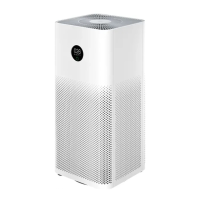
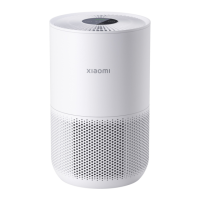
The Mi Air Purifier 3 is designed to improve indoor air quality by filtering out dust, hair, particles, and harmful gases. It features a compact design with an OLED display that shows real-time air quality information, including PM2.5 levels, temperature, and humidity. The purifier offers various operating modes to suit different needs and environments, ensuring a comfortable and clean living space.
Function Description:
The Mi Air Purifier 3 operates by drawing in air through its inlets, passing it through a multi-layer filter, and then releasing purified air through the top grille. The device is equipped with a laser particle sensor that continuously monitors the PM2.5 concentration in the air, allowing the purifier to adjust its operation automatically in Auto mode. The OLED display provides a clear visual representation of the current air quality, making it easy for users to understand their indoor environment at a glance. The purifier is designed to be user-friendly, with a single On/Off & Mode button for basic controls and a display On/Off button for adjusting screen brightness or turning the display off entirely.
Usage Features:
- On/Off & Mode Button: A single tap on this button turns the purifier on and allows users to cycle through different operating modes. Pressing and holding the button for two seconds turns the purifier off.
- Operating Modes:
- Auto Mode (A): The purifier automatically adjusts its fan speed based on the detected air quality conditions, providing efficient purification without constant manual intervention.
- Sleep Mode (C): Designed for quiet operation, this mode ensures ultra-low noise levels, making it ideal for use in bedrooms during sleep.
- Low Speed (—): Provides a gentle purification suitable for maintaining good air quality in less polluted environments.
- Medium Speed (≡): Offers a balanced purification performance for everyday use.
- High Speed (≡): Delivers maximum purification power for quickly clearing heavily polluted air.
- Manual Mode (♡): Allows users to set and save a specific coverage area and purification efficiency through the Mi Home/Xiaomi Home app, providing customized control.
- Air Quality Indicator: The OLED display features a color-coded indicator (Green, Orange, Red) that visually represents the PM2.5 level, making it easy to gauge air quality:
- Green: 0-75 µg/m³ (Good air quality)
- Orange: 76-150 µg/m³ (Moderate air quality)
- Red: 150 µg/m³ or higher (Poor air quality)
- Display On/Off Button: Located on the back of the purifier, this button allows users to adjust the display's brightness or turn the display on/off, which can be particularly useful in dark environments like bedrooms.
- Wi-Fi Connectivity: The purifier can be connected to the Mi Home/Xiaomi Home app, enabling remote control and access to advanced features. Users can monitor air quality, change modes, set schedules, and receive filter replacement notifications directly from their smartphone.
- Wi-Fi Reset: If the phone cannot connect to the purifier, users can reset the Wi-Fi by simultaneously pressing and holding the On/Off & Mode button and the Display On/Off button for five seconds until a beep is heard.
- Placement Recommendations: For optimal performance, it is recommended to maintain a distance of at least 20 cm between the air inlets and walls or other objects. Keeping doors and windows closed during operation enhances the purifying effect.
- Filter Status Notifications: The purifier provides notifications regarding the filter status:
- Filter Installation Notification: Appears if no filter is detected or if an installed filter is not genuine.
- Filter Service Life Notification: Displays the remaining filter service life (in %) when the purifier is turned on or after opening and closing the filter compartment. This notification appears when the service life is more than 10%.
- Filter Replacement Notification: Appears when the filter's service life is 10% or less, indicating that it's time for a replacement. A QR code is also displayed for easy reordering. The recommended replacement period is 6-12 months.
Maintenance Features:
- Filter Compartment Access: The filter compartment is easily accessible by pressing a buckle, allowing for straightforward filter installation and replacement.
- Cleaning the Filter Compartment: Regular cleaning of the air inlets and the filter compartment is crucial for maintaining optimal ventilation and purification efficiency. This can be done using a vacuum cleaner or a soft cloth to remove accumulated dust and hair.
- Cleaning the Laser Particle Sensor: The laser particle sensor, located inside the filter compartment, also requires periodic cleaning. To access it, users need to remove the sensor cover by pushing a finger up against its latch. Once open, an air blow gun or a hair dryer (using cool air only) can be used to clean the cover and the sensor, ensuring accurate air quality readings.
- Filter Replacement: The device is designed for easy filter replacement. The manual provides instructions on how to replace the filter, and the Mi Home/Xiaomi Home app can also guide users through the process.
- Odor Management: If the filter produces odors due to absorbing excessive harmful gases, it is recommended to store the filter in a well-lit and ventilated area to reactivate the activated carbon and restore its particle adsorption capacity. However, timely replacement according to the recommended service life is essential.
- Safety Precautions: Before any maintenance or moving the purifier, it is crucial to turn it off and unplug it from the power outlet to prevent electric shocks or other hazards. The purifier will not turn on if the fan grille or filter compartment cover is not properly installed, ensuring user safety.

 Need help?
 General



 To Next Page