
 Need help?
Do you have a question about the Xiaomi EraClean Max CW-BS01 and is the answer not in the manual?
Connect to Mi Home App by scanning the product QR code.
Start fresh mode by clicking the switch once.
Start anion mode by clicking the switch twice.
Start deodorize mode by clicking the switch three times.
Check battery capacity by clicking the switch four times. Blue light indicates sufficient power.
Install the hook in the hook hole if it is needed.
The EraClean Refrigerator Odor Eliminator Max (model CW-BS01) is a smart device designed to improve the air quality within your refrigerator by eliminating odors and maintaining freshness. This device integrates seamlessly with the Mi Home App, offering users convenient control and monitoring capabilities directly from their smartphone. Its primary function is to provide a cleaner, more pleasant environment for your stored food, potentially extending its freshness and preventing the transfer of unwanted smells between different items.
The EraClean Refrigerator Odor Eliminator Max operates on a multi-mode system, allowing users to select the most appropriate function for their needs. It offers three distinct operational modes: Fresh mode, Anion mode, and Deep deodorize mode.
Fresh Mode: This is the basic operational mode, activated with a single click of the device's switch. It is designed for everyday use to maintain a consistently fresh environment within the refrigerator, preventing the buildup of common food odors. This mode likely employs a gentle, continuous release of active agents or air purification to neutralize smells before they become strong.
Anion Mode: Activated by clicking the switch twice, the Anion mode focuses on releasing negative ions into the refrigerator. Negative ions are known for their ability to attract and neutralize airborne particles, including dust, bacteria, and odor-causing molecules. This mode aims to purify the air more thoroughly, contributing to a healthier and cleaner storage space for your food. It can be particularly beneficial in reducing microbial growth and improving overall air quality beyond just odor elimination.
Deep Deodorize Mode: For more persistent or strong odors, the Deep Deodorize mode is available, activated by clicking the switch three times. This mode is intended for intensive odor removal, tackling entrenched smells that might have accumulated over time or from particularly pungent food items. It likely utilizes a more powerful or concentrated purification process to break down and eliminate stubborn odors effectively, restoring a neutral scent to the refrigerator interior.
The device is designed for user-friendly operation, both through its physical interface and its smart connectivity.
Mi Home App Integration: A key feature is its compatibility with the Mi Home App. Users can download the Mi Home App from their respective app stores and easily connect the device. The connection process involves a simple long press of the device's switch for 5 seconds, initiating a pairing mode indicated by a flowing blue light. Once connected, the blue light remains on for 5 seconds, confirming successful pairing. For new Mi Home users, scanning the QR code on the product directly leads to the device-connecting page, streamlining the setup. Existing users can add the device by clicking the "+" icon in the app's upper right corner, navigating to the add-devices page, and then scanning the product QR code. In cases where the QR code is unscannable, the device can also be added by searching for its product name within the app. This smart integration allows for remote control, mode selection, and potentially scheduling, offering a high level of convenience and customization.
Battery Indicator: The device includes a practical battery indicator feature. By clicking the switch four times, users can check the current battery capacity. A blue light indicates sufficient power, while a red light signals that the power is not enough, prompting the user to recharge the device. This ensures that users are always aware of the device's operational status and can prevent unexpected power depletion.
Installation Flexibility: The EraClean Refrigerator Odor Eliminator Max is designed with a hook hole, allowing for flexible installation within the refrigerator. Users can install a hook into this hole if needed, enabling the device to be hung in an optimal position for air circulation and odor elimination, rather than simply placed on a shelf. This adaptability helps ensure maximum effectiveness regardless of the refrigerator's internal layout.
While the manual does not explicitly detail extensive maintenance features, the design implies a focus on ease of use and minimal upkeep.
Rechargeable Battery: The presence of a battery indicator and a Type-C port for charging suggests that the device is powered by a rechargeable battery. This eliminates the need for disposable batteries, making it more environmentally friendly and cost-effective in the long run. Regular recharging, as indicated by the battery light, is the primary maintenance task.
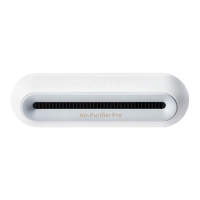
Durable Design: The device's compact and enclosed design, as depicted in the diagrams, suggests a robust construction that is likely resistant to the typical conditions within a refrigerator, such as humidity and low temperatures. This inherent durability contributes to its low maintenance profile.
Software Updates: The manual notes that "As Mi Home will be updated from time to time, the actual operation might have little differences, please follow Mi Home's guidance to finish all steps." This implies that the device's functionality, particularly through the app, may receive software updates. These updates could introduce new features, improve existing ones, or enhance the device's performance and connectivity, ensuring its long-term relevance and optimal operation. Users are simply advised to follow the app's guidance, indicating that these updates are managed through the Mi Home ecosystem without requiring complex user intervention.
In summary, the EraClean Refrigerator Odor Eliminator Max is a smart, multi-functional device aimed at enhancing refrigerator hygiene and freshness. Its intuitive controls, smart app integration, and practical features like the battery indicator and flexible installation options make it a convenient and effective solution for managing odors and improving air quality in food storage environments.
 General
| Model | CW-BS01 |
|---|---|
| CADR (Clean Air Delivery Rate) | 400 m³/h |
| Connectivity | Wi-Fi |
| Filter Type | HEPA, Activated Carbon |
| Control Method | Touch, Remote |



 To Next Page