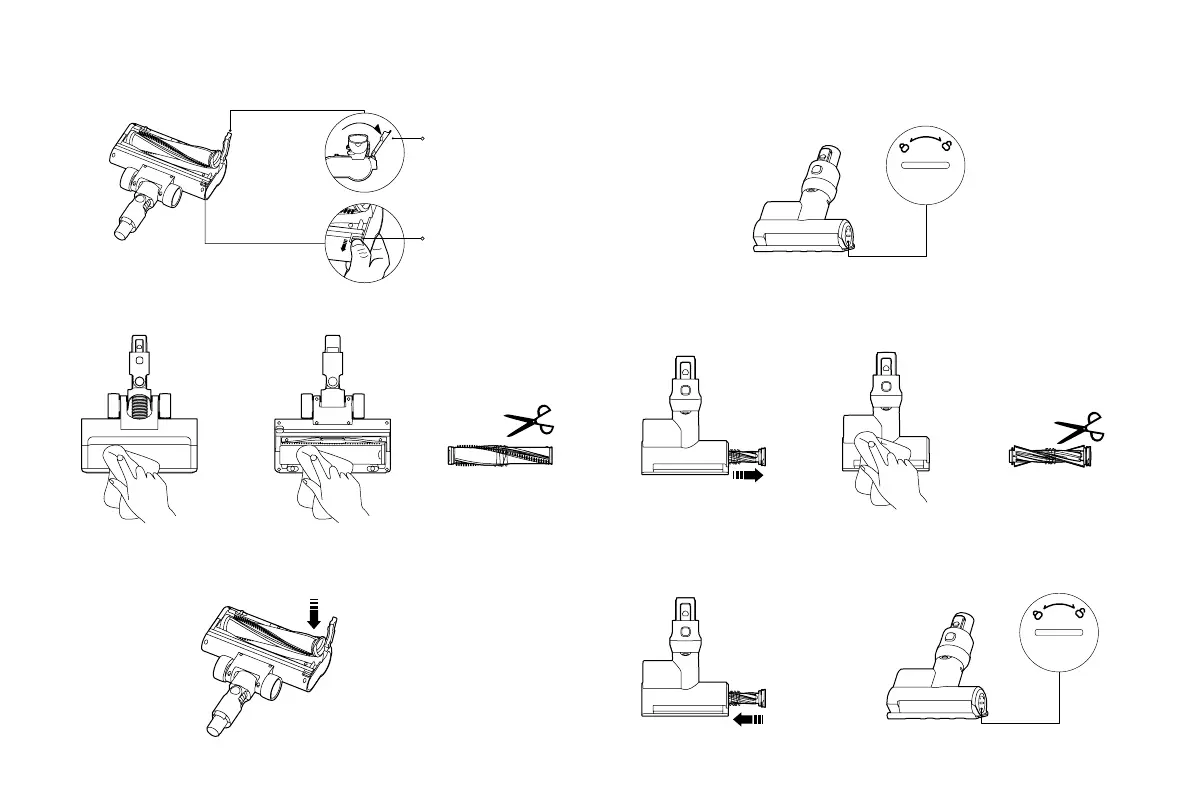
Roller Brush
Release Button
Roller Brush Lock
Cleaning the Electric Brush Bar
1. Place the electric brush bar upside down, press the roller brush release button, open the roller brush lock, and
take out the roller brush.
2. Use a dry cloth or paper towel to wipe dust and debris from the suction opening and the transparent cover.
3. Cut any hair tangled around the roller brush, and then clean it.
4. Reinstall the roller brush in the correct direction as illustrated, and then press the roller brush lock to secure the
roller brush into place.
Caution: Do not clean the electric brush bar with water as it has a built-in motor.
2. Use a dry cloth or paper towel to wipe dust and debris from the suction opening and the transparent cover.
3. Cut any hair tangled around the roller brush, and then clean it.
4. Reinstall the roller brush in the correct direction, and rotate it counterclockwise to lock it into place.
Caution: Do not clean the mini electric brush with water as it has a built-in motor.
Cleaning the Mini Electric Brush
1. Use a suitable tool to rotate the roller brush clockwise as indicated to remove it.






 To Next Page