EasyManua.ls Logo

Xiaomi Mi 2 Pro - User Manual

Xiaomi Mi 2 Pro
10 pages
Print Icon
To Next Page IconTo Next Page
Loading...
Mi True Wireless Earphones 2 Pro
User Manual
Question and Answer IconNeed help?

Do you have a question about the Xiaomi Mi 2 Pro and is the answer not in the manual?

Summary

Product Overview

Package Contents

Instructions

Charging Procedures

Instructions for charging the earphones and the charging case using wired or wireless methods.

Battery Level Checking

Guides on how to check the battery status of both the earphones and the charging case.

Device Power Management

Information on how the earphones automatically turn on and enter sleep mode for power saving.

Wearing and Fit

Guidance on how to properly wear the earphones by inserting them into the ears.

Connection Procedures

Steps for connecting the earphones to devices, handling interruptions, and clearing history.

Function Overview

Specifications and Compliance

Technical Specifications

Details on product model, dimensions, connectivity, battery life, and operating frequencies.

WEEE Information

Information regarding the disposal of waste electrical and electronic equipment.

Safety and Warnings

Safety Precautions

Important safety guidelines related to battery handling, heat exposure, and disposal.

Hearing Damage Warning

A warning against listening at high volume levels for extended periods to prevent hearing damage.

Summary

Product Overview

Package Contents

Instructions

Charging Procedures

Instructions for charging the earphones and the charging case using wired or wireless methods.

Battery Level Checking

Guides on how to check the battery status of both the earphones and the charging case.

Device Power Management

Information on how the earphones automatically turn on and enter sleep mode for power saving.

Wearing and Fit

Guidance on how to properly wear the earphones by inserting them into the ears.

Connection Procedures

Steps for connecting the earphones to devices, handling interruptions, and clearing history.

Function Overview

Specifications and Compliance

Technical Specifications

Details on product model, dimensions, connectivity, battery life, and operating frequencies.

WEEE Information

Information regarding the disposal of waste electrical and electronic equipment.

Safety and Warnings

Safety Precautions

Important safety guidelines related to battery handling, heat exposure, and disposal.

Hearing Damage Warning

A warning against listening at high volume levels for extended periods to prevent hearing damage.

Overview

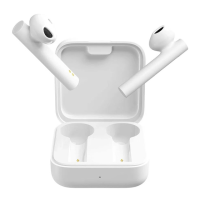
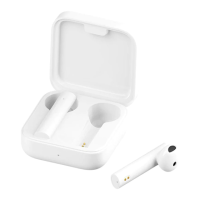
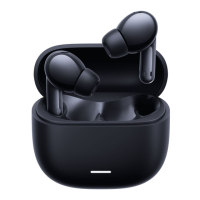
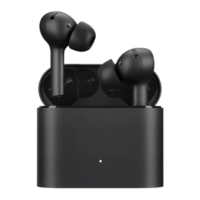
The Mi True Wireless Earphones 2 Pro are a pair of wireless earbuds designed for audio playback and communication, offering a range of features for an enhanced user experience. These earphones come with a charging case that not only protects them but also provides additional battery life, ensuring they are ready for use whenever needed.

Function Description

The primary function of the Mi True Wireless Earphones 2 Pro is to provide high-quality audio playback and hands-free communication. They connect wirelessly to your device via Bluetooth, allowing you to listen to music, podcasts, and other audio content without the hassle of cables. The earphones are equipped with a touch button on each earbud, enabling intuitive control over various functions.

A key feature of these earphones is their active noise cancellation (ANC) capability. This allows users to immerse themselves in their audio by reducing ambient noise, making them ideal for use in noisy environments such as commutes or busy offices. In addition to ANC, the earphones also offer a "Transparency mode," which allows external sounds to pass through, keeping you aware of your surroundings without needing to remove the earbuds. There's also a "Wind noise cancellation" mode specifically designed to mitigate the effects of wind during noise cancellation, ensuring clearer audio in breezy conditions.

For communication, the earphones feature both primary and secondary microphones. These work together to pick up your voice clearly during calls, while also helping to reduce background noise for the person on the other end. Incoming calls can be answered or ended with a simple double tap on either earphone.

The earphones also integrate with voice assistants. A double tap on the left earphone can wake up your device's voice assistant, allowing for hands-free control and access to information.

Usage Features

Wearing the Earphones:

To use the earphones, simply take them out of the charging case and insert them into your ears. The earbuds are marked with 'L' for left and 'R' for right to ensure correct placement for optimal sound and comfort. After use, it is recommended to place them back into the charging case to extend their lifespan and prevent them from being lost or misplaced.

Turning On and Off:

The earphones automatically turn on when the charging case lid is opened. When you place the earphones back into the charging case and close the lid, they will automatically disconnect from your device and enter sleep mode, conserving battery.

Connecting to Devices:

  • Connecting to a New Device: To connect to a new device, place the earphones in the charging case, then press and hold the function button on the case for 2 seconds. The charging case's indicator light will start blinking, signaling that the earphones are in pairing mode. Enable Bluetooth on your device, search for "Mi Earphones 2 Pro," and connect. If prompted for a passcode, enter "0000." For first-time use, ensure the earphones are activated by placing them in the charging case and holding the function button for 5 seconds.
  • Connecting with a Mi Phone (Quick Connection): For Mi phone users, a quick connection feature is available. Place the earphones in the charging case and close the lid. Ensure Bluetooth is enabled on your Mi phone. Hold the phone close to the charging case, then open the lid. A notification will appear on your phone, guiding you through the connection process. This feature requires your Mi phone to be updated to the latest stable version.
  • Automatic Connection: Once paired, the earphones will automatically connect to the most recently used Bluetooth device when the charging case lid is opened. If no connection is established within five minutes (e.g., if the device is out of range or Bluetooth is disabled), the earphones will enter sleep mode. If automatic connection fails, you may need to manually connect via your device's Bluetooth settings.
  • Connection Interruption: If your device moves out of the earphones' wireless range or its Bluetooth function is disabled, the earphones will enter awaiting connection mode. If they don't connect to any device within five minutes, they will enter sleep mode.

Controlling Audio and Calls:

  • Incoming Calls: Double-tap either earphone to answer or end a call.
  • Music Playback (Both Earphones): Double-tap the right (R) earphone to play or pause music.
  • Voice Assistant (Both Earphones): Double-tap the left (L) earphone to wake up the voice assistant.
  • Noise Cancellation Modes (Both Earphones): Press and hold either earphone to cycle through the noise cancellation modes: Noise cancellation on > Transparency mode > Wind noise cancellation > Noise cancellation off.
  • Pausing Music (Taking out an Earphone): Removing an earphone from your ear will automatically pause the music.
  • Music Playback (Single Earphone): If you are only wearing one earphone, double-tap it to play or pause music. Note that noise cancellation modes are not available when using a single earphone.

Maintenance Features

Charging:

The Mi True Wireless Earphones 2 Pro offer convenient charging for both the earbuds and the charging case.

  • Charging the Earphones: Simply place the earphones into the charging case, and they will automatically begin charging.
  • Charging the Charging Case: The charging case can be charged using the included Type-C charging cable. Connect the cable to the Type-C charging port on the case. Alternatively, the case supports wireless charging. Place the charging case onto a compatible wireless charging pad with its indicator facing up. The charging indicator on the case will remain lit during charging and turn off once fully charged, indicating a full battery.

Checking Battery Level:

Keeping track of the battery level ensures uninterrupted use.

  • Earphone Battery Level: After connecting the earphones to your phone, you can typically check their battery level on your phone's status bar. Note that the status bar usually displays the battery level of the earphone with the lowest charge, and this feature may not be supported by all phones.
  • Charging Case Battery Level: To check the charging case's battery level, open its lid. If the lid is closed, you can press the function button.
    • If the indicator light stays lit for 5 seconds, the battery level is sufficient.
    • If the indicator light is blinking, the battery level is low, and the case should be charged immediately.
  • Checking Battery Level with a Mi Phone: For Mi phone users, a more detailed battery check is available. After connecting the earphones to your Mi phone, place them in the charging case and close the lid. Ensure Bluetooth is enabled on your phone. Hold your phone close to the charging case, then open the lid. A notification will appear on your phone, displaying the battery levels of both the earphones and the charging case. This feature requires your Mi phone to be updated to the latest stable version and is supported by some Mi phones.

Clearing Connection History:

If you encounter connection issues or wish to reset the earphones for a new pairing, you can clear the connection history.

  1. Place both earphones into the charging case.
  2. Press and hold the charging case's function button for at least 10 seconds.
  3. Release the button once the charging case's indicator light lights up. This action will reset the earphones, clear the old connection history, cause the charging case's indicator to blink, and put the earphones back into pairing mode, ready for a new connection.

It's important to note that due to the characteristics of Bluetooth signals, especially in environments with dense 2.4 GHz electromagnetic signal interferences, occasional disconnects or a lack of sound may occur.

Xiaomi Mi 2 Pro Specifications

General IconGeneral
Frequency Range20Hz - 20kHz
Impedance32 ohms
Cable LengthN/A (Wireless)
Plug TypeN/A (Wireless)
Charging TimeAbout 1 hour (earbuds), about 2 hours (charging case)

Related product manuals