This version is for private use only and should not be distributed.
04
Installing the app
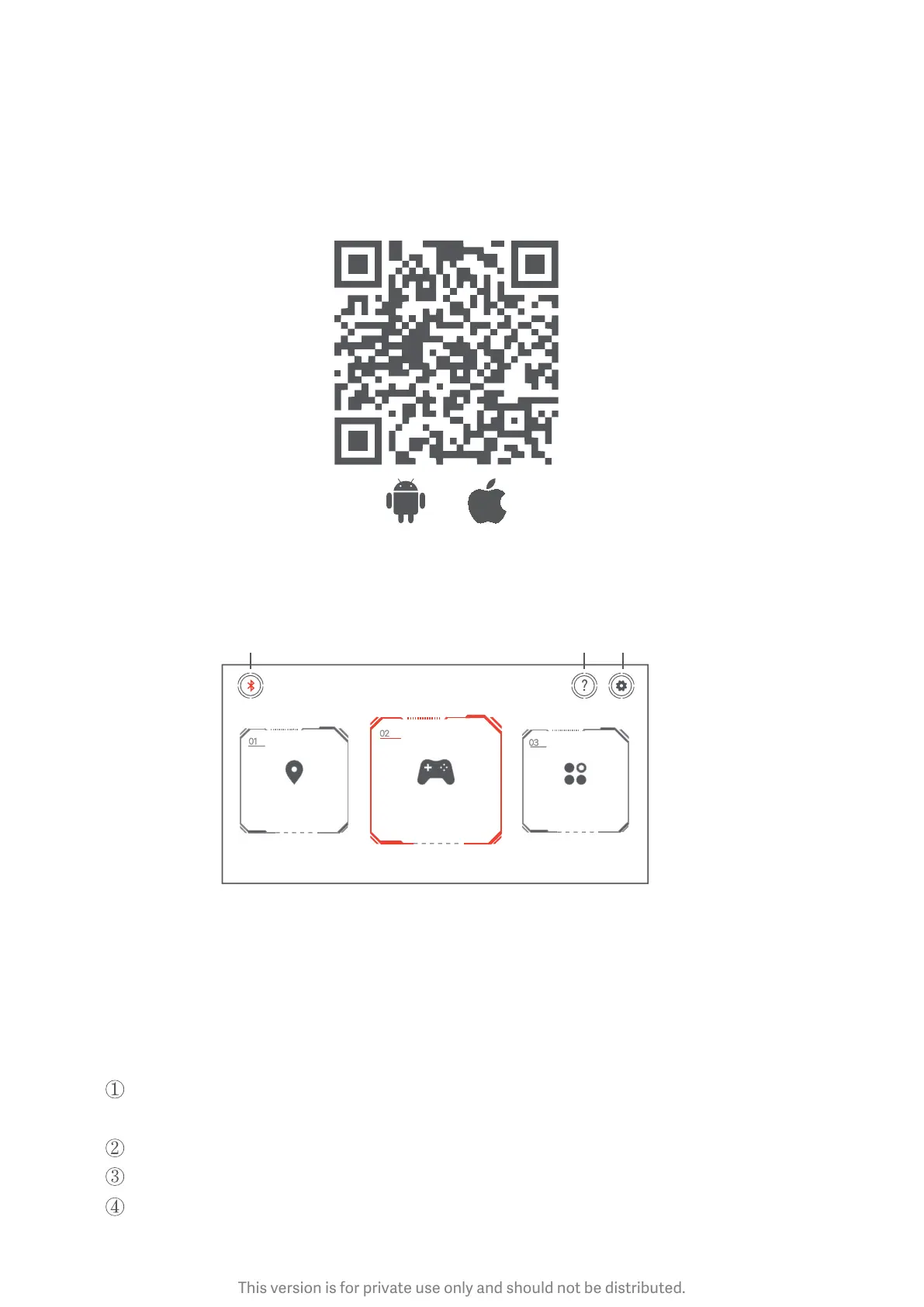
1. Search for "Mi Robot Builder'' in your preferred app market or scan the QR code to
download the app.
2. Connecting your robot
Turn on Bluetooth of your phone, open the Mi Robot Builder app, tap the Bluetooth
icon in the upper le corner, and connect your robot.
Bluetooth
Help Seings
Connented
Baery 67 %
Route Planning Controller Programming
3. Firmware updates and support
Make sure your phone is connected to the internet (preferably via Wi-Fi). Open the app
and connect to your robot.
Tap Seings System updates Firmware updates
It takes about 20 minutes to update the firmware. Here are the things you should
remember during the update:
The motor shouldn't be working during updates; otherwise, some parameters may be
overwrien, which may result in misbehavior.
The controller should be fully charged before an update.
Your phone should be close to the controller throughout the update.
View "Help" in the app to learn more.


 To Next Page