Need help?
Do you have a question about the Xiaomi Mi Robot Builder and is the answer not in the manual?
Key technical details including model, materials, battery capacity, and connectivity.
Visual guide to the robot's motors, controller, storage box, adapter, and building instructions.
Details on the controller's interface: microphone, indicator light, power button, speaker, and connection ports.
Information on using the power adapter, charging ports, and charging status indicators.
Explanation of the motor's transmission shaft and connectors for proper assembly.
Instructions for preparing blocks, following building steps, and inspecting the assembled robot.
Steps to power on the robot, its self-balancing, and how to turn it off.
Guide to finding, downloading, and pairing the Mi Robot Builder app with the robot.
Instructions for updating the robot's firmware, including essential precautions for a successful update.
Solutions for common problems like connection errors, program execution failures, and balance issues.
Essential safety guidelines for handling, operation, environmental exposure, and child usage.
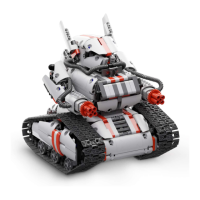
The Mi Robot Builder is an engaging and educational toy designed for users aged 10 and above, offering a hands-on experience in assembling and programming a robotic creation. This builder kit allows individuals to construct a robot from 978 individual pieces, fostering creativity, problem-solving skills, and an understanding of basic robotics principles. The finished robot, weighing 2500g and measuring 380x320x95mm, is a substantial and impressive model.
The core function of the Mi Robot Builder is to provide a platform for users to build, control, and program their own robot. It integrates mechanical assembly with electronic control, allowing the robot to perform various movements and actions. The robot's intelligence is driven by a central controller, which houses the processing unit, Bluetooth connectivity, and power management. Two motors provide the necessary power for movement, enabling the robot to balance itself and navigate its environment.
The assembly process is a key part of the experience, guiding users through the construction of the robot using a detailed building instruction manual. Once assembled, the robot can be brought to life through a dedicated mobile application, which connects to the robot via Bluetooth. This app serves as the primary interface for controlling the robot, offering features such as route planning and programming. Users can command the robot to move, turn, and perform pre-defined actions, or they can delve into programming to create custom behaviors. The self-balancing capability is a notable feature, allowing the robot to stand upright and move dynamically.
The Mi Robot Builder offers a rich set of usage features that enhance the building and interaction experience:
Comprehensive Building Experience: The kit includes 978 pieces, categorized into smaller blocks stored in a storage box and larger blocks in block bags. This organized approach facilitates the assembly process. The building instruction manual provides step-by-step guidance, and an electronic version is also available within the Mi Robot Builder app for convenience. This dual-format instruction ensures that users have all the necessary resources to complete the construction.
Intuitive Control and Connectivity: The robot is controlled via a dedicated mobile application, "Mi Robot Builder," available for download from app markets. Connectivity is established through Bluetooth 4.0, ensuring a stable and responsive link between the smartphone and the robot's controller. The app features a user-friendly interface with a Bluetooth icon in the upper left corner for easy connection.
Interactive App Features: The app provides several modes of interaction. "Route Planning" allows users to draw paths on their screen for the robot to follow, offering a visual and intuitive way to control movement. The "Programming" feature empowers users to create custom sequences of actions, introducing them to basic coding concepts in a fun and accessible manner. This extensibility allows for endless possibilities in how the robot can be used and controlled.
Self-Balancing Mechanism: A standout feature of the Mi Robot Builder is its self-balancing capability. After assembly, the robot can be placed vertically on a level floor. Upon pressing the power button, the robot will turn on, automatically adjust its gravity center, and balance itself. This dynamic stability adds to the robot's appeal and demonstrates advanced engineering principles. Users are advised to lightly hold the robot during its initial balancing phase to prevent accidental falls.
Controller Interface: The robot's controller is equipped with several indicators and ports for user interaction and functionality. It includes a microphone for potential voice commands or sound detection, an indicator light to show status, a power button for turning the robot on and off, and a speaker for sound prompts and feedback. Motor ports allow for the connection of the two included motors, while data extension ports offer potential for future expansions or accessories. Connectors ensure secure attachment of components, and a reset button is available for troubleshooting.
Power Adapter and Charging: The device comes with a dedicated power adapter for charging the controller's Li-polymer battery. The adapter has four ports (A, B, C, and D) that can be used for charging. An indicator light on the adapter shows the charging status: red for charging and green when fully charged. This ensures that the robot is always ready for action.
Motor Design: The motors are designed with transmission shafts, indicating their role in driving the robot's movement. Proper connection and orientation of the motors are crucial for the robot's functionality, with specific attention to ensuring the "Mi Bunnies" logo on the motor and controller face the same direction.
Maintaining the Mi Robot Builder involves several key practices to ensure its longevity and optimal performance:
Initial Charging: Before the first use, it is crucial to fully charge the controller. This ensures that the robot has sufficient power for its initial setup and operation.
Secure Connections: During and after assembly, users should regularly check that the motors are tightly connected to the controller. Loose connections can lead to erratic behavior or complete loss of function. The building instructions emphasize aligning the "Mi Bunnies" logos on the motor and controller, which is a visual cue for correct orientation.
Firmware Updates: The Mi Robot Builder app supports firmware updates, which are essential for improving performance, adding new features, and resolving bugs. Users are encouraged to connect their phone to the internet (preferably via Wi-Fi) and update the firmware through the app's "Settings" menu. During updates, it is critical that the motor is not working, the controller is fully charged, and the phone remains close to the controller to prevent interruptions.
Troubleshooting Guide: The manual includes a comprehensive troubleshooting section to address common issues. This guide lists potential problems, their possible causes, and corresponding solutions. For example, if the power button doesn't respond, the battery might be low or the controller might be off. If the robot can't balance, the motors might be improperly connected or oriented. This resource empowers users to resolve minor issues independently.
Reset Functionality: In cases where troubleshooting steps do not resolve an issue, a reset button is provided on the controller. Pressing this button can help in resolving software glitches or connectivity problems.
Proper Storage: While not explicitly detailed as a maintenance feature, the inclusion of a storage box for smaller blocks suggests an emphasis on organized storage, which helps in preventing loss of parts and maintaining the kit's integrity over time.
Safety Precautions: The manual outlines several safety precautions that contribute to the long-term care and safe use of the device. These include avoiding disassembly of the controller and motor, protecting the toy from extreme temperatures (above 60°C/140°F), preventing short circuits, and avoiding mechanical impact. These measures help in preserving the electronic components and structural integrity of the robot. It is also advised to turn off the controller when it is charging.
By following these guidelines, users can ensure a safe, enjoyable, and long-lasting experience with their Mi Robot Builder, continuously exploring its capabilities and expanding their understanding of robotics.
 General
| Material | Plastic, Polycarbonate |
|---|---|
| Product color | Red, White |
| Number of pieces | 978 pc(s) |
| Assembly required | Yes |
| Recommended usage | Indoor |
| Recommended gender | Boy |
| Minimum number of players | 1 |
| Mobile operating systems supported | Android |
| Battery capacity | 1700 mAh |
 Weight and Dimensions
| Depth | 90 mm |
|---|---|
| Width | 320 mm |
| Height | 380 mm |

 To Next Page