How to Install
The camera can be placed on flat surfaces, such as desks, dining
tables, and coee tables. It can also be mounted on a wall.
Mounting the Camera on a Wall:
1. First use a pencil to mark the positions for the base mounting holes
on the wall, then drill two holes at the marked positions. The diameter
of each hole is approximately 6 mm, and the depth is approximately
30 mm.
2. Insert the plastic wall plugs into the drilled holes.
3. Place the side of the base with arrows facing outward, then align
the holes. Insert the screws and then tighten them into the wall plugs
with a Phillips head screwdriver.
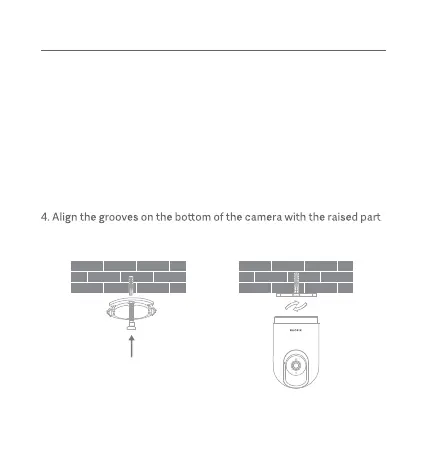
on the base, then turn it clockwise until it locks into place.
2






 To Next Page