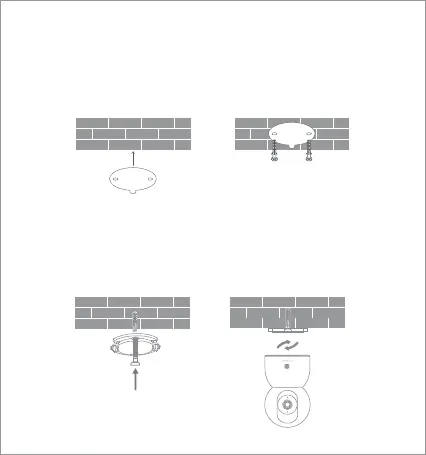
Mounting the Camera on a Wall:
1. Paste the mounting sticker where the camera needs to be
installed, and drill two holes in the wall with a drilling tool according
to the locating holes on the sticker. The hole is approx. 6 mm in
diameter and approx. 30 mm in depth.
2. Insert the plastic wall plugs into the drilled holes.
3. Keep the base side with an arrow facing outward, and align the
base with the holes. Insert the screws and then tighten them into
the wall plugs with a Phillips head screwdriver.
4. Align the groove on the bottom of the camera with the raised
part on the base, and then turn the camera clockwise until it locks
into place.
05






 To Next Page