NetDisk User Manual Network Direct Attached Storage / NDAS
—————————————————————————————————————————————
XIMETA, Inc. www.XIMETA.com
—————————————————————————————————————————————
7
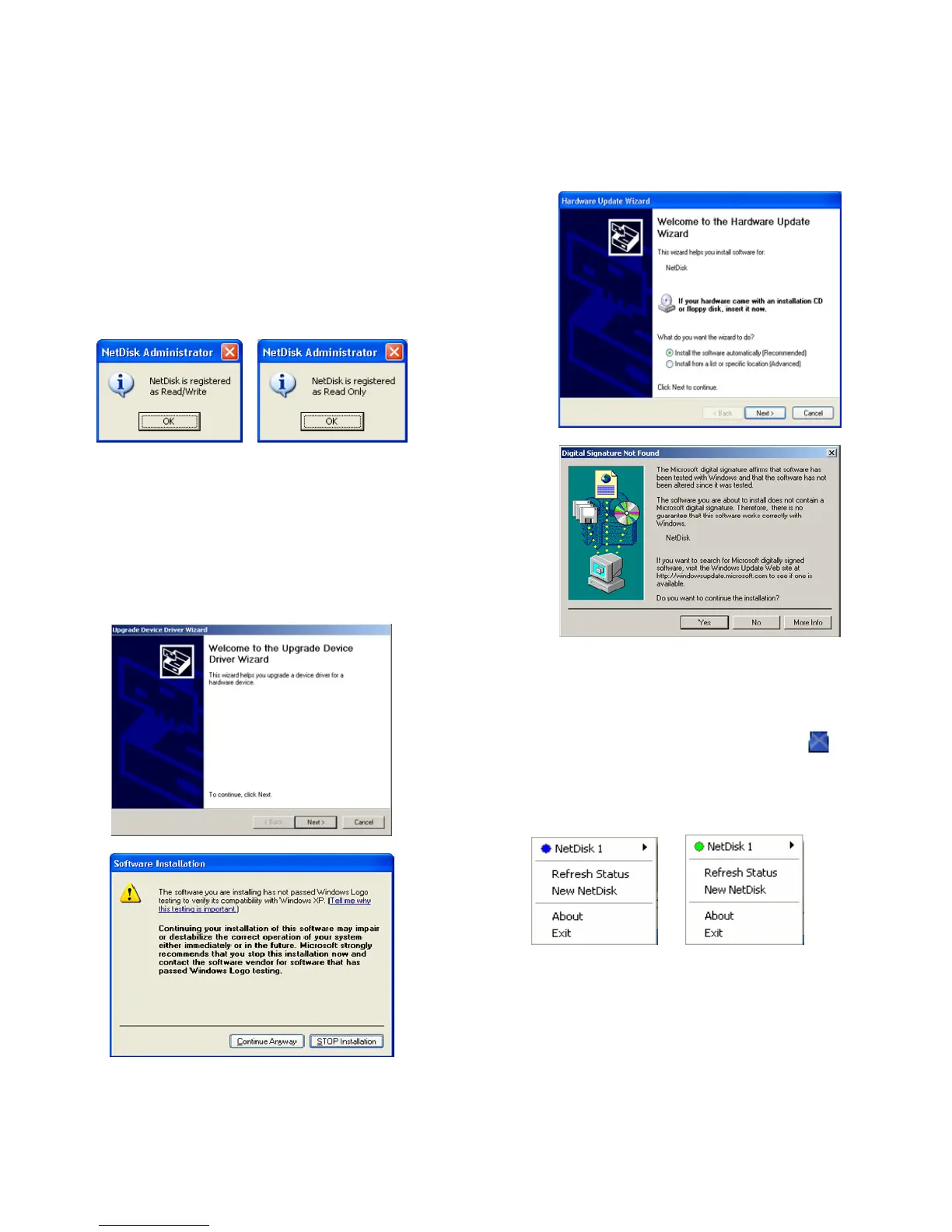
• NetDisk Administrator
- Confirms the NetDisk you just registered.
- If the Write Key was entered in the previous step,
the NetDisk is registered as Read / Write Mode.
- If the Write Key was not entered in the previous
step, the NetDisk is registered as Read Only Mode.
Read/Write Mode Read Only Mode
• Found New Hardware Wizard.
- This window may or may not appear.
- If the window appears, follow the instructions and
install the new NetDisk.
Windows XP
Please click “Continue Anyway”
Windows 2000
Please click “Yes”
• Registration is completed.
- Click NetDisk™ Administrator Tool
to see
the registered NetDisk.
Read/Write Mode Read Only Mode



 To Next Page