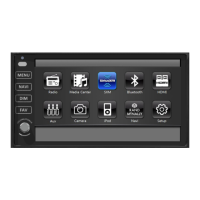
The XSG3NA Infotainment Center is a comprehensive in-vehicle entertainment and navigation system designed for recreational vehicles (RVs). It features a 10.4" main and 7" secondary (optional) touch screen LCD display, offering a user-friendly interface for various functions.
Function Description:
The Infotainment Center provides a wide array of functionalities, including:
-
Audio/Video Entertainment:
- AM/FM/RDS Stereo Radio: Allows tuning into AM and FM radio stations with RDS (Radio Data System) support for displaying station information. It offers both basic and extended radio modes, with options for auto-store, program scan, and saving up to 18 preset stations across three FM and two AM bands. The LO/DX feature allows switching between local and distant signals, and TA (Traffic Announcement) can interrupt audio for traffic messages. AF (Alternative Frequencies) helps find stronger signals for the same station, and REG (Regional) supports local broadcast reception. PTY (Program Type) allows searching for stations by genre.
- SiriusXM-Ready™: Provides access to over 140 channels of commercial-free music, sports, news, talk, and comedy. Requires a SiriusXM Vehicle Tuner and Subscription. Features include channel locking and skipping for parental control, artist and song alerts, and a Replay function that allows pausing, rewinding, and replaying up to 60 minutes of live SiriusXM content. Users can set alerts for favorite artists and songs, creating virtual categories like "My Favorites" for easy access to channels playing matching content.
- Media Center: Supports playback of various audio/video file formats (MP3, MP2, WAV, WMA, FLAC, APE, HE-AAC, OGG, BSAC, MPEG4-ASP, MPEG4, AVC, MPEG1/2, VC-1, H.263, RV, Sorenson H.263(S/W), WMV7, WMV8(S/W), AVI, ASF, MP4, M2TS, RMFF, FLV, MKV, TS). It includes an on-board memory for storing favorite files and allows copying, pasting, deleting, and viewing files from connected USB devices. Playback options include pausing, stopping, skipping tracks, random playback, and repeat functions.
- iPod & iPhone AV Interface: Connects to Apple iPod or iPhone devices for audio and (optional) video playback. Users can browse tracks by categories like PlayList, Artists, Albums, Genres, Songs, Composers, Audiobooks, and Podcasts. It supports album artwork display and offers standard playback controls.
- HDMI Input: Allows connection of HDMI-compatible devices (smartphones, tablets) to display their output on the Infotainment Center screen. Video display is restricted to when the parking brake is fully engaged.
- Auxiliary Monitor Support: Connects to external auxiliary monitors.
-
Navigation and Vehicle Integration:
- GPS Navigation (Optional): Provides guidance to destinations. Requires an SD card with the navigation program. Voice prompts are integrated with system audio, with options for full mute, mixed audio, or muting front speakers during instructions.
- Rearview Camera Connectivity: Supports optional rearview cameras and camera control boxes for multiple cameras, enhancing visibility during maneuvers. Manual and automatic viewing modes are available, with triggers for turn signals and reverse gear.
- TPMS (Tire Pressure Monitoring System) (Optional): Displays tire pressure information.
- Compass Heading Display (Optional): Shows the current compass direction.
- Temperature Sensor/OS Display (Optional Accessory): Displays temperature and other operating system information.
- Steering Wheel Control Compatible: Allows control of the system via steering wheel buttons.
-
Communication:
- Bluetooth Hands-Free Calling and Streaming Audio Player (A2DP): Enables wireless connection to Bluetooth-enabled mobile phones for hands-free calling and audio streaming (A2DP). Supports HF/HS (Hands-Free/Headset) and AV (Audio) profiles. Features include auto-connect, adjustable Bluetooth and MIC gain, and a customizable PIN code. Phonebook download is supported, allowing direct dialing from the unit.
-
User Interface and Control:
- Main Menu: Provides easy access to all functions via icons on the LCD display.
- Information Bar: Displays current source, temperature, compass, time, and Bluetooth connection status.
- House Mode: When the parking brake is engaged, sends current source audio/video to other areas of the coach. The LCD screen enters sleep mode after 1 minute of inactivity.
- Aux Zone: Allows selection of audio/video sources for display on secondary monitors or auxiliary outputs, including MAIN (mirrors main screen), NAVI, HDMI, AUX, CAMERA, RADIO, SXM, and OFF. Passenger control of the secondary monitor can be enabled or disabled.
- Split Screen: Enables viewing navigation and another Infotainment Center option simultaneously.
- Premium Remote Control (Optional Accessory): Provides remote control functionality for various system features.
Important Technical Specifications:
- Power Supply: Designed for operation with a negative grounded 12 V DC battery system.
- Speaker Output: High Power MOSFET Speaker Output 4 X 50W.
- Display Brightness: Adjustable from 1 to 5, with options for sensor-based, manual, or auto (GPS) dimming.
- Audio Settings: Includes Treble Gain, Mid Gain, Bass Gain, Equalizer (Flat, Pop, Jazz, Classic, Live, Rock), Fader, Balance, Center/Woofer Volume, Loudness, NAV Volume, and NAV Audio Mix.
- Video Settings: Adjustable Brightness, Contrast, Tint, and Sharpness.
- Bluetooth Profiles: Supports Hands-Free Profile and A2DP (Audio Advanced Distribution Profile).
- SiriusXM Storage: Stores up to 50 favorite artists and 50 favorite songs for alerts. Replay buffer stores up to 60 minutes of live content.
Usage Features:
- Touch Screen Interface: Most functions are controlled by tapping icons on the LCD display.
- Voice Prompts: Recommended for navigation to minimize screen viewing while driving.
- Safety Features: Includes warnings against operating the system while driving, and restrictions on video display when the parking brake is not engaged. Navigation cannot be overridden by the passenger when the driver selects it on the main monitor.
- Customization: Extensive settings allow users to personalize their experience, including display brightness, audio equalizer, language, and SiriusXM features.
- Firmware Updates: Product registration helps users stay updated on enhancements.
Maintenance Features:
- Troubleshooting: Manual provides guidance for common issues like antenna faults, tuner communication problems, and signal loss.
- Service and Support: Users are advised to contact qualified service personnel or the dealer for repairs and malfunctions. Technical support contact information is provided for questions and warranty issues.
- Cleaning: The screen should be cleaned with a dry silicone cloth or soft cloth, avoiding stiff cloths or volatile solvents.
- Product Registration: Encouraged for updates and expedited service/support.
Disclaimer:
The manufacturer emphasizes that the Infotainment Center should not distract from driving. Users assume total responsibility and risk. It is crucial to operate the vehicle safely, adhere to traffic laws, and minimize screen viewing while driving. Adjustments and troubleshooting should be done when the vehicle is safely pulled off the road. The navigation feature is an assistance tool and does not supersede traffic signs or laws.

 Need help?
 General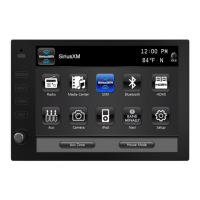

 To Next Page