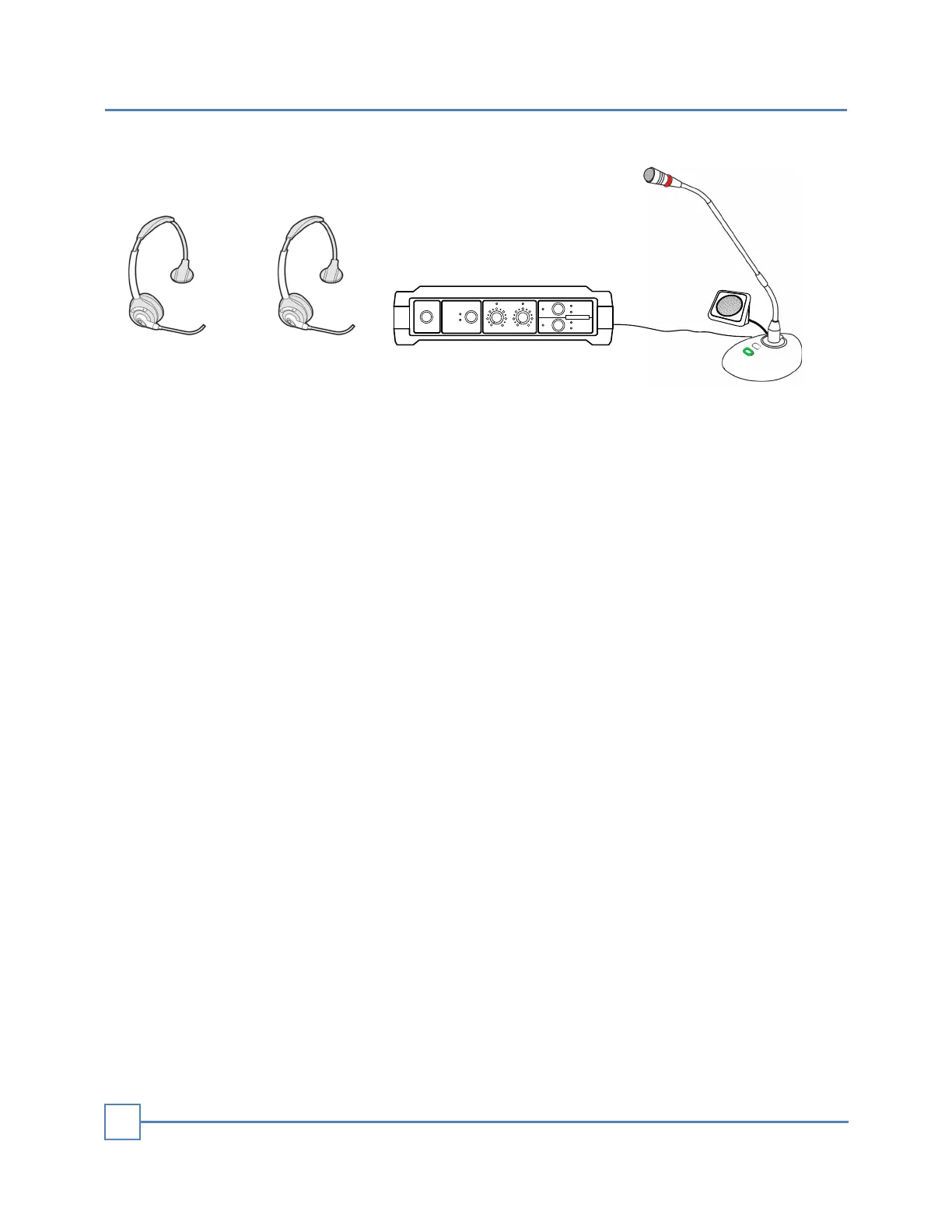
MUTE
STATUS
MUTE
STATUS
OVERRIDE
CAR
PRESENT
POWER VEHICLE DETECTOR MIC SPEAKER
1
2
HEADSETS PAIR
DTX1
Headset 1 Headset 2 Base Station
Desktop Mic
Intercom Function
When a car is present at the drive-thru in front of the speaker post, the following
functionalities are in place:
• A beep sound is emitted on the headsets and the desktop microphone.
• The beep sound will continue until someone answers the drive-thru call.
Any available order taker can answer the call using either the headsets or the desktop
microphone.
If either headset 1 or headset 2 answers the call, the respective LED will indicate which
one is actively taking orders.
Once a response is provided on any device, the other two devices enter a monitoring
mode, allowing them to listen only.
You can mute the audio monitor by tapping the multi-button on the headset.
On the desktop device, you can monitor the customer's audio only.
While communicating with the customer, you can mute or unmute your microphone by
tapping the headset's multi-button.
This action will trigger a beep sound, and the MUTE LED on the base station will
display the mute status.
If necessary, you can promptly adjust the main volume control on the base station for
immediate eect.
When the car departs from the speaker post, the intercom system will automatically
terminate the communication after 2 seconds.
INTERCOM FUNCTION
10


 To Next Page