MUTE
STATUS
MUTE
STATUS
OVERRIDE
CAR
PRESENT
POWER VEHICLE DETECTOR
MIC SPEAKER
1
2
HEADSETS PAIR
DTX1
1
2
3
4
5
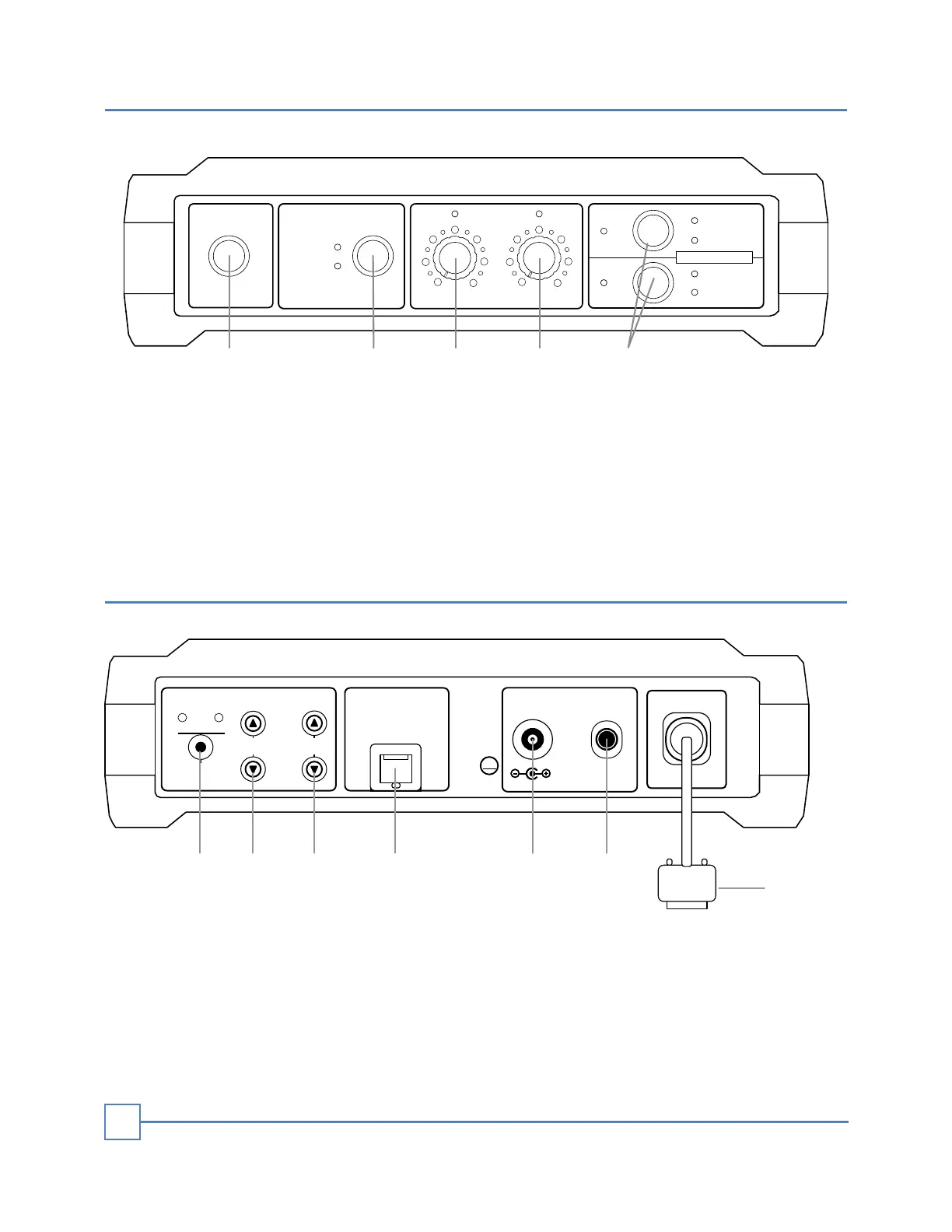
1. Power Switch
2. Vehicle Detector Override
3. Outside Mic Volume Gain
4. Outside Speaker Volume Level
5. Headsets Pair/Register button
1. Select Bluetooth headset button
2. Operator's headset speaker gain adjustment button
3. Operator's headset mic gain adjustment button
4. Ethernet cable connector for Desktop Mic-Speaker Base
5. 12-volt DC power jack
6. Fuse - Fast Blow - 3 Amp. 5x20 mm
7. Connector for CAT6 cable to Speaker Post
EQUIPMENT DESCRIPTION
4
DESKTOP
MIC
SPEAKER
BLUETOOTH HEADSETS LEVEL
12V. DC
SPEAKER
GAIN
2
MIC
GAIN
1
SELECT
1
2
3
4
5
6
+
FUSE
+
EXT. SPK-MIC
DTX1
3 A.
INTERCOM
CTR
UA
10A23M1287-1
7


 To Next Page