EasyManua.ls Logo

XMOD Drive Thru DTX1 - Bluetooth Headsets

XMOD Drive Thru DTX1
11 pages
Print Icon
To Next Page IconTo Next Page
To Previous Page IconTo Previous Page
Loading...
1
2
MUTE
STATUS
MUTE
STATUS
MIC SPEAKER
1
2
HEADSETS PAIR
PAIR
PAIR
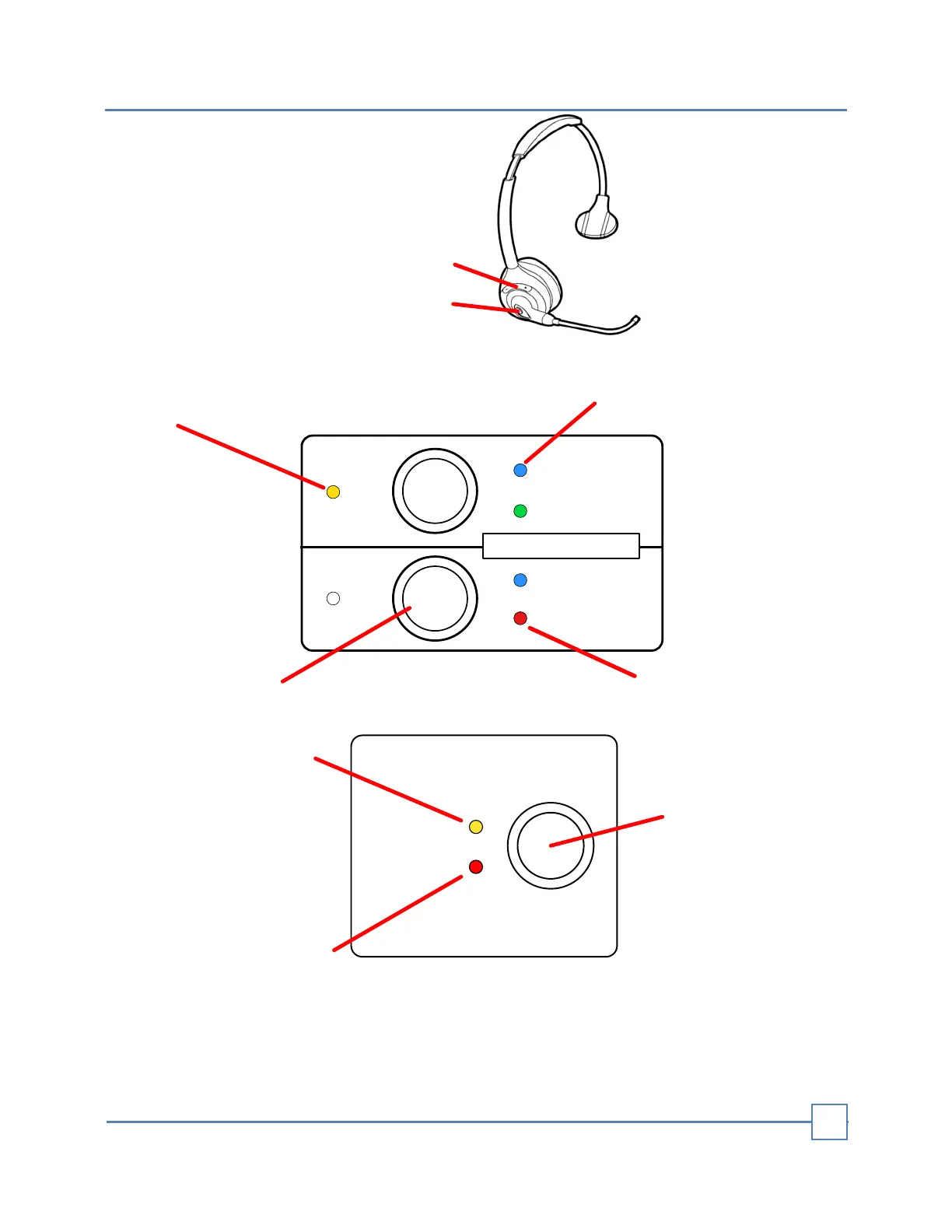
BLUE Blinking: No Paired
BLUE Solid: Paired
GREEN: Open Audio
RED: Microphone Muted
Bluetooth Pair Button
(Hold for 2 seconds)
YELLOW: Indicates
active Bluetooth
headset taking orders
1- Volume Control
2- Multi-Button
- Power
- Pair
- Mute
OVERRIDE
CAR
PRESENT
POWER VEHICLE DETECTOR
MIC SPEAKER
DTX1
Vehicle Detector
Override Button
Indicates a Car Present
in the drive-thru
Override function ON
Vehicle Detection
Normal: Standard mode of operation for detection. When a vehicle arrives at a detection
point in a lane, a vehicle alert tone is heard in headsets.
Override: The microphone at the menu is constantly on, and no arrival tones are issued
when a vehicle arrives at the detection point.
BLUETOOTH HEADSETS
9