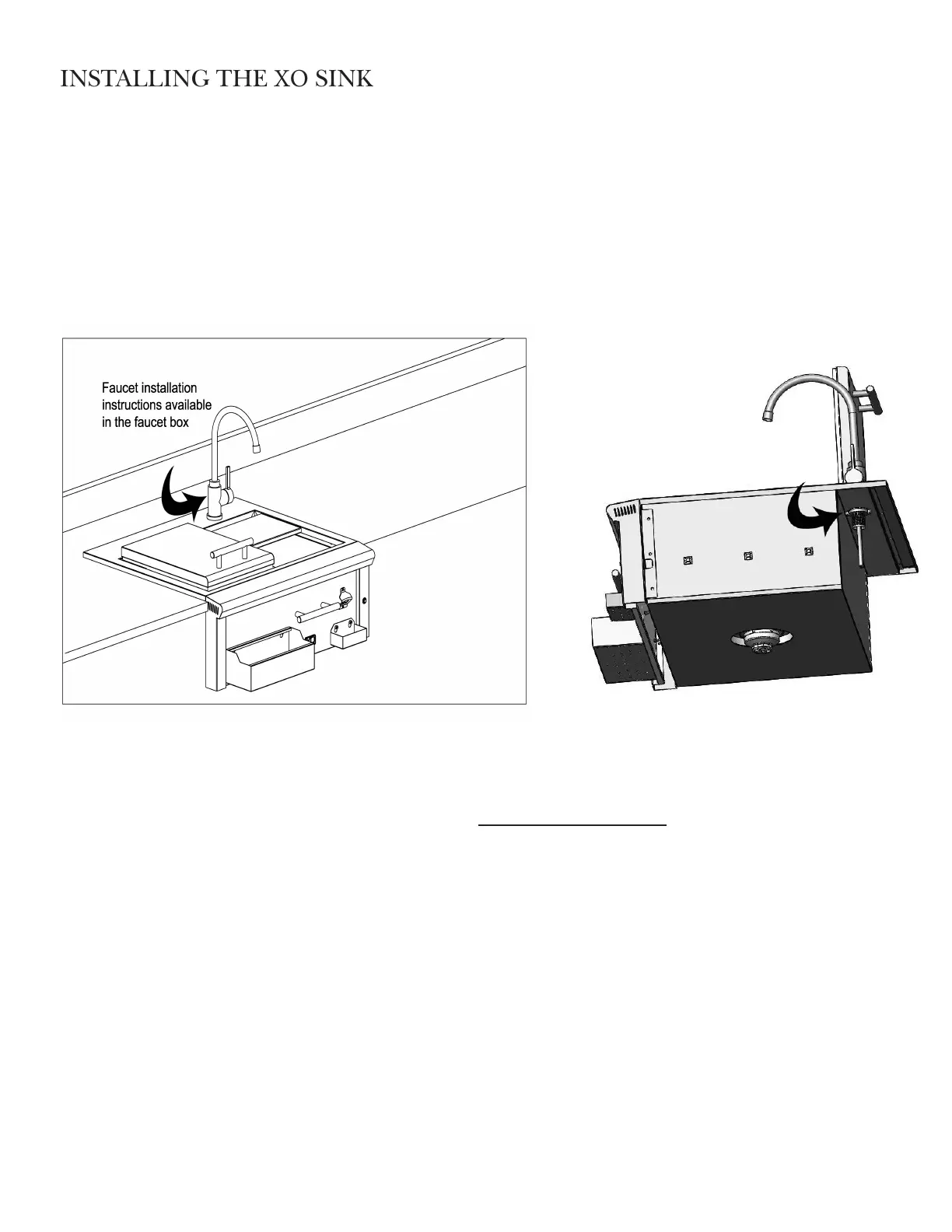
1. Install the faucet into the top faucet opening on right back of the sink.
2. Carefully place the sink into the cut out on the counter top. Push the sink back until there are no gaps in the
back and the bull nose contacts the front face of the cabinet. The sink will be supported by its weight on both
sides and back lip.
3. If needed a small bead of silicone sealant could be put around the edges of the sink to prevent water seepage
into the spaces below the sink.
INSTALLING THE DRAIN PIPING (NOT INCLUDED)
Assemble all drain pipe connecons to the tailpiece and on through a pipe trap and proper drainage. The drain
must be installed in accordance with all local codes. In the absence of local codes, the requirements of the Uniform
Plumbing Code should be followed.
INSTALLING THE LED LIGHT TRANSFORMER
The power supply transformer should be installed below the sink within the cabinet enclosure. Select a locaon
where the transformer is protected against water, heat and physical damage. It is recommended that fasteners are
used in at least two of the four mounng holes for secure aachment.
The power supply transformer must be plugged into a properly grounded GFI equipped outlet, installed by a
qualified technician. The outlet of the transformer is plugged into the connector at the rear of the sink. Please see
the electrical diagram provided in this manual.


 To Next Page