9
Owner’ Manual
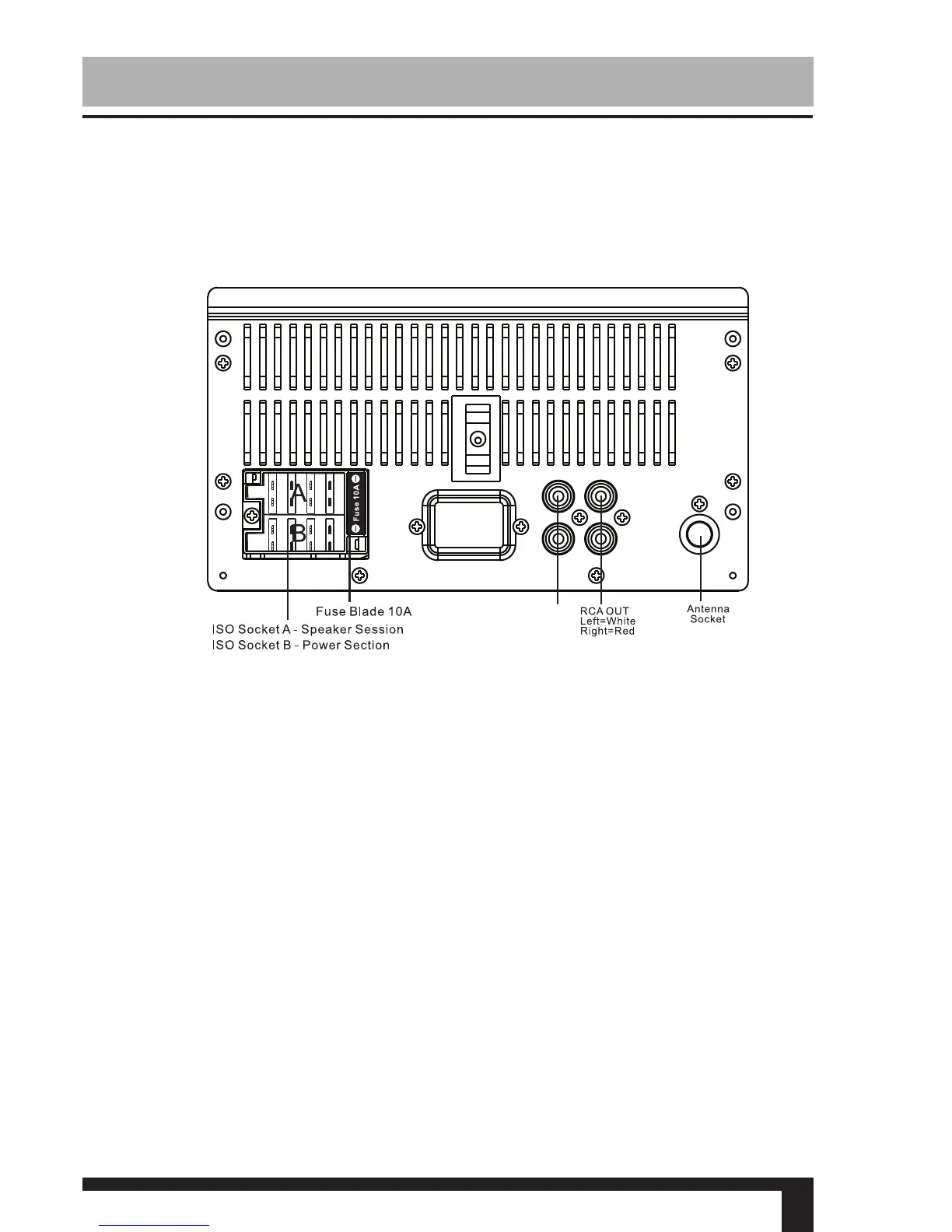
Wiring Connections
Black Ground
Connect to vehicle body/chassis. Make sure that you have a good
chassis ground. This will eliminate most electrical noise from the
motor and alternator. A good chassis ground requires a tight con-
nection to ground. The area should be free from rust, paint or any
form of dirt.
Yellow Memory backup
Connect to electrical terminal always supplied with power regard-
less of ignition switch position.
Orange Remote
Connect to Auto-antenna or power amp control wire/remote con-
nection. Maximum current 300Ma 12 V DC.(Low Current)
SUBx2
Connector A
1. Rear right speaker(+)/Blue
2.
3. Front right speaker(+)/Grey
4.
5. Front left speaker(+)/Green
6.
7.
8.
Rear right speaker(-)/Blue-White
Front right speaker(-)/Grey-White
Front left speaker(-)/Green-White
Rear left speaker(+)/Brown
Rear left speaker(-)/Brown-White
Connector B
1. -
2. -
3. -
4. Battery 12V (+)/Yellow
5. Antenna power/Orange
6. Panel light/White
7. ACC+/Red
8. Ground/Black
1 3 5 7
2 4 6 8
1 3 5 7
2 4 6 8
Make sure that you have a good chassis ground. Good
ground connections will eliminate most electrical noise prob-
lems. A good chassis ground requires a tight connection
to the vehicle’s metal chassis. The area around the ground
connection should be clean, bare metal without rust, paint,
plastic, dust, or dirt for a good electrical connection.



 To Next Page