EasyManua.ls Logo

Xomax XM-RD285 - User Manual

Xomax XM-RD285
5 pages
Print Icon
To Next Page IconTo Next Page
Loading...
CAR AUDIO
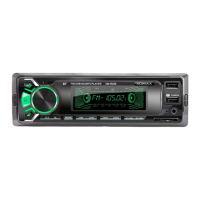
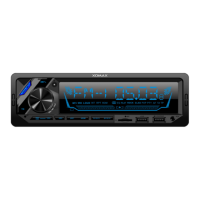
CAR MP3 PLAYER WITH RADIO USB/SD/MMC MANUAL
XM-RD285
1. Power on / off /Mode
2. TR: Color change
3. Change radio channel /
Search automatically/Storage button
(BND/AMS)
4. Radio memory number(1.2.3.4.5.6)
5. Radio search forward/Next song
/Answer the call
6. LCD
7. CLK: Clock
8. USB slot
9. AUX: Aux in
10. SD/MMC slot
11.Knob: Volume button/ Sound effect
chanage
12.Radio search backward/previous
song/Ring off
13. RST: Reset
14. 5/-10: Last 10 songs/Last folder
15. 6/+10: Next 10 songs/next folder
16. MIC
17. Fast charge USB
18.IR: Remote control receive window

Questions and Answers

Summary

Basic Operation and Features

Power On;Off and Mode Selection

Controls device power and cycles through operational modes like Radio, SD/MMC, USB, AUX, and BT.

Volume and Sound Effect Adjustment

Adjusts audio volume and selects sound effects such as Bass, Treble, EQ presets (Pop, Rock, Class, Flat).

LCD Display Information

Shows radio frequency, song titles, and content from SD/USB devices.

FM Radio Tuning and Memory

Allows changing radio bands (FM1-FM3), automatic station search/storage, and manual station recall.

Clock Display and Setting

Displays the current time and allows setting the hour and minute.

Auxiliary Input (AUX)

Enables playing external audio sources via the AUX input port.

Reset and Media Input Slots

Covers system reset function and usage of SD/MMC and USB slots for media playback.

USB Media Playback Controls

Details playback functions for USB media, including play/pause, next/previous track, scan, repeat, and random modes.

Fast Charge USB Port

Dedicated USB port for charging mobile phones.

Color Change (TR) Button

Cycles through display colors or sets a single color; long press turns off display light.

Bluetooth (BT) Operation

BT Connection and Music Playback

Connects wirelessly to mobile phones for music streaming; symbol stops flashing upon successful connection.

BT Call Management

Allows answering and ending calls from a connected mobile device via Bluetooth.

Radio Modes and Station Switching

Entering DAB+ Radio Mode

Instructs on how to select the DAB radio mode by pressing the MODE button.

Automatic FM Channel Scan (AMS)

Initiates an automatic scan for strong FM radio stations by pressing the BND/AMS button.

Switching Radio Stations

Details how to manually switch between radio stations using the directional buttons.

Technical Specifications

Tuner Part Specifications

Lists technical details for the FM tuner, including frequency range and sensitivity.

USB;MMC;SD Part Specifications

Outlines technical parameters for USB, MMC, and SD card playback, such as frequency response and bit rates.

Wiring Diagram

Troubleshooting Guide

LCD Display Issues

Addresses problems with the LCD display not showing content, often due to wiring.

No Sound or Audio Problems

Covers causes for no sound, including power supply, open speaker circuits, or incompatible media formats.

Low Sound Quality

Diagnoses issues with low or unclear sound, possibly related to power supply or antenna connection.

Mono Audio Track Issue

Troubleshoots audio output problems where only one channel works, indicating speaker wire or amplifier issues.

Summary

Basic Operation and Features

Power On;Off and Mode Selection

Controls device power and cycles through operational modes like Radio, SD/MMC, USB, AUX, and BT.

Volume and Sound Effect Adjustment

Adjusts audio volume and selects sound effects such as Bass, Treble, EQ presets (Pop, Rock, Class, Flat).

LCD Display Information

Shows radio frequency, song titles, and content from SD/USB devices.

FM Radio Tuning and Memory

Allows changing radio bands (FM1-FM3), automatic station search/storage, and manual station recall.

Clock Display and Setting

Displays the current time and allows setting the hour and minute.

Auxiliary Input (AUX)

Enables playing external audio sources via the AUX input port.

Reset and Media Input Slots

Covers system reset function and usage of SD/MMC and USB slots for media playback.

USB Media Playback Controls

Details playback functions for USB media, including play/pause, next/previous track, scan, repeat, and random modes.

Fast Charge USB Port

Dedicated USB port for charging mobile phones.

Color Change (TR) Button

Cycles through display colors or sets a single color; long press turns off display light.

Bluetooth (BT) Operation

BT Connection and Music Playback

Connects wirelessly to mobile phones for music streaming; symbol stops flashing upon successful connection.

BT Call Management

Allows answering and ending calls from a connected mobile device via Bluetooth.

Radio Modes and Station Switching

Entering DAB+ Radio Mode

Instructs on how to select the DAB radio mode by pressing the MODE button.

Automatic FM Channel Scan (AMS)

Initiates an automatic scan for strong FM radio stations by pressing the BND/AMS button.

Switching Radio Stations

Details how to manually switch between radio stations using the directional buttons.

Technical Specifications

Tuner Part Specifications

Lists technical details for the FM tuner, including frequency range and sensitivity.

USB;MMC;SD Part Specifications

Outlines technical parameters for USB, MMC, and SD card playback, such as frequency response and bit rates.

Wiring Diagram

Troubleshooting Guide

LCD Display Issues

Addresses problems with the LCD display not showing content, often due to wiring.

No Sound or Audio Problems

Covers causes for no sound, including power supply, open speaker circuits, or incompatible media formats.

Low Sound Quality

Diagnoses issues with low or unclear sound, possibly related to power supply or antenna connection.

Mono Audio Track Issue

Troubleshoots audio output problems where only one channel works, indicating speaker wire or amplifier issues.

Overview

This document describes the XM-RD285 Car MP3 Player with Radio, USB/SD/MMC, a car audio system designed for in-vehicle entertainment. It offers a range of audio playback options, radio functionality, and some modern conveniences like USB charging and Bluetooth connectivity.

Function Description:

The core function of the XM-RD285 is to provide audio entertainment in a car. It supports multiple input sources:

  • MP3 Player: Plays MP3 and WMA files from USB drives, SD cards, and MMC cards.
  • Radio: Features an FM radio tuner with automatic search and storage capabilities for radio stations. It also includes a DAB+ radio mode for digital audio broadcasting, allowing access to a wider range of stations with potentially better sound quality.
  • AUX Input: An auxiliary input allows connection of external audio devices, such as smartphones or portable music players, via a 3.5mm audio jack.
  • Bluetooth (BT): Enables wireless audio streaming from Bluetooth-enabled mobile phones and hands-free calling. The device indicates Bluetooth status with a flashing symbol that becomes solid upon successful connection.
  • USB Fast Charge: A dedicated USB slot is provided for fast charging of mobile phones.

The device also includes several control and display features:

  • LCD Display: Shows radio frequency, current time, and content information from SD/USB sources.
  • Knob Control: A multi-function knob controls volume and allows selection of sound effects.
  • Button Controls: Various buttons are present for power on/off, mode selection (Radio, SD/MMC, USB, AUX, BT), track navigation (next/previous song, skip 10 songs), radio station search (forward/backward, automatic/manual), repeat (RPT), random play (RDM), intro scan (INT), and color change for the display.
  • Clock Function: Displays the current time and allows for adjustment.
  • Reset Button: A dedicated reset button is available to restart the system in case of a crash.
  • Color Change (TR): The display backlight can change colors automatically every 3 seconds, or users can manually select a single color. Long pressing this button can turn off the color light.

Important Technical Specifications:

  • FM Frequency Range: 87.5MHz-108MHz
  • FM Noise-Limited Sensitivity: ≤26dB
  • FM Signal to Noise Ratio (S/N): ≥45dB
  • USB/MMC/SD Part Frequency Response: 100Hz-10kHz (+10dB)
  • MP3 Bit Rates: 8-320kbps
  • Channel Balance: ≤3 dB
  • Channel Separation: ≤22dB
  • MP3 Signal to Noise Ratio (S/N): ≥55dB
  • Working Voltage: 12V DC
  • Real Power Output: 4x60W/14.4V (This indicates a four-channel amplifier with a maximum output of 60 watts per channel at 14.4 volts, likely peak power)
  • Speaker Impedance: 4Ω-8Ω
  • Size Dimension: 180mm (W) x 52mm (H) x 115mm (L)
  • Fuse: 10A (indicated in the wiring diagram)

Usage Features:

  • Power Control: Short press for power on, long press for power off.
  • Volume and Sound Effects: The knob controls volume. Pressing the SEL button allows cycling through sound effects like BASS, TREBLE, BAL (Balance), FAD (Fader), LOUD (Loudness on/off), and BT (Bluetooth volume). EQ presets include POPS, ROCK, CLASS, and FALT.
  • Radio Operation:
    • Band Selection: Repeatedly press the FM button to switch between FM1, FM2, and FM3 bands.
    • Automatic Search and Store (AMS): In radio mode, long pressing the "BND/AMS" button automatically searches for and saves strong radio stations into memory numbers (1-6).
    • Manual Station Saving: Long press any number button (1-6) to save the current station to that memory slot. Short pressing the number button will recall the saved station.
    • Search Forward/Backward: Short press the search buttons to automatically find the next/previous strong station. Long press for manual tuning, then short press to fine-tune, or wait 5 seconds to exit manual tuning.
    • DAB+ Mode: Press the MODE button until "DAB" appears on the display.
  • Media Playback (USB/SD/MMC):
    • Insertion: Insert USB disk or SD/MMC card into the respective slots. The device will automatically read the music files.
    • Playback Controls:
      • Play/Pause: Short press the play/pause button.
      • Next/Previous Song: Short press the forward/backward track buttons.
      • Skip 10 Songs: Short press the +10/-10 buttons. Long press for next/previous folder.
      • Intro Scan (INT): Scans the beginning of each track.
      • Repeat (RPT): Repeats the current track or all tracks.
      • Random Play (RDM): Plays tracks in a random order.
  • Bluetooth Operation:
    • Activation: Bluetooth is on by default when the player powers on. Select BT MODE using the MODE button.
    • Pairing: The BT symbol will flash until a mobile phone successfully connects.
    • Audio Streaming: Play music from the connected mobile phone.
    • Hands-Free Calling: Short press the call button to answer or hang up calls.
  • Clock Setting: Short press the CLK button to display time. Long press until the time flashes, then use buttons (5) and (12) to adjust hours and minutes.
  • Display Color Customization: The "TR" button changes the display color. It cycles through 7 colors automatically, or a short press selects a single color. Long pressing turns off the color light.

Maintenance Features:

  • Troubleshooting Guide: The manual includes a troubleshooting section for common issues:
    • LCD doesn't display: Check yellow wire connection to battery (+), and fuse of red wire.
    • No sound: Check power supply, speaker wire connections, and content/format of SD/MMC/USB media. Clean golden finger of SD/MMC card/USB disk if dirty.
    • Low sound (not clear): Check power internal resistance and antenna connection.
    • Mono track: Check speaker wire connection for one channel and amplifier integrated circuit.
  • Reset Function: The RST button allows for a system reset if the device crashes.
  • Wiring Diagram: A detailed wiring diagram is provided for installation, showing connections for power (yellow to positive, red to ignition switch, black to negative), antenna, and speaker outputs (front left/right, rear left/right). It also indicates a 10A fuse for protection.

The device is designed for a 12V DC negative ground system, which is standard for most car electrical systems. The technical data is subject to change without prior notification.

Xomax XM-RD285 Specifications

General IconGeneral
BrandXomax
ModelXM-RD285
CategoryCar Receiver
LanguageEnglish

Related product manuals