5
2. Package Content
3. Charge Your Portable Power Supply
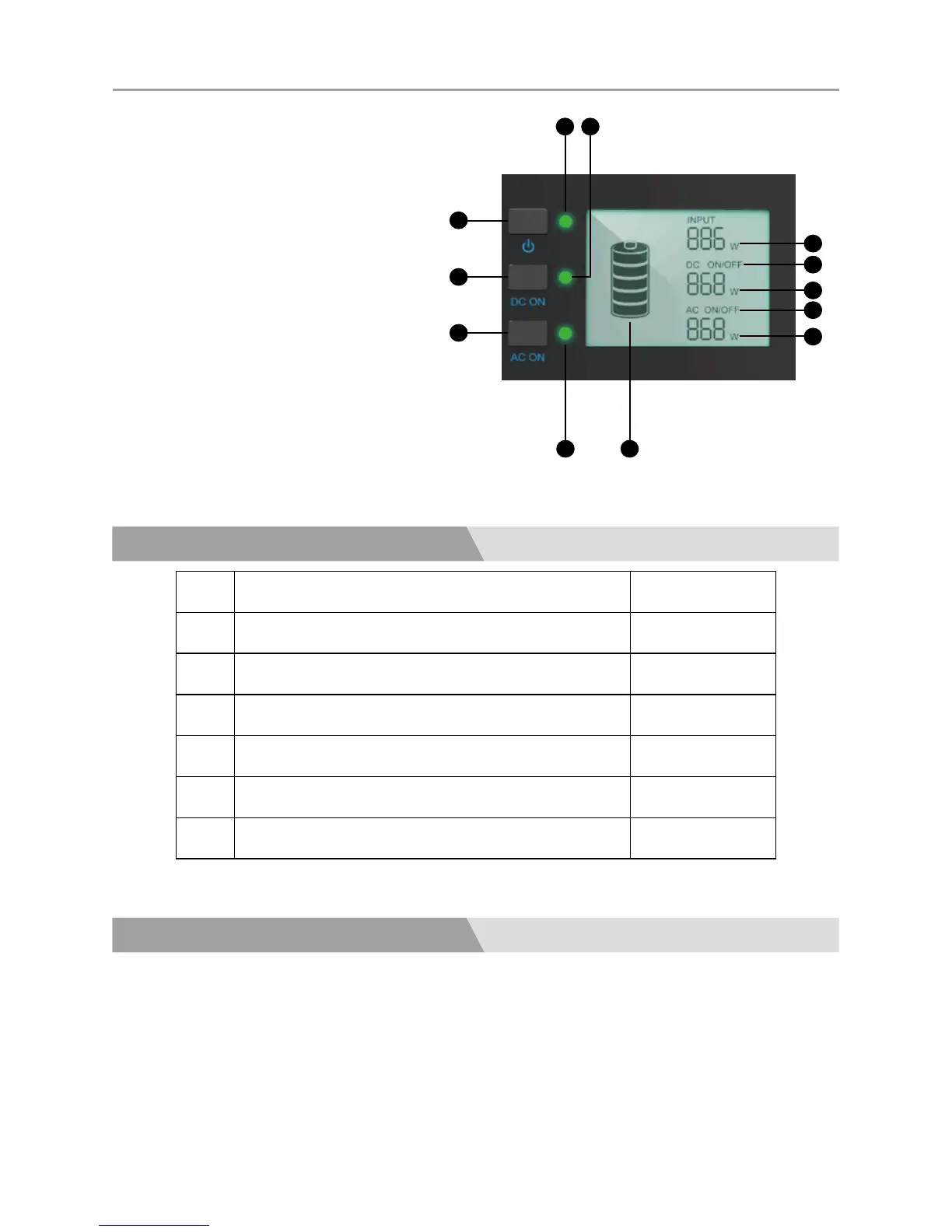
1. Master Power Button(ON/OFF)
2. DC Power Button(ON/OFF)
3. AC Power Button(ON/OFF)
4. Master Power ON/OFF Indicator
5. DC Power ON/OFF Indicator
6. AC Power ON/OFF Indicator
7. Battery Capacity
8. Charging Power
9. DC Output State(ON/OFF)
10. DC Output Power
11. AC Output State(ON/OFF)
12. AC Output Power
No. Item Quantity
1 Portable Power Supply 1
2 AC Wall Charger 1
3 Car Charger 1
4 Solar Charging Cable 1
5 Starter Battery Clamp 1
6 User Manual 1
Before using or storing the portable power supply, fully charge it.
Note:NEVER charge it with solar panels and a wall charger at the same time.
■ LCD Battery Display
The LCD Battery Display indicates the charge level. There are 5 segments of the battery,
approximating 20%~40%~60%~80%~100% capacity. The lled segments in the batter display do



 To Next Page