7
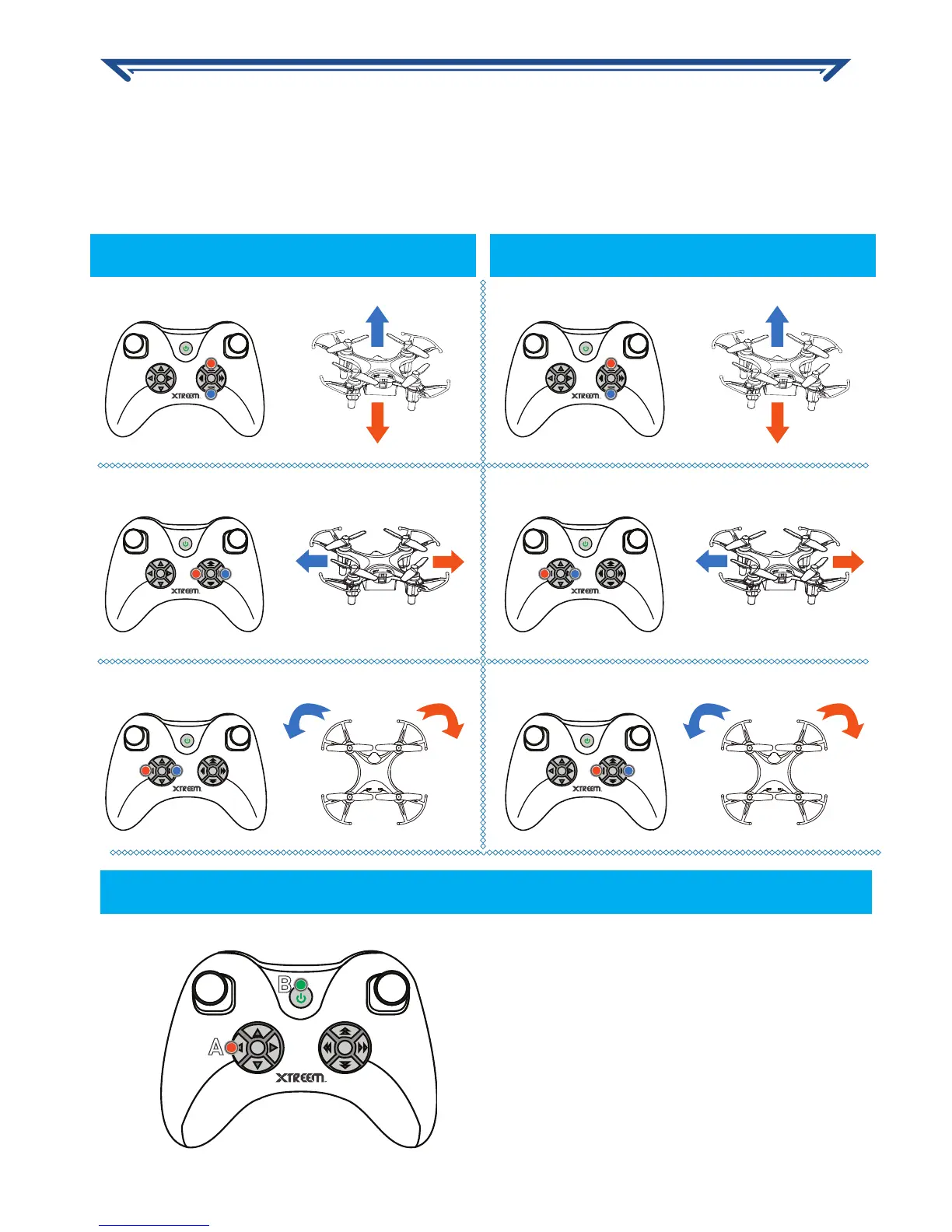
During a flight, it is normal for the Atom to go off-course slightly sometimes. But if it drifts
continually without any input from the control sticks, you have to adjust the trim positions
to compensate for the drifting. The trim ‘fine-tunes’ the speed of the motors. Just press
the appropriate trim button opposite to the movement repeatedly until the Atom is flying
as straight as possible.
OK
*
OK
*
OK
*
OK
*
OK
*
OK
*
Forward/Backward trim Forward/Backward trim
Rotation trim Rotation trim
Sideways trim Sideways trim
CORRECTING NAVIGATIONAL DRIFTS
Resetting trims to default position
Flight mode 1 Flight mode 2
CORRECTING NAVIGATIONAL DRIFTS
Make sure the controller is off.
Press and hold the Trim Reset
button then press the ON/OFF
Power button to turn on the
controller.


 To Next Page