(E) Main Features
● 800 DMIPS Processor
● Linux Operating System
● Media Player
● Downloadable Plug-ins supported
● 2 x Smartcard Readers
● MPEG2/H.264 Hardware Decoding
● 1 x DVB-S2 Tuner
● Status Indicator
● 128MB NAND Flash/256MB*2 DDR Memory
● 10/100MB Ethernet Interface
● 2 x USB 2.0
● RS-232
● HDMI
● S/PDIF for digital bit stream out
● Automatic & Manual Service Scan supported
● Multiple LNB control (DiSEqC) supported
● Skin change supported
● Power Supply by External SMPS and power switch
● OSD 3D
● RCA
● Sleep timer
● Composite Video(RGB)
● Quick and easy installation & user-friendly menu
● Automatic and manual channel scan options
● Low power consumption
08
Xtrend ET4000
(F) Installation of Xtrend-ET4000
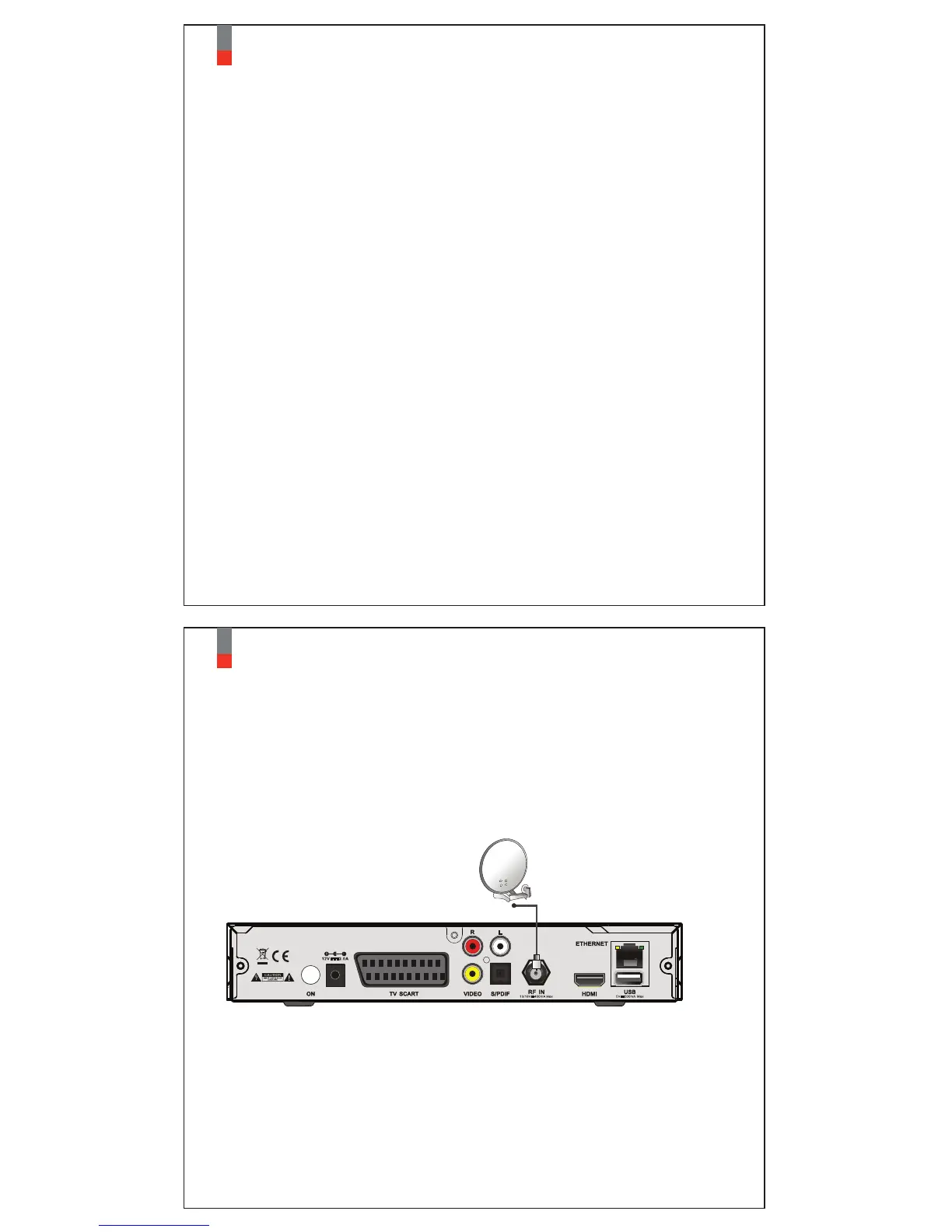
1. Connecting Satellite Cables
ET4000 is integrated with one satellite tuner, and one of the first steps is to connect
satellite cable to ET4000 in order to gain optimal signal quality.
A. Connecting Satellite Cable
Connect satellite cable to LNB-IN.
This chapter will guide you through the whole installation process of ET4000.
Please read each section carefully to make sure that the system runs properly.
09
Xtrend ET4000


 To Next Page
 Loading...