
 Need help?
Do you have a question about the XVIM N1010 and is the answer not in the manual?
Instructions for downloading the HoMeYe Pro application from app stores.
Steps to connect the camera to a 2.4 GHz WiFi network.
Process for creating a user account within the HoMeYe Pro application.
Instructions on how to pan and tilt the camera using the mobile application.
Enabling and using the two-way audio feature for communication.
Configuring recording settings, including SD card status and format options.
How to access and view recorded video footage from the camera.
Information on available cloud storage subscription plans and features.
Enabling and configuring the camera's automatic motion tracking.
Setting up alarm triggers, human detection, and push notifications.
Managing camera lighting modes, including full color and infrared vision.
Guide to resolve issues with the camera image appearing upside-down.
Steps to correct the camera's time if it is not synchronized properly.
Instructions on how to share camera access with a different mobile device.
 General
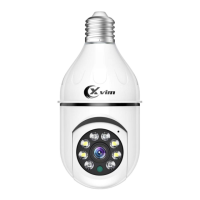
| Brand | XVIM |
|---|---|
| Model | N1010 |
| Category | Digital Camera |
| Language | English |

 To Next Page