13
1
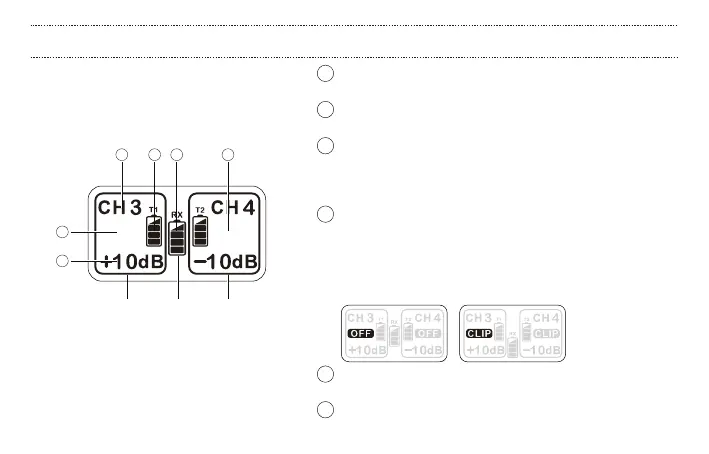
T1 RF channel display: To pair with transmitter, press the channel
switch button and select the same channel on both units.
2 T1 channel output gain: change this level using the output
gain controls on the transmitter
3 T1 channel transmitter battery level: The battery level of the
paired transmitter is displayed after a successful connection.
Only displays the U5 transmitter battery level—cannot display
U3 and U4 transmitter battery levels.
4 T1 channel clip and OFF display:
OFF: Press the channel switch button for 3 seconds to close
the T1 channel.
Output clip: peak indicator. When the clip LED illuminates, the
sound level is beyond the acceptable dynamic range, and may
result in distortion.
5 T2 channel display: shows channel, gain and battery level for
the second transmitter
6 Receiver battery level
1
4
2
Part 1 Part 2 Part 3
6 53
The screen is divided into three parts:
Transmitter 1 information; receiver battery level;
and Transmitter 2 information.
U5 RECEIVER: DISPLAY


 To Next Page