12
13 12
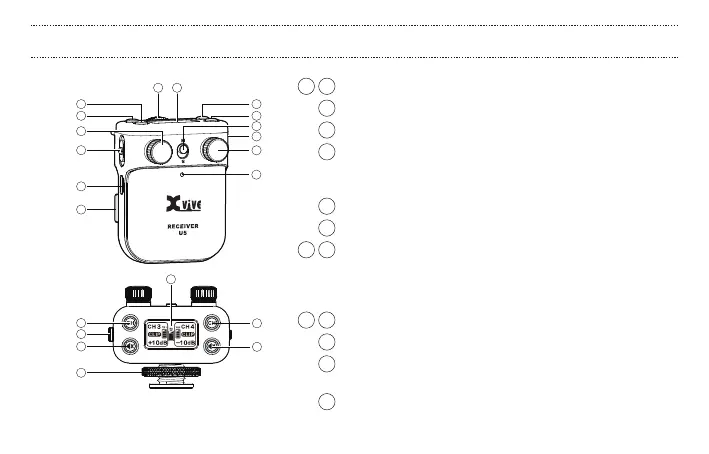
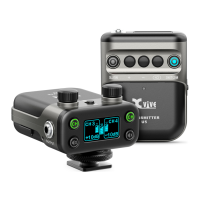
1 2 T1 and T2 channel output gain: -54dB to +24dB
3 S / M switch: see page 23
4 Power status LED
5 Power switch: switches unit on/o, and can also be set to hold.
All functions of the unit are disabled while the power switch
is set to the hold position.
6 USB charging port: USB Micro B input
7 Audio output: Stereo 3.5mm TRS
8 9 Channel switch and T1/T2 RF status LED:
LED ON = transmitter is on and link is established
LED Flashing = signal connection interference
LED OFF = transmitter unlinked
10 11 T1 and T2 Channel mute switch with status LED
12
OLED display: displays battery power, channel, gain, clip, mute
13 Shoe mount adapter for DSLR camera,
with 3/8" female screw adapter
14 Battery compartment: see page 25
1
7
3
8
2
4
6
14
5
11
109
8
7
10
13
9
11
12
U5 RECEIVER: BASIC OPERATION


 To Next Page