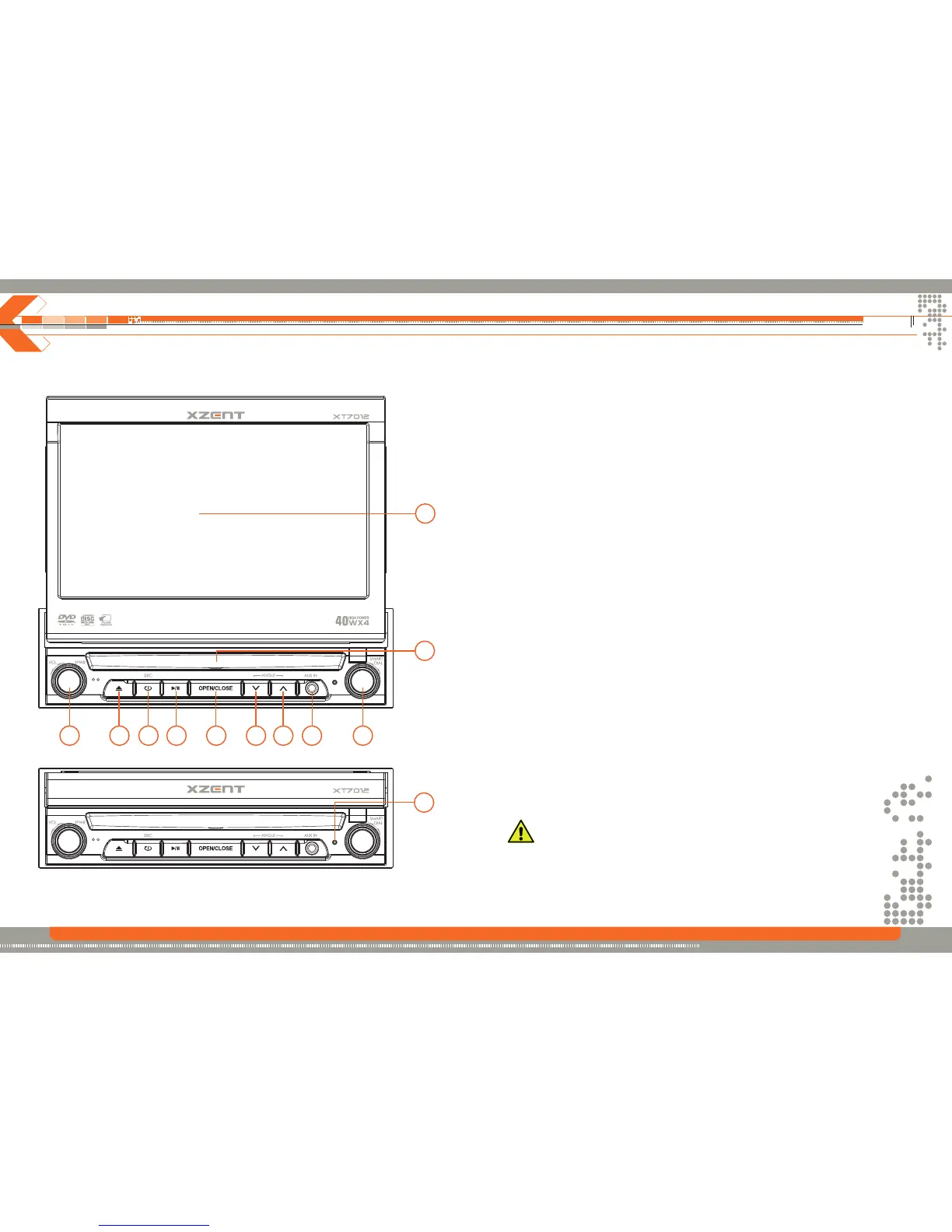
Controls and Indicators
6 7
1 POWER OFF/ VOL
Rotary encoder.
Press the encoder to turn on the unit, press and hold it to turn off.
Rotate clockwise/counterclockwise to adjust the volume.
Press to enter the audio adjust menu when the unit is on.
2 EJECT
Press the button once to eject the disc.
Hold to reset the loading mechanism.
3 SRC
Press the button to select a playing source.
4 PLAY/PAUSE
Press and hold to toggle traffic announcements.
5 OPEN
Press the button to activate the motorized system and move the TFT monitor into the
viewing position.
Press again to close the TFT.
6 ANGLE-
Press to adjust the downward tilt angle of the screen one step at a time.
Press and hold to continuously adjust the downward tilt.
Press to adjust the picture settings in picture setup.
7 ANGLE+
Press the button to adjust the upward tilt angle of the screen one step at a time.
Press and hold to continuously adjust the upward tilt.
Press to adjust the picture settings in picture setup mode.
8 AUX-IN
Audio only
9 SMART DIAL
Rotary encoder.
Press the encoder to access the MAIN menu.
Rotate clockwise/counterclockwise to select a desired item and press to access or confirm.
10 DISK SLOT
11 TFT DISPLAY
12 RESET
Press the button with the tip of a ball-pen to reset the unit.
I Do not touch the moving components when you are opening or closing the monitor.
If you touch the moving part, you may be hurt or the unit may be damaged.
I Do not try to open or close the monitor by hand.
1 2 3 4 5 6 7 8 9
10
11
12
Button Operation


 To Next Page