EasyManua.ls Logo

Yaber Y21 - No Display with Audio; No Signal

Yaber Y21
19 pages
Print Icon
To Next Page IconTo Next Page
To Previous Page IconTo Previous Page
Loading...
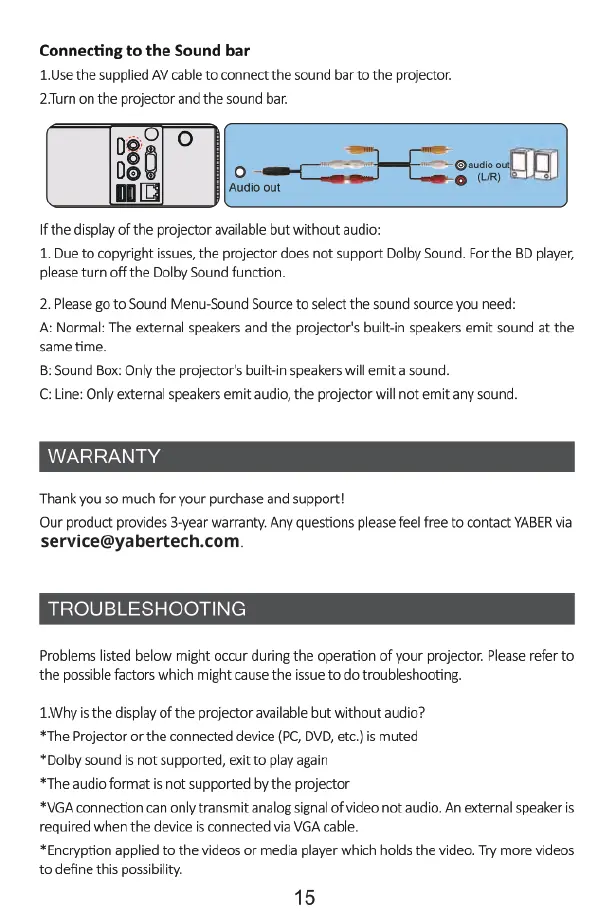
Connecting
to
the
Sound
bar
1.Use
the
supplied
AV
cable
to
connect
the
sound
bar
to
the
projector.
2.Tur
on
the
projector
and
the
sound
bar.
Ifthe
display
of
the
projector
available
but
without
audio:
1.
Due
to
copyright
ssues,
the
projector
does
not
support
Dolby
Sound.
For
the
BD
player,
please
tun
off
the
Dolby
Sound
function.
2.
Please
go
to
Sound
Menu-Sound
Source
to
select
the
sound
source
you
need:
A:
Normal:
The
external
speakers
and
the
projector's
built-in
speakers
emit
sound
at
the
same
time.
8:
Sound
Box:
Only
the
projector's
built-in
speakers
will
emit
a
sound.
C:
Line:
Only
external
speakers
emit
audio,
the
projector
will
not
emit
any
sound.
WARRANTY
Thank
you
so
much
for
your
purchase
and
support!
Our
product
provides
3-year
warranty.
Any
questions
please
feel
free
to
contact
YABER
via
service@yabertech.com
TROUBLESHOOTING
Problems
listed
below
might occur
during
the
operation
of
your
projector.
Please
refer
to
the
possible
factors
which
might
cause
the issue
to
do
troubleshooting.
1Whyis
the display
of
the
projector
available
but
without
audio?
*The
Projector
or
the
connected
device
(PC,
DVD,
etc.)
is
muted
*Dolby
sound
is
not
supported,
exit
to
play
again
*The
audio
format
is
not
supported
by
the
projector
*VGA
connection
can
only
transmit
analog
signal
of
video
not
audio.
An
external
speaker
is
required
when
the
device
is
connected
via
VGA
cable.
*Encryption
applied
to
the
videos
or
media
player
which
holds
the
video.
Try
more
videos
to
define
this
possibility.
15

Related product manuals