EasyManua.ls Logo

Yaber Y21 - Connecting to the Sound bar; Troubleshooting and Support; Warranty Information; No Audio with Display

Yaber Y21
19 pages
Print Icon
To Next Page IconTo Next Page
To Previous Page IconTo Previous Page
Loading...
Connecting
to
the
Mobile
Device
Connect
with
Android
phone:
(Note:
check
if
your
Android
phone
supports
MHL
function
or
not,and
the
MHL-HDMI
cable
not
included)
1.Connect
the
projector
and
the
Android
smartphone
with
the
MHL-HDMI
cable.
2.Choose
the
signal
source:
"HDMI"
Connect
with
10S
system:
1.Connect
the
projector
and
iPhone
with
Lightning-to-HDMI
cable
(not
included)
2.Choose
the
signal
source:
"HDMI"
Connect
with
an
Anycast:
1:
Plugin
Anycast
with
the
micro
usb
port
and
another
usb
port
to
your
power
adapter.
2:
Connect
Anycast
to
your
Projector's
HDMI
port
and
switch
the
Projector
source
to
HDMI.
3:
You
will
see the
Anycast
main
menu
on
the
Projector
screen.
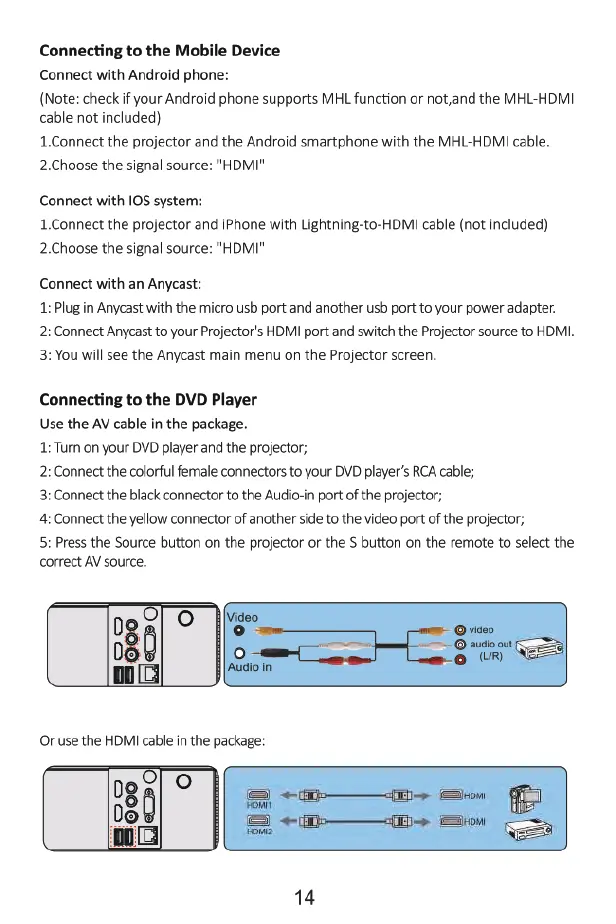
Connecting
to
the
DVD
Player
Use
the
AV
cable
in
the
package.
1:Turn
on
your
DVD
player
and
the
projector;
2:
Connect
the
colorful
female
connectors
to
your
DVD
player’s
RCA
cable;
3:
Connect
the
black
connector
to
the
Audio-in
port
of
the
projector;
4:
Connect
the
yellow
connector
of
another
side
to
the
video
port
of
the
projector;
5:
Press
the
Source
button
on
the
projector
or
the
S
button
on
the
remote
to
select
the
correct
AV
source.
14

Related product manuals