EasyManua.ls Logo

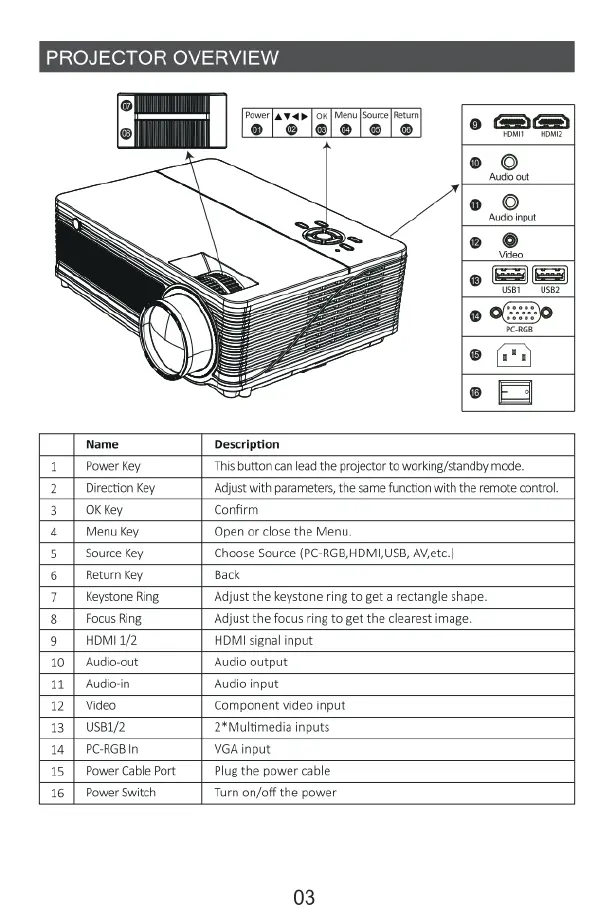
Yaber Y21 - Projector Overview

Yaber Y21
19 pages
Print Icon
To Next Page IconTo Next Page
To Previous Page IconTo Previous Page
Loading...
PROJECTOR
OVERVIEW
Audoout
Audo
nput
Video
o
oo
e
®
(i
°
T
Name
Description
1|
Powerkey
This
button
can
lead
the
projector
to
working/standby
mode.
2|
Direction
Key
‘Adjust
with
parameters,
the
same
function
with
the
remote
control
3
|
OKkey
Confirm
4|
Menukey
Open
or
close
the
Menu
5
|
Source
ey Choose
Source
(PC-RGB,HDMI,USB,
AVietc
|
6|
Retumkey
Back
7|
Keystone
Ring
‘Adjust
the
keystone
ring
to
get
a
rectangle
shape.
8
|
FocusRing
‘Adjust
the
focus
ring
to
get the
clearest
image
9
|
romina
HDMI
signal
input
10
|
Audio-out Audio
output
11
|
Audioin
Audio
input
12
|
Video
Component
video
input
13 |
Usei2
2*Multimedia
inputs
14
|
PCRGBIN
VGA
input
15
|
Power
Cable
Port
Plug
the
power
cable
16
|
Power
Switch Turn on/off
the
power
03

Related product manuals