EasyManua.ls Logo

Yaber Y21 - Setup and Adjustment; Starting the Projector

Yaber Y21
19 pages
Print Icon
To Next Page IconTo Next Page
To Previous Page IconTo Previous Page
Loading...
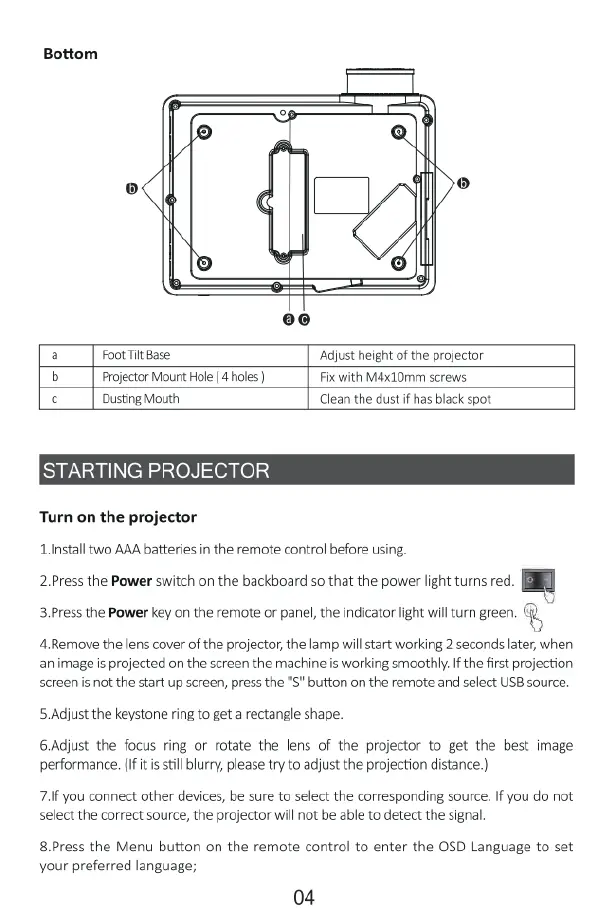
Bottom
a
Foot
Tilt
Base
Adjust height
of
the
projector
b
Projector
Mount
Hole
(4
holes
)
Fix
with
Mdx10mm
screws
c
Dusting
Mouth
Clean
the dust
if
has
black
spot
STARTING
PROJECTOR
Turn
on
the
projector
Linstall
two
AAA
batteries
in
the
remote
control
before
using.
2.Press
the
Power
switch
on
the
backboard
so
that
the
power
light
turns
red.
3.Press
the
Power
key on the
remote
or
panel,
the
indicator
light
will
turn green.
%
4Remove
the
lens
cover
of
the
projector,
the
lamp
willstart
working
2
seconds
later,
when
animage
is
projected
on the
screen
the
machine
is
working
smoothly.
If
the
first
projection
screen
is
not
the
start
up
screen,
press
the
"S"
button
on the
remote
and
select
USB
source.
5.Adjust
the
keystone
ring
to
get
a
rectangle
shape.
6.Adjust
the
focus
ring
or
rotate
the
lens
of
the
projector
to
get the best
image
performance.
(If
it is
still
blurry,
please
try
to
adjust
the
projection
distance.)
7.
you
connect
other
devices,
be
sure
to
select
the
corresponding
source.
If
you
do not
select
the
correct
source,
the
projector
will
not
be
able
to
detect
the
signal.
8.Press
the
Menu
button
on
the
remote
control
to
enter
the
OSD
Language
to
set
your
preferred
language;
04

Related product manuals