EasyManua.ls Logo

Yaber Y21 - Image Adjustment; Keystone Correction; Focus Adjustment

Yaber Y21
19 pages
Print Icon
To Next Page IconTo Next Page
To Previous Page IconTo Previous Page
Loading...
Turn
off
the
projector
1.Press
the
Power
button
when
the
projector
s
in
use,
this
will
cause
it
to
switch
to
standby
mode.
2When
the
projector
switch
into
standby
mode,
the
light
will
turn
green
from
red.
IMAGE
ADJUSTMENT
‘When
using
the
projector
for
the
first
time,
it
normally
displays
an
unclear
image.
This
is
due
to
the
lens
being
out
of
focus
or
incorrect
trapezoid
setting,
Please
follow
the
below
steps
to
correct;
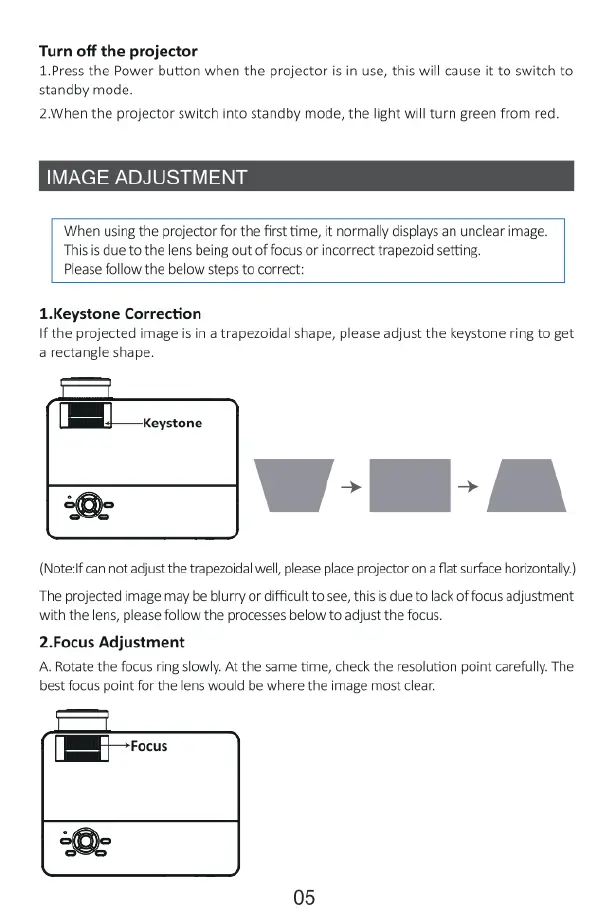
1.Keystone
Correction
Ifthe
projected
image
is
in
a
trapezoidal shape,
please
adjust
the
keystone
ring
to
get
a
rectangle
shape.
(B
cevtone
(Noteif
can
not
adjust
the
trapezoidal
well,
please
place
projector
on
a
flat
surface
horizontally)
“The
projected
image
may
be
blurry
or
difficult
to
see,
thisis
due
to
lack
of
focus
adjustment
with
the
lens,
please
follow
the
processes
below
to
adjust
the
focus.
2.Focus
Adjustment
A
Rotate
the
focus
ring
slowly.
At
the
same
time,
check
the
resolution
point
carefully.
The
best
focus point
for
the
lens
would
be
where
the
image
most
clear.
|:=fl—»mus
05

Related product manuals