19
P.A.S.M. Mode
P.A.S.M. Mode include four modes that are adjustable through the mode
dial.
P mode-
This mode allows you to take general still pictures. The
digital camera will automatically set the aperture and shutter speed to suit
the scene's brightness.
Aperture Priority-
The Aperture value that can be selected from F2.8 to
F3.41.
Shutter Priority- In this mode, the shutter speed can be select from
1/2000 sec to 16.
Manual-
In this mode, you set both the shutter speed and the aperture
value.The exposure level can be viewed on the LCD.
Tip: Users can also change the resolution and image quality
under Scene Mode.
Tip: The larger or brighter the aperture value ( lower f/
number) the more blurred the background will become.
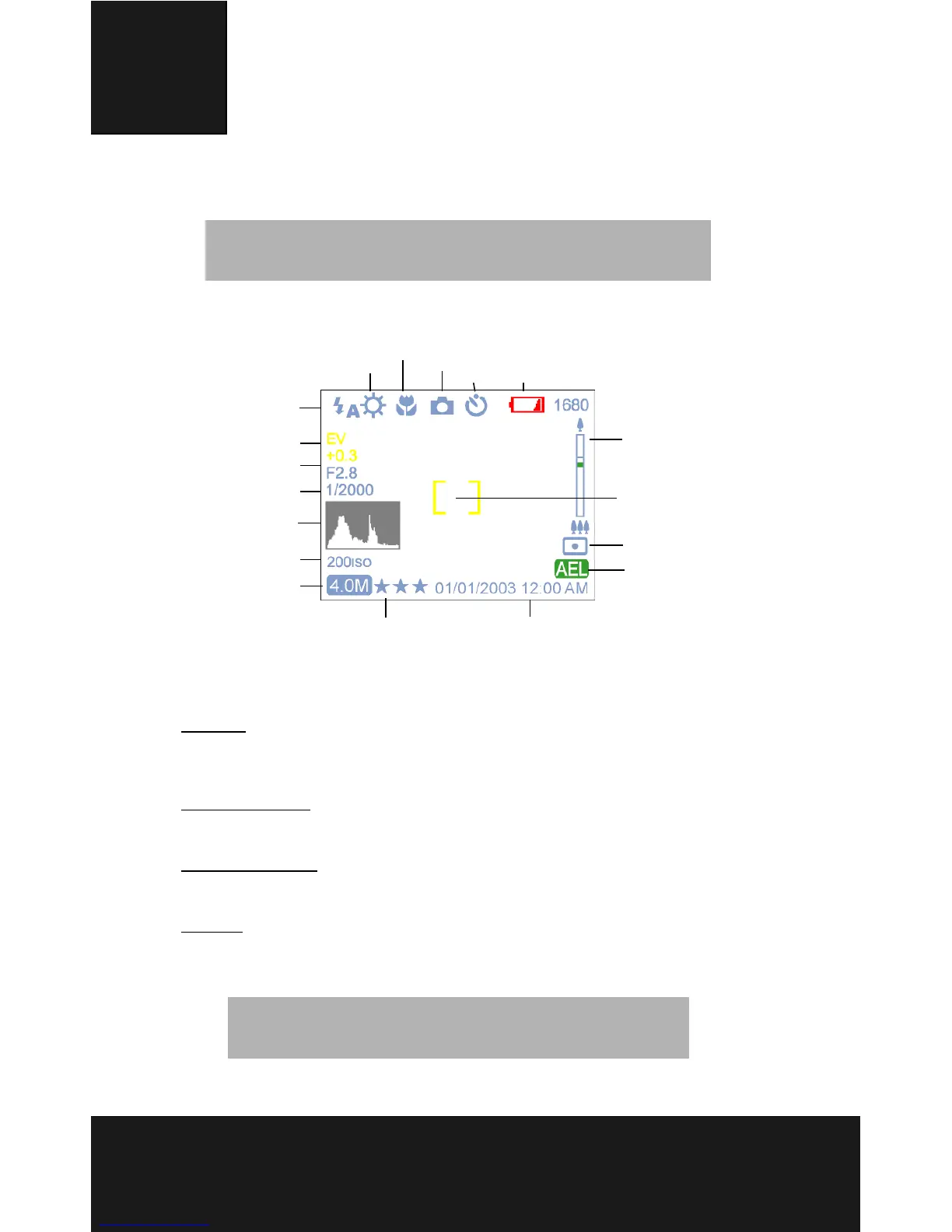
Flash
White Balance
Macro
Mode
Timer
Battery
Zoom Bar
Metering
AEL/AFL
Date/TimeImage Quality
ISO
HV
Shutter speed
Aperture
EV
Focus area
Resolution



 To Next Page