EasyManua.ls Logo

Yamaha C-65 - Page 5

Yamaha C-65
12 pages
Print Icon
To Next Page IconTo Next Page
To Previous Page IconTo Previous Page
Loading...
@
REC
OUT
selector
This
switch
selects
the
source
for
recording.
Monitoring
the
recording
source
is
optional:
the
input
selector
switches
can
be
set
to
the
same
or
a
different
source
from
that
being
recorded.
If
your
tape
deck
has
three-head
monitoring
capability,
you
can
monitor
the
just-recorded
signal
by
pressing
the
corresponding
TAPE
input
selector
switch.
(9
PHONO
selector
This
selector
selects
the
turntable
and
impedance.
The
leftmost
position
selects
PHONO
2,
which
requires
an
MM
cartridge.
The
five
positions
to
the
right
all
select
PHONO
1:
a
choice
of
3
MM
and
2
MC
setting
is
offered.
€}
TONE
BYPASS
switch
and
indicator
Press
this
button
to
engage
tone
bypass
circuitry,
which
routes
the
input
signal
so
that
it
is
unaffected
by
the
tone
control
circuitry.
@
AUDIO
MUTING
switch
and
indicator
Press
to
lower
the
volume
20
dB
without
disturbing
the
Volume
Contro!
position.
Press
again
to
restore
normal
volume.
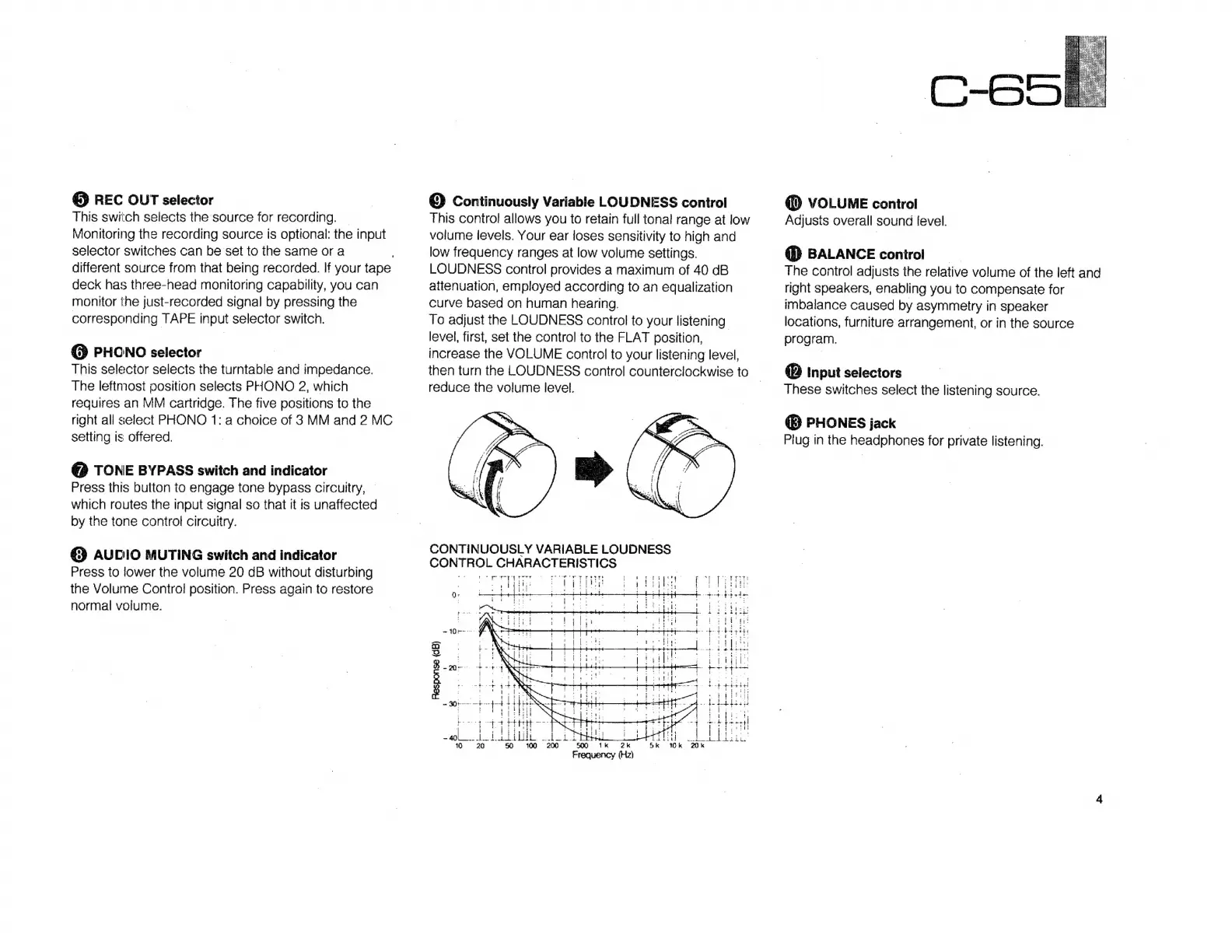
©
Continuously
Variable
LOUDNESS
control
This
control
allows
you
to
retain
full
tonal
range
at
low
volume
levels.
Your
ear
loses
sensitivity
to
high
and
low
frequency
ranges
at
low
volume
settings.
LOUDNESS
control
provides
a
maximum
of
40
dB
attenuation,
employed
according
to
an
equalization
curve
based
on
human
hearing.
To
adjust
the
LOUDNESS
control
to
your
listening
level,
first,
set
the
control
to
the
FLAT
position,
increase
the
VOLUME
control
to
your
listening
level,
then
turn
the
LOUDNESS
control
counterclockwise
to
|
reduce
the
volume
level.
CONTINUOUSLY
VARIABLE
LOUDNESS
CONTROL
CHARACTERISTICS
Sr
ea
aes
ig
Je
Gigs
z
*
tope
e
s
hoy
rere
ror
poryp
yr
Por
ETS
f
i
PDYTYYI
217
As
:
1-703
,
l
ba
cba
.
i!
pod
ee
ee
[og
rf
plait
$
u
dts
R
lyt
1
'
bra
Tc
ey
p
pate.
E
BENE
i
Dati
i
*
H
t
Response
(dB)
mt
n
(D
VOLUME
control
Adjusts
overall
sound
level.
@
BALANCE
control
The
control
adjusts
the
relative
volume
of
the
left
and
right
speakers,
enabling
you
to
compensate
for
imbalance
caused
by
asymmetry
in
speaker
locations,
furniture
arrangement,
or
in
the
source
program.
@
input
selectors
These
switches
select
the
listening
source.
(D
PHONES
jack
Plug
in
the
headphones
for
private
listening.

Related product manuals