Connections
Owner’s Manual
32
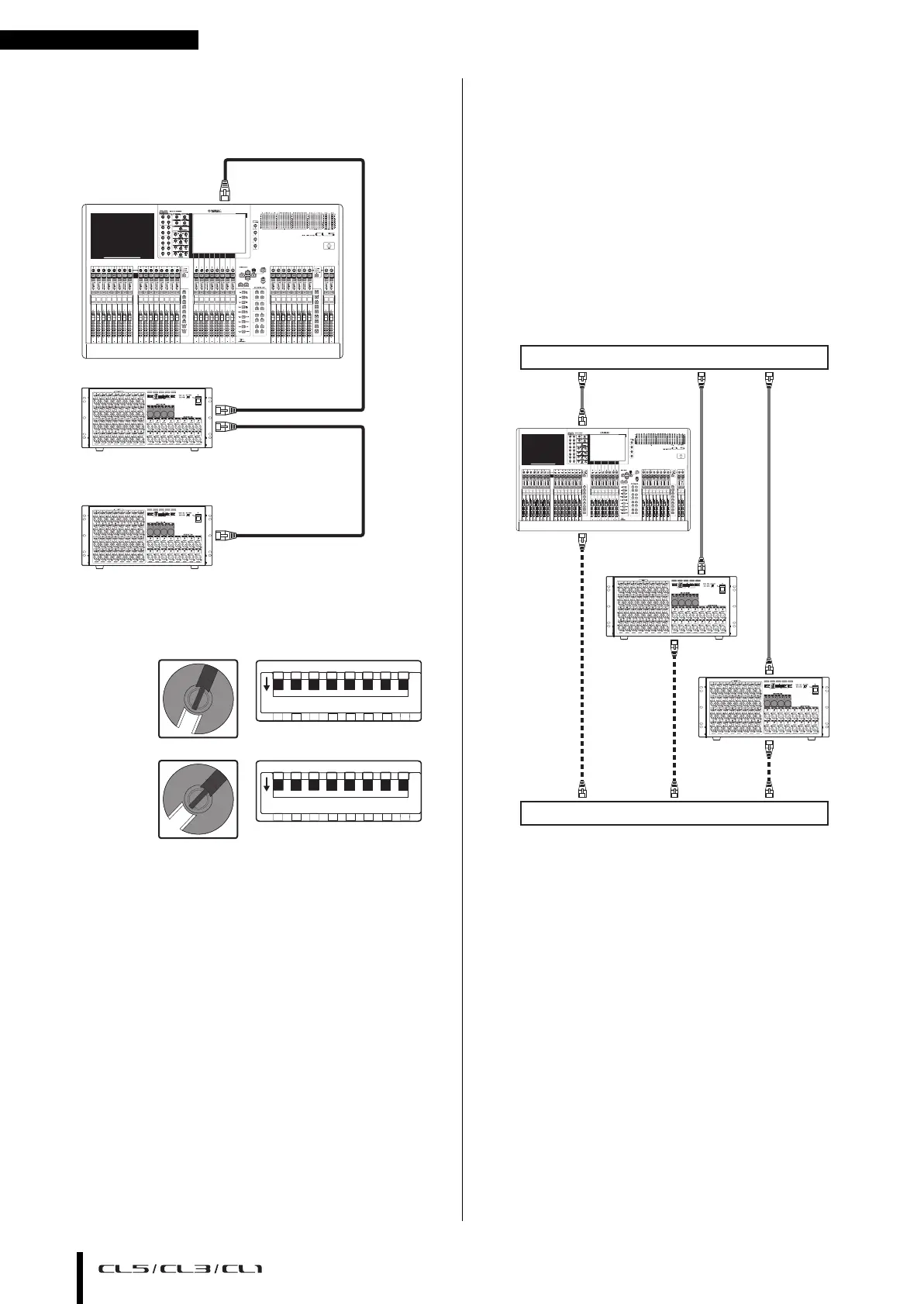
■ Connecting I/O devices to the CL series
Make connections as shown below using the Dante
connectors of the CL series and the I/O devices, and set the
rotary switches and DIP switches of the I/O devices.
■ Rotary switch and DIP switch settings of the I/O
devices
Star network (redundant network)
In a star network, each device is connected to a central hub.
Using a GbE-compatible network switch enables you to
configure a wide-band, large-scale network. We
recommend a network switch that gives you the ability to
control and monitor the network (such as QoS, the ability
to assign priority to data flows - e.g., clock synchronization
or audio transmission on certain data circuits).
With this topology, it is usual to configure a redundant
network so that even if an unexpected network problem
occurs, communication can occur without affecting the
audio.
About redundant networks
A redundant network consists of two circuits, a primary
circuit and a secondary circuit. Normally, the network
operates on the primary circuit. However, if the primary
connection is broken, the secondary circuit will
automatically take over communications. Therefore, using
a redundant network with a star topology would increase
communication stability relative to a daisy chain network.
■ Connecting I/O devices to the CL series
Make connections as shown below using the Dante
connectors of the CL series and the I/O devices, and set the
rotary switches and DIP switches of the I/O devices.
CL5
Rio3224-D (ID#1)
Rio3224-D (ID#2)
SECONDARY
PRIMARY
PRIMARY
0
1
2
3
4
5
6
7
8
9
A
B
C
D
E
F
0
1
2
3
4
5
6
7
8
9
A
B
C
D
E
F
(ID#1)
(ID#2)
0
1
2
3
4
5
6
7
8
9
A
B
C
D
E
F
0
1
2
3
4
5
6
7
8
9
A
B
C
D
E
F
1 2 3 4 5 6 7 8
ON
1 2 3 4 5 6 7 8
ON
CL5
SECONDARY
SECONDARY
SECONDARY
PRIMARY
PRIMARY
PRIMARY
Rio3224-D
(ID#1)
Rio3224-D
(ID#2)
0
1
2
3
4
5
6
7
8
9
A
B
C
D
E
F
0
1
2
3
4
5
6
7
8
9
A
B
C
D
E
F
Network switch
Network switch



 To Next Page