CSP-170/CSP-150 Owner’s Manual
28
Functions
You can select and apply a reverb effect to the sound, which simulates the natural reverberation of a concert
hall.
Reverb Type List
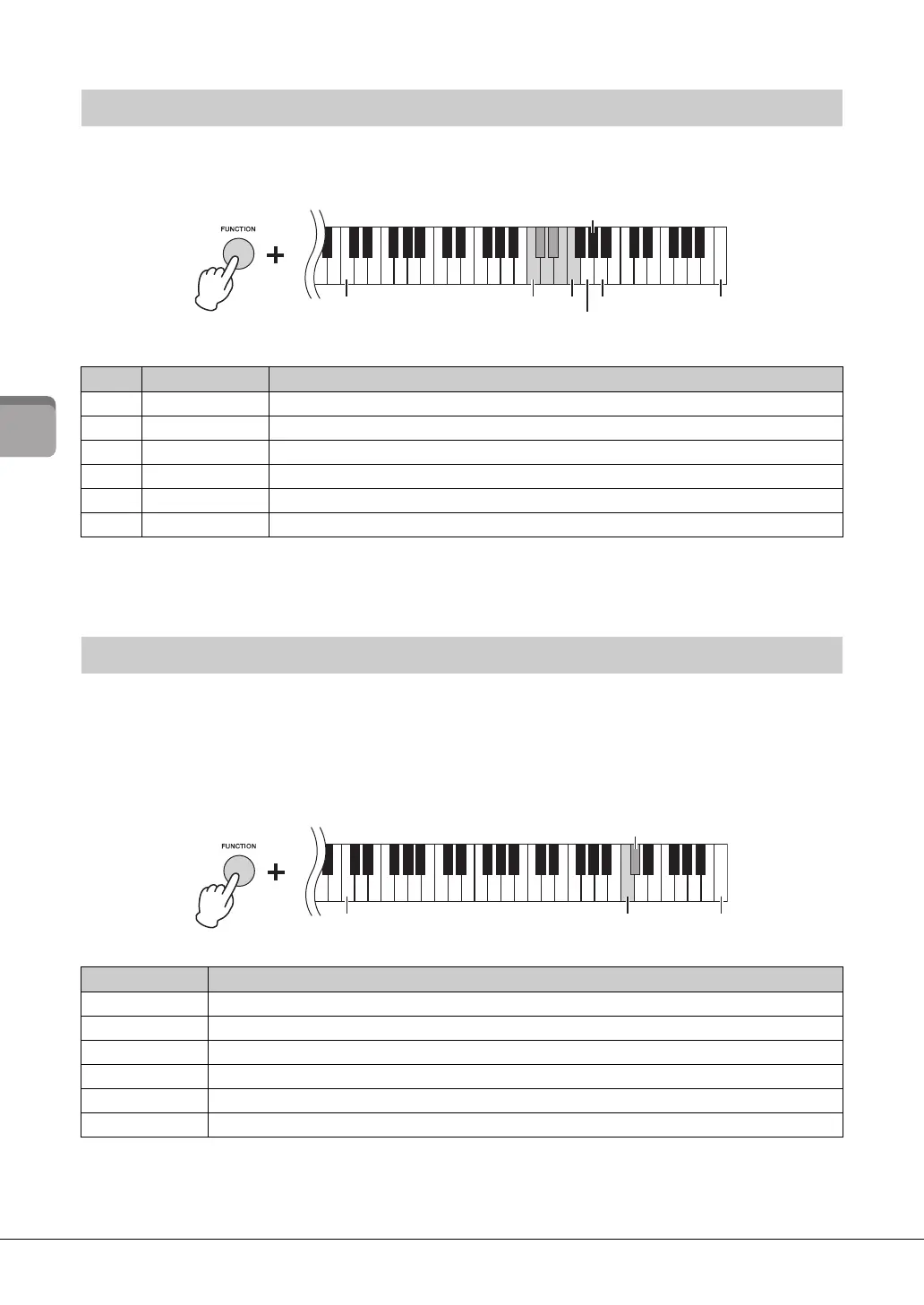
The depth can be adjusted in steps. Use the G5 – A5 keys while holding down the [FUNCTION] button.
Touch Sensitivity determines how the sound responds to your playing strength. This setting does not
change the weight of the keyboard. Simultaneously hold down the [FUNCTION] button and press the
C6 key to toggle among the various settings: Medium, Hard 1, Hard 2, Fixed, Soft 2, Soft 1 and Medium. To
reset to the default setting (Medium), simultaneously hold down the [FUNCTION] button and press the
C#6key.
Touch Sensitivity List
Selecting the Reverb
Key Reverb type Reverb description
C5 Recital Hall Simulates clear reverberation in a mid-sized hall suitable for piano recital.
C#5 Concert Hall Simulates brilliant reverberation in a large hall for public orchestra performances.
D5 Chamber Simulates the elegant reverberation in a small room suitable for chamber music.
D#5 Cathedral Simulates the solemn reverberation in a high-ceiling stone-made cathedral.
E5 Club Simulates the lively reverberation in a jazz club or a small bar.
F5 No Effect No effect
Setting the Touch Sensitivity of the keyboard
Touch Sensitivity Touch Sensitivity description
Soft 2 Produces relatively high volume even with light playing strength. Best for players with a light touch.
Soft 1 Produces high volume with moderate playing strength.
Medium Standard Touch Sensitivity.
Hard 1 Requires moderately strong playing for high volume.
Hard 2 Requires strong playing to produce high volume. Best for players with a heavy touch.
Fixed No touch response. The volume level will be the same regardless of how hard you play the keys.
C5C3 F5
Highest key
G#5 (Default depth)
G5 (Depth down 1)
A5 (Depth up 1)
Highest key
C#6 (Default touch)
C6 (Touch Sensitivity)



 To Next Page