CS-800 User Guide
8
Controls and connectors
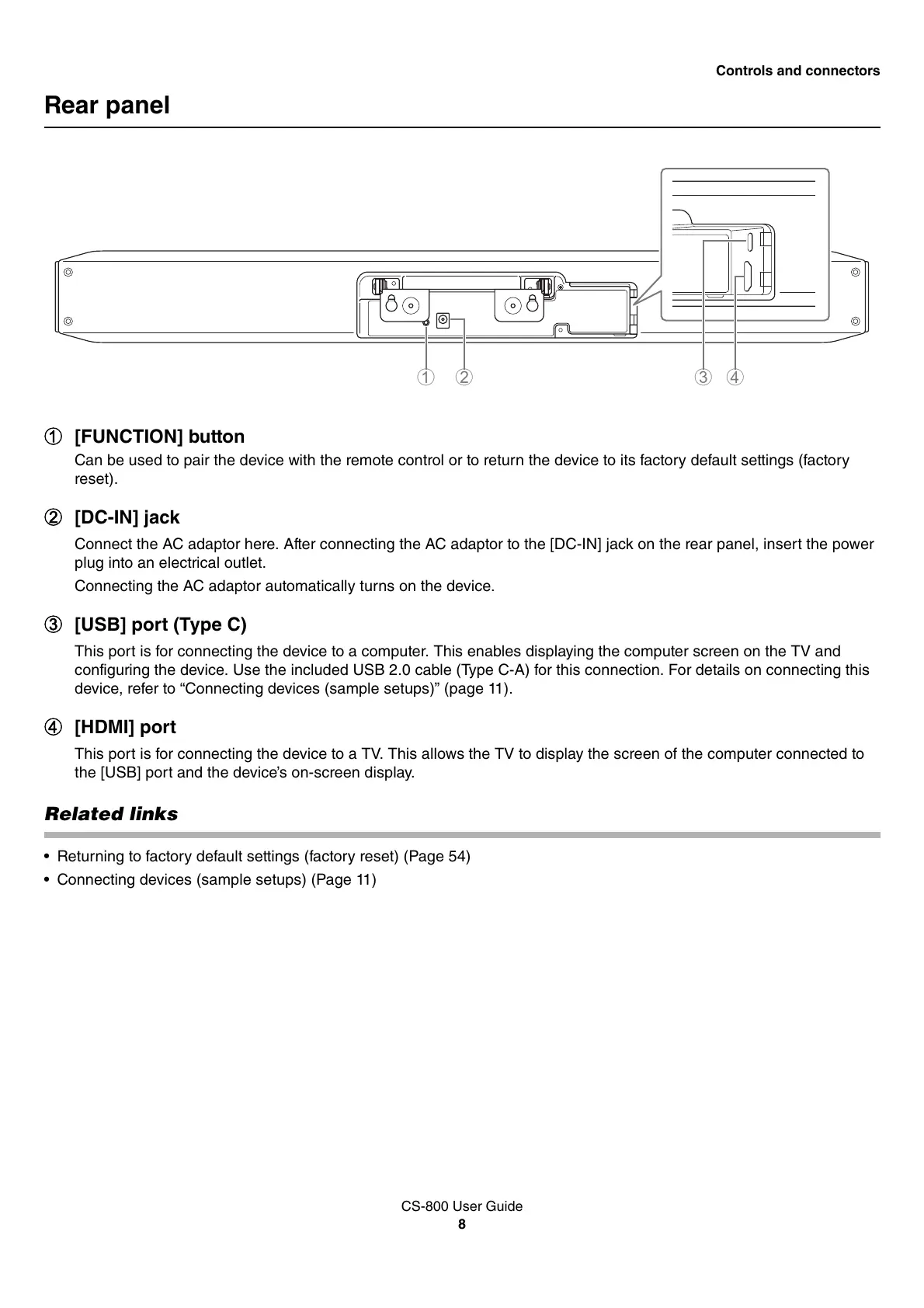
Rear panel
1 [FUNCTION] button
Can be used to pair the device with the remote control or to return the device to its factory default settings (factory
reset).
2 [DC-IN] jack
Connect the AC adaptor here. After connecting the AC adaptor to the [DC-IN] jack on the rear panel, insert the power
plug into an electrical outlet.
Connecting the AC adaptor automatically turns on the device.
3 [USB] port (Type C)
This port is for connecting the device to a computer. This enables displaying the computer screen on the TV and
configuring the device. Use the included USB 2.0 cable (Type C-A) for this connection. For details on connecting this
device, refer to “Connecting devices (sample setups)” (page 11).
4 [HDMI] port
This port is for connecting the device to a TV. This allows the TV to display the screen of the computer connected to
the [USB] port and the device’s on-screen display.
Related links
• Returning to factory default settings (factory reset) (Page 54)
• Connecting devices (sample setups) (Page 11)


 To Next Page