CS-800 User Guide
9
Controls and connectors
Remote control
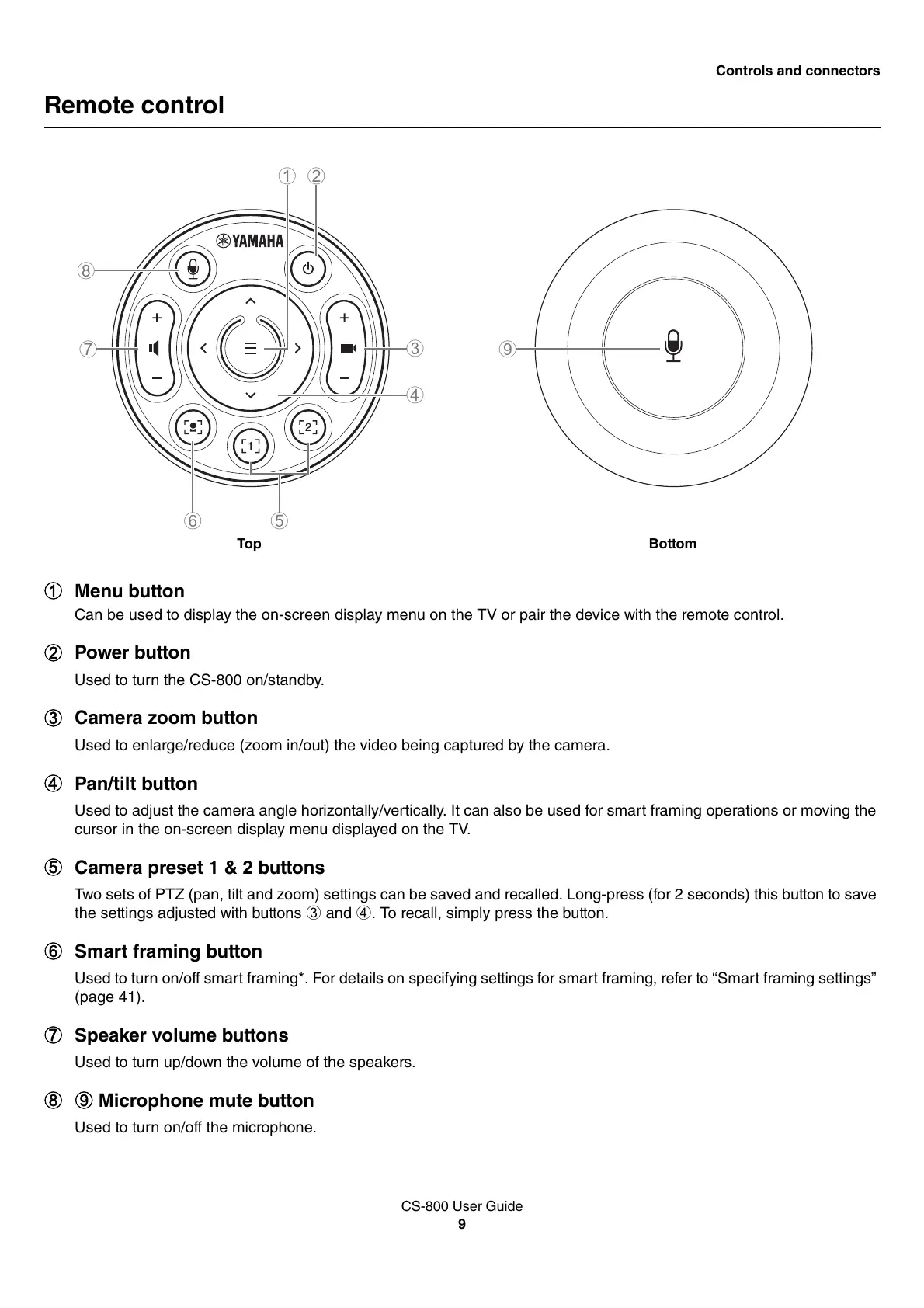
1 Menu button
Can be used to display the on-screen display menu on the TV or pair the device with the remote control.
2 Power button
Used to turn the CS-800 on/standby.
3 Camera zoom button
Used to enlarge/reduce (zoom in/out) the video being captured by the camera.
4 Pan/tilt button
Used to adjust the camera angle horizontally/vertically. It can also be used for smart framing operations or moving the
cursor in the on-screen display menu displayed on the TV.
5 Camera preset 1 & 2 buttons
Two sets of PTZ (pan, tilt and zoom) settings can be saved and recalled. Long-press (for 2 seconds) this button to save
the settings adjusted with buttons 3 and 4. To recall, simply press the button.
6 Smart framing button
Used to turn on/off smart framing*. For details on specifying settings for smart framing, refer to “Smart framing settings”
(page 41).
7 Speaker volume buttons
Used to turn up/down the volume of the speakers.
89 Microphone mute button
Used to turn on/off the microphone.


 To Next Page