DM7 Console Owner’s Manual
16
Installing Optional Cards
Installing a PY Card
Before you install a PY card, you must check the Yamaha
Pro Audio global website to see whether the DM7 series
supports your card.
https://www.yamahaproaudio.com/
1. Make sure that the power to this product is
turned off.
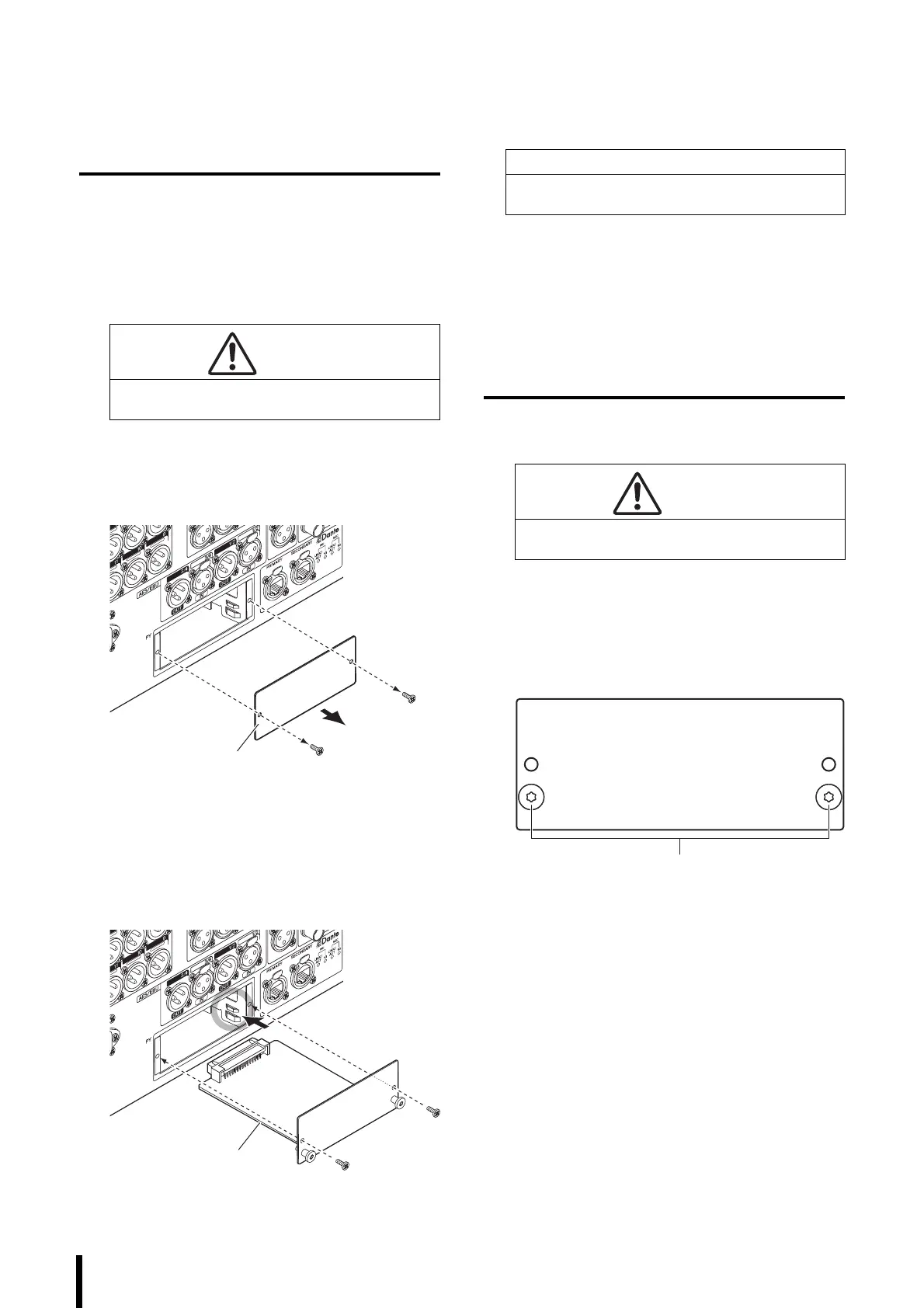
2. Remove the screws that fasten the [PY] slot
cover and remove the cover.
The removed screws will be used again to install the
PY card. Keep the cover in a safe place for future use.
3. Align both edges of the PY card with the
guide rails inside the slot, and then insert the
PY card into the slot.
Push the PY card all the way into the slot so that the
connector at the end of the PY card is correctly
inserted into the connector inside the slot.
4. Affix the PY card using the screws that were
removed in step 2.
Do not use the card unless it is affixed by the screws
securely. Be aware that component failure or
malfunction may occur if the PY card is not fastened.
Removing the PY Card
1. Make sure that the power to this product is
turned off.
2. Completely loosen and remove the screws
that hold the PY card in place.
3. Pull the card toward you while holding the
peg-shaped handles (see the figure below) on
the PY card.
4. Replace the stored slot cover and affix it with
the screws.
Do not use the unit while the slot cover is removed.
Component failure or malfunction may occur.
CAUTION
Installing or removing a card while the power is on
may lead to component failure or electric shock.
NOTICE
When inserting the PY card, align both sides of the PY
card with the guide rails in the slot of the host device.
CAUTION
Installing or removing a card while the power is on
may lead to component failure or electric shock.



 To Next Page