EasyManua.ls Logo

Yamaha DXS18XLF - User Manual

Yamaha DXS18XLF
54 pages
Print Icon
To Next Page IconTo Next Page
Loading...
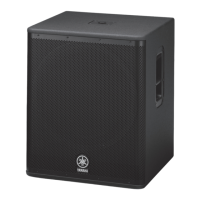
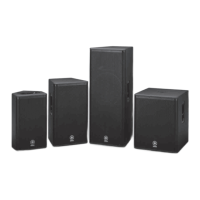
POWERED LOUDSPEAKER POWERED SUBWOOFER
Reference Manual
JA
EN

Other manuals for Yamaha DXS18XLF

Questions and Answers

  • P
    Perry OliverSep 23, 2025
    What to do if a “USB: OVER CURRENT” message appears on the Yamaha DXS18XLF screen?
    • C
      Christopher ClaySep 23, 2025
      If a “USB: OVER CURRENT” message appears on the screen, it indicates that the connection between the product and the USB device has been cut due to excess current flowing to the USB terminal. Remove the USB flash drive from the USB terminal and then turn the power to the product on again.
  • N
    Nancy VaughnAug 25, 2025
    What to do if my Yamaha Speakers sound is interrupted suddenly?
    • S
      sgardnerAug 25, 2025
      If the sound from your Yamaha Speakers is suddenly interrupted, it could be due to the protection function being activated because the amplifier became too hot, triggering the mute function. In this case, “MUTED” will appear on the HOME screen, and the [POWER] indicator will flash. To resolve this, reduce the output level, improve ventilation around the rear panel, and shield the rear panel from direct sunlight. The system will recover once the temperature decreases. Alternatively, the speaker units may be damaged. If MUTED is not displayed and there is a signal in the SP Output Meter, contact your Yamaha dealer.
  • A
    Amy BrownAug 25, 2025
    Why is there no sound coming from my Yamaha Speakers?
    • M
      Melissa HudsonAug 26, 2025
      If you're not getting any sound from your Yamaha Speakers, the routing might not be set up correctly. On the HOME screen, check that the signal is routed to SP OUT under ROUTER in the settings, especially if you see a signal in the Input Meter but not in the SP Output Meter. Also, for Dante models, the INPUT level under ROUTER may be too low. Check this setting and increase the level if needed.
  • B
    Brian BradyAug 27, 2025
    How to fix Yamaha Speakers when there is no sound?
    • M
      mpattersonAug 27, 2025
      If there is no sound coming from your Yamaha Speakers, check the routing settings. On the HOME screen, if there is a signal in the INPUT meter but no signal in the SP Output Meter, verify if the signal is routed to SP OUT under ROUTER in the settings. Also, if you are using a Dante model, check the INPUT level on the ROUTER screen and raise the level if it is too low.
  • L
    linda22Aug 27, 2025
    What to do if the volume becomes low suddenly on my Yamaha Speakers?
    • A
      Alexander BruceAug 27, 2025
      If the volume of your Yamaha Speakers suddenly becomes low, the protection function might be active because the amp is too hot, triggering the limiter. If “THERMAL” is displayed on the HOME screen, reduce the output level, improve ventilation around the rear panel, and shield the rear panel from direct sunlight to lower the amplifier temperature.
  • S
    Sarah WheelerSep 13, 2025
    How to fix Yamaha Speaker System display that goes off after a few moments?
    • C
      Charles ColeSep 13, 2025
      If the display on your Yamaha Speaker System goes off after a few moments, it means the display's protection function is active. To return to the normal display, press either the main knob or the [ ] (back) key.
  • E
    egreenSep 12, 2025
    How to fix Yamaha Speaker System when the power does not come on?
    • S
      Scott DiazSep 12, 2025
      If your Yamaha Speaker System's power does not come on, it might be because the time between turning the power on and off is too short. Wait about 20 seconds after turning the power off before turning it back on again.
  • T
    Teresa FisherSep 12, 2025
    Why is the sound interrupted suddenly on my Yamaha Speaker System?
    • T
      Tracey NovakSep 12, 2025
      If the sound from your Yamaha Speaker System is suddenly interrupted, this could be due to the protection function activating because the amp became too hot, triggering the mute function. When this happens, MUTED is displayed on the HOME screen, and the [POWER] indicator flashes. To fix this, improve ventilation around the rear panel and shield it from direct sunlight. If MUTED is not displayed and there is a signal in the SP Output Meter, the speaker units might be damaged. Please contact your Yamaha dealer.
  • V
    Valerie KrauseSep 4, 2025
    What to do if the volume becomes low suddenly on Yamaha DXS18XLF?
    • A
      Amy BrownSep 4, 2025
      If the volume on your Yamaha Speakers suddenly decreases, the protection function might be active because the amp is overheating, which triggers the limiter. If 'THERMAL' is displayed on the HOME screen, improve the ventilation around the rear panel and shield the panel from direct sunlight to prevent the speaker from getting hotter.
  • A
    anthony08Sep 2, 2025
    Why is there no sound coming from my Yamaha Speaker System?
    • D
      Debra Palmer MDSep 2, 2025
      If you're not getting any sound from your Yamaha Speaker System, first, on the HOME screen, if there is a signal in the INPUT meter but no signal in the SP Output Meter, verify the signal is routed to SP OUT under ROUTER in the settings. Also, if you have a Dante model, check the INPUT level under ROUTER in the settings and raise it if it is too low.

Summary

Introduction

Main Features

Highlights key features of the DZR and DXS-XLF series powered speakers.

Main Functions and Manual Structure

Main Functions

Describes key operational functions like processing, display, presets, and network.

Rear Panel Controls

Display and Navigation

Covers the display, main knob, back key, and level controls for operation.

Input;Output and Power

Power Section

Details the power section, including AC IN and power switch.

Dante Network Interface

Panel Operations - Basic Navigation

Basic Operation Flow

Covers basic navigation using the main knob and back key.

Panel Functions Overview

Device Identification and Levels

Displays device ID, labels, input/output levels, and protection status.

Sound Processing Controls

Configures filter, contour, D-XSUB, EQ, and delay settings for sound shaping.

Routing and Special Modes

Sets cardioid mode and configures audio signal routing.

Presets and Utility Settings

Manages presets and accesses device settings like Panel Setup, Lock, Backup, Dante.

Alert Messages and Initialization

Initialization Procedures

Details methods for resetting the product to default settings.

Screen Structure and Presets

PRESET Screen Functions

Details how to recall, store, clear, edit titles, and protect presets.

Preset Operations

Preset Management

Covers clearing, recalling, and storing presets.

ROUTER Screen

Device Backup and Dante Setup

Dante Setup Configuration

Configures Dante settings and displays network status.

Dante Setup Details

Dante Network Configuration

Network Settings

Configures network settings like IP address, subnet mask, and gateway.

Device Information and Initialization

Initialize Product Settings

Resets all settings to their default values.

Log and Firmware Update

Firmware Update Procedure

Guides on updating product and Dante module firmware via USB.

About Dante Network System

Dante Network Connections

Describes daisy chain and star network connection methods for Dante.

Dante Settings and Controller

Connecting to Dante Devices

Details using Dante Controller for configuration and audio routing.

Integration with Yamaha Digital Mixers

Mixer Integration Functions

Lists functions available when integrating with TF, CL, and QL series mixers.

Mixer Compatibility

Supported Mixer Firmware Versions

Lists compatible Yamaha digital mixers and their required firmware versions.

Function Tree - Meters & Tuning

Tuning Parameters

Covers filter, contour, D-XSUB, EQ, and delay settings.

Function Tree - Routing & Utility

Routing and Input;Output Settings

Details signal routing and Dante/analog input/output level settings.

Panel Setup and Lock

Covers display settings, panel lock, and PIN code management.

Function Tree - Dante & Presets

Dante Setup and Network Configuration

Details Dante modes, patching, IDs, FS, latency, lock, and network settings.

Presets and Device Information

Covers preset management, device information, initialize, log, and firmware updates.

Patch Correspondence Chart

Quick Config Patching

Maps Dante PATCH screen options to TF series router inputs and outputs.

Troubleshooting

No Power or Sound Issues

Provides solutions for power, sound, and volume-related problems.

Display and Panel Lock Issues

Offers solutions for display, indicator, and panel lock operational issues.

USB and Service Mode Issues

Addresses USB connection errors and service mode display.

Dante-related Terms

Network and ID Terms

Explains Dante network terms like daisy chain, latency, UNIT ID, and device label.

General Specifications

Detailed Specifications

Route Latency Values

Current Draw and Power Consumption

Block Diagram

DZR(-D) Block Diagram

Illustrates the internal signal flow and processing for DZR(-D) series.

DXS-XLF(-D) Block Diagram

Illustrates the internal signal flow and processing for DXS-XLF(-D) series.

Yamaha DXS18XLF Specifications

General IconGeneral
TypePowered Subwoofer
Frequency Response30Hz - 150Hz
Maximum SPL136 dB
Enclosure MaterialPlywood
Input TypesXLR
Output TypesXLR
ProtectionOverload, Thermal
Driver18" Cone

Related product manuals