EasyManua.ls Logo

Yamaha DZR15 - User Manual

Yamaha DZR15
54 pages
Print Icon
To Next Page IconTo Next Page
Loading...
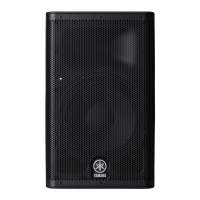
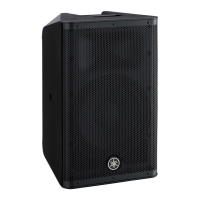
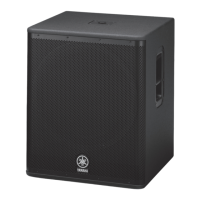
POWERED LOUDSPEAKER POWERED SUBWOOFER
Reference Manual
JA
EN

Other manuals for Yamaha DZR15

Questions and Answers

  • N
    nelsonkevinSep 23, 2025
    What to do if a “USB: OVER CURRENT” message appears on the Yamaha DZR15 Speakers screen?
    • S
      sullivanbrittanySep 23, 2025
      If a “USB: OVER CURRENT” message appears on the screen, it indicates that the connection between the product and the USB device has been cut due to excess current flowing to the USB terminal. Remove the USB flash drive from the USB terminal and then turn the power to the product on again.
  • M
    Michael McdanielAug 25, 2025
    What to do if my Yamaha DZR15 sound is interrupted suddenly?
    • D
      David FrostAug 25, 2025
      If the sound from your Yamaha Speakers is suddenly interrupted, it could be due to the protection function being activated because the amplifier became too hot, triggering the mute function. In this case, “MUTED” will appear on the HOME screen, and the [POWER] indicator will flash. To resolve this, reduce the output level, improve ventilation around the rear panel, and shield the rear panel from direct sunlight. The system will recover once the temperature decreases. Alternatively, the speaker units may be damaged. If MUTED is not displayed and there is a signal in the SP Output Meter, contact your Yamaha dealer.
  • R
    rjonesAug 25, 2025
    Why is there no sound coming from my Yamaha DZR15 Speakers?
    • A
      Abigail WeberAug 26, 2025
      If you're not getting any sound from your Yamaha Speakers, the routing might not be set up correctly. On the HOME screen, check that the signal is routed to SP OUT under ROUTER in the settings, especially if you see a signal in the Input Meter but not in the SP Output Meter. Also, for Dante models, the INPUT level under ROUTER may be too low. Check this setting and increase the level if needed.
  • D
    debra85Aug 27, 2025
    How to fix Yamaha DZR15 Speakers when there is no sound?
    • A
      Aaron HarrisonAug 27, 2025
      If there is no sound coming from your Yamaha Speakers, check the routing settings. On the HOME screen, if there is a signal in the INPUT meter but no signal in the SP Output Meter, verify if the signal is routed to SP OUT under ROUTER in the settings. Also, if you are using a Dante model, check the INPUT level on the ROUTER screen and raise the level if it is too low.
  • B
    briandanielsAug 27, 2025
    What to do if the volume becomes low suddenly on my Yamaha DZR15 Speakers?
    • J
      John McconnellAug 27, 2025
      If the volume of your Yamaha Speakers suddenly becomes low, the protection function might be active because the amp is too hot, triggering the limiter. If “THERMAL” is displayed on the HOME screen, reduce the output level, improve ventilation around the rear panel, and shield the rear panel from direct sunlight to lower the amplifier temperature.
  • T
    Taylor StevensSep 13, 2025
    How to fix Yamaha Speaker System display that goes off after a few moments?
    • T
      tsalinasSep 13, 2025
      If the display on your Yamaha Speaker System goes off after a few moments, it means the display's protection function is active. To return to the normal display, press either the main knob or the [ ] (back) key.
  • H
    Hannah HendricksSep 12, 2025
    Why is the sound interrupted suddenly on my Yamaha Speaker System?
    • C
      Charles EvansSep 12, 2025
      If the sound from your Yamaha Speaker System is suddenly interrupted, this could be due to the protection function activating because the amp became too hot, triggering the mute function. When this happens, MUTED is displayed on the HOME screen, and the [POWER] indicator flashes. To fix this, improve ventilation around the rear panel and shield it from direct sunlight. If MUTED is not displayed and there is a signal in the SP Output Meter, the speaker units might be damaged. Please contact your Yamaha dealer.
  • B
    bradleydaleSep 12, 2025
    How to fix Yamaha Speaker System when the power does not come on?
    • J
      John SpencerSep 12, 2025
      If your Yamaha Speaker System's power does not come on, it might be because the time between turning the power on and off is too short. Wait about 20 seconds after turning the power off before turning it back on again.
  • V
    vincent23Sep 4, 2025
    What to do if the volume becomes low suddenly on Yamaha DZR15?
    • M
      matthew88Sep 4, 2025
      If the volume on your Yamaha Speakers suddenly decreases, the protection function might be active because the amp is overheating, which triggers the limiter. If 'THERMAL' is displayed on the HOME screen, improve the ventilation around the rear panel and shield the panel from direct sunlight to prevent the speaker from getting hotter.
  • R
    rachaelsuarezSep 2, 2025
    Why is there no sound coming from my Yamaha Speaker System?
    • D
      David WilliamsonSep 2, 2025
      If you're not getting any sound from your Yamaha Speaker System, first, on the HOME screen, if there is a signal in the INPUT meter but no signal in the SP Output Meter, verify the signal is routed to SP OUT under ROUTER in the settings. Also, if you have a Dante model, check the INPUT level under ROUTER in the settings and raise it if it is too low.

Summary

Introduction

Product Overview and Features

Lists models, key features, main functions, and manual structure.

Functions and Panel Operations

Speaker Functions and Rear Panel

Details speaker rear panels, Dante section, and related functions.

Panel Operations and Settings

Covers basic navigation, HOME screen, unit settings, alerts, and initialization.

Screen Functions and Dante Configuration

Screen Navigation and Preset Management

Explains screen structure, navigation, and preset operations.

Tuning, Routing, and Utility Functions

Details tuning, processing, routing, utility, display, and lock functions.

Dante Setup and Device Management

Covers Dante setup, network, device info, firmware updates, and remote muting.

About Dante and Reference

Dante Network System and Connections

Outlines Dante technology, connections, controller, and mixer integration.

Reference Information and Specifications

Includes USB precautions, messages, troubleshooting, terms, specs, diagrams, and index.

Yamaha DZR15 Specifications

General IconGeneral
TweeterYes
Magnet typeNeodymium
Speaker type2-way
Number of drivers2
Speaker placementIn-wall/in-ceiling, Wall-mountable
Audio output channels- channels
Driver diaphragm materialTitanium
Number of tweeter drivers1
Tweeter diameter (imperial)15 \
Mid-range driver diameter (imperial)2 \
Sensitivity96 dB
Frequency range34 - 20 Hz
RMS rated power2000 W
Crossover frequency1.7 Hz
Sound pressure level (max)139 dB
Product colorBlack
Recommended usageUniversal
Amplifier classD
BluetoothNo
Connectivity technologyWired
Power source typeAC
Power consumption (typical)150 W
Weight and Dimensions IconWeight and Dimensions
Depth460 mm
Width450 mm
Height761 mm
Weight25200 g

Related product manuals