EasyManua.ls Logo

Yamaha M-2 - CONNECTION AND OPERATIONS; Connection Procedures; Level Controls Adjustment

Yamaha M-2
12 pages
Print Icon
To Next Page IconTo Next Page
To Previous Page IconTo Previous Page
Loading...
CONNECTION
AND
|
AC
CONNECTIC
1.
As
the
M-2
has
very
high
power
consumption,
do
not
connect
it
to
an
additional
AC
outlet
on
some
other
piece
of
equipment,
but
plug
it
directly
into
a
wall
outlet.
2
Regardless
of
the
position
of
the
power
switch,
the
additional
AC
power
outlet
on
the
rear
panel
of
the
M-2
provides
AC
power
for
a
maximum
consumption
of
100W.
8
5
=
S
0
t
7]
6
H
Speakers
with
any
impedance
from
8
~
1682
can
be
connected
to
either
of
the
A
or
B
terminals
on
the
rear
panel.
When
using
two
sets
of
speakers
at
the
A
and
B
terminals
simultaneously,
be
sure
to
use
only
speakers
having
an
impedance
of
4.
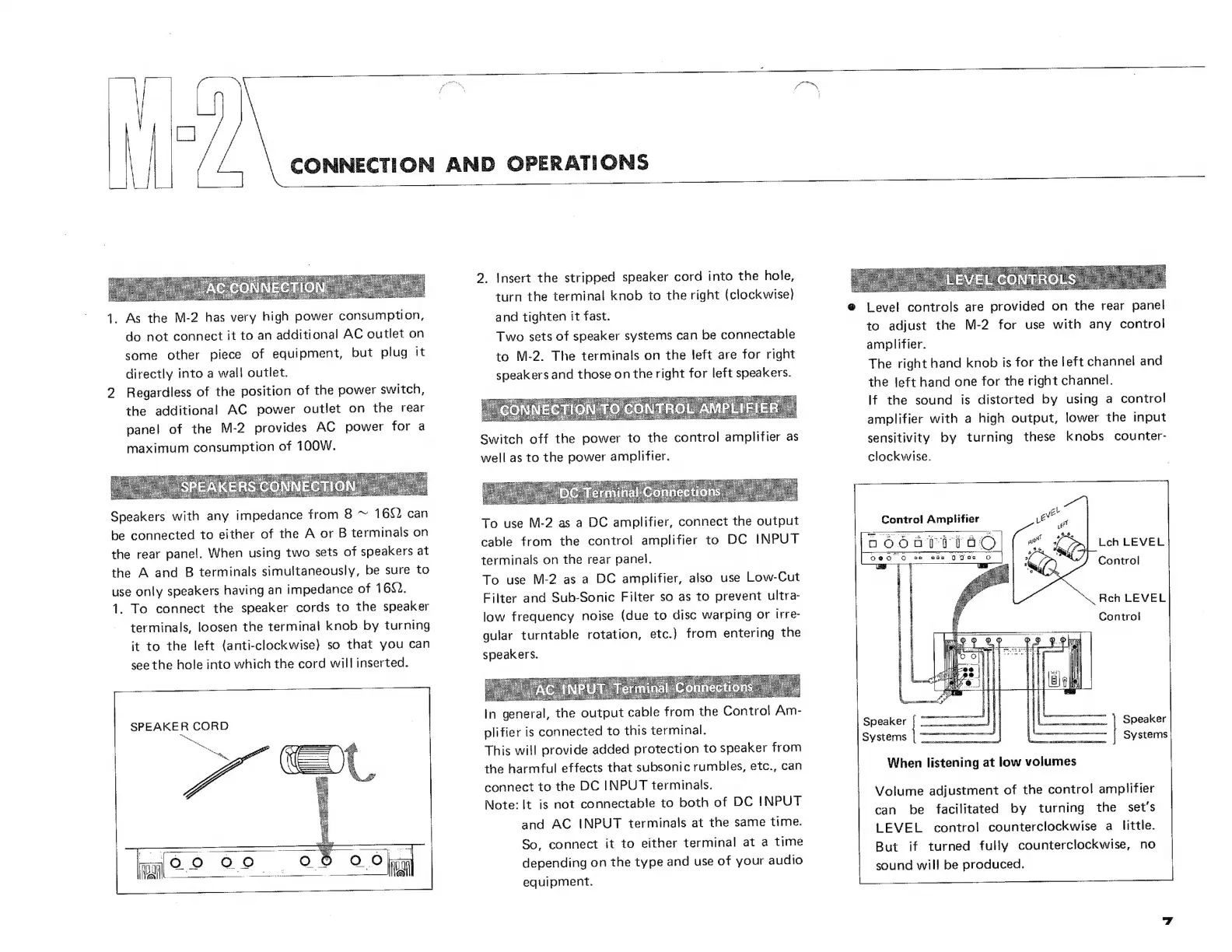
1.
To
connect
the
speaker
cords
to
the
speaker
terminals,
loosen
the
terminal
knob
by
turning
it
to
the
left
(anti-clockwise)
so
that
you
can
see
the
hole
into
which
the
cord
will
inserted.
SPEAKER
CORD
ho
OPERATIONS
2.
Insert
the
stripped
speaker
cord
into
the
hole,
turn
the
terminal
knob
to
the
right
(clockwise)
and
tighten
it
fast.
Two
sets
of
speaker
systems
can
be
connectable
to
M-2.
The
terminals
on
the
left
are
for
right
speakers
and
those
on
the
right
for
left
speakers.
'
CONNECTION
TO
CONTROL
AMPLIFIER
Switch
off
the
power
to
the
control
amplifier
as
well
as
to
the
power
amplifier.
To
use
M-2
as
a
DC
amplifier,
connect
the
output
cable
from
the
control
amplifier
to
DC
INPUT
terminals
on
the
rear
panel.
To
use
M-2
as
a
DC
amplifier,
also
use
Low-Cut
Filter
and
Sub-Sonic
Filter
so
as
to
prevent
ultra-
low
frequency
noise
(due
to
disc
warping
or
irre-
gular
turntable
rotation,
etc.)
from
entering
the
speakers.
In
general,
the
output
cable
from
the
Control
Am-
plifier
is
connected
to
this
terminal.
This
will
provide
added
protection
to
speaker
from
the
harmful
effects
that
subsonic
rumbles,
etc.,
can
connect
to
the
DC
INPUT
terminals.
Note:
It
is
not
connectable
to
both
of
DC
INPUT
and
AC
INPUT
terminals
at
the
same
time.
So,
connect
it
to
either
terminal
at
a
time
depending
on
the
type
and
use
of
your
audio
equipment.
כ
8
Level
controls
are
provided
on
the
rear
panel
to
adjust
the
M-2
for
use
with
any
control
amplifier.
The
right
hand
knob
is
for
the
left
channel
and
the
left
hand
one
for
the
right
channel.
If
the
sound
is
distorted
by
using
a
contro!
amplifier
with
a
high
output,
lower
the
input
sensitivity
by
turning
these
knobs
counter-
clockwise.
Control
Amplifier
80
66
ם
o
o
EU
ean
0
0০5
D󰾰
Lch
LEVEL
Control
Rch
LEVEL
Control
Speaker
|
(|
7)
Speaker
Speaker
is
Systems
When
listening
at
low
volumes
Volume
adjustment
of
the
control
amplifier
can
be
facilitated
by
turning
the
set's
LEVEL
control
counterclockwise
a
little.
But
if
turned
fully
counterclockwise,
no
sound
will
be
produced.

Other manuals for Yamaha M-2

Related product manuals