EasyManua.ls Logo

Yamaha MC1608M - Page 8

Yamaha MC1608M
20 pages
Print Icon
To Next Page IconTo Next Page
To Previous Page IconTo Previous Page
Loading...
РНОМЕЗ
0
10
CUE/PHONES
B
INPUT
CUE
10
COMM
IN
COMMUNICATION
iON
IN
di
Ө
PHONES
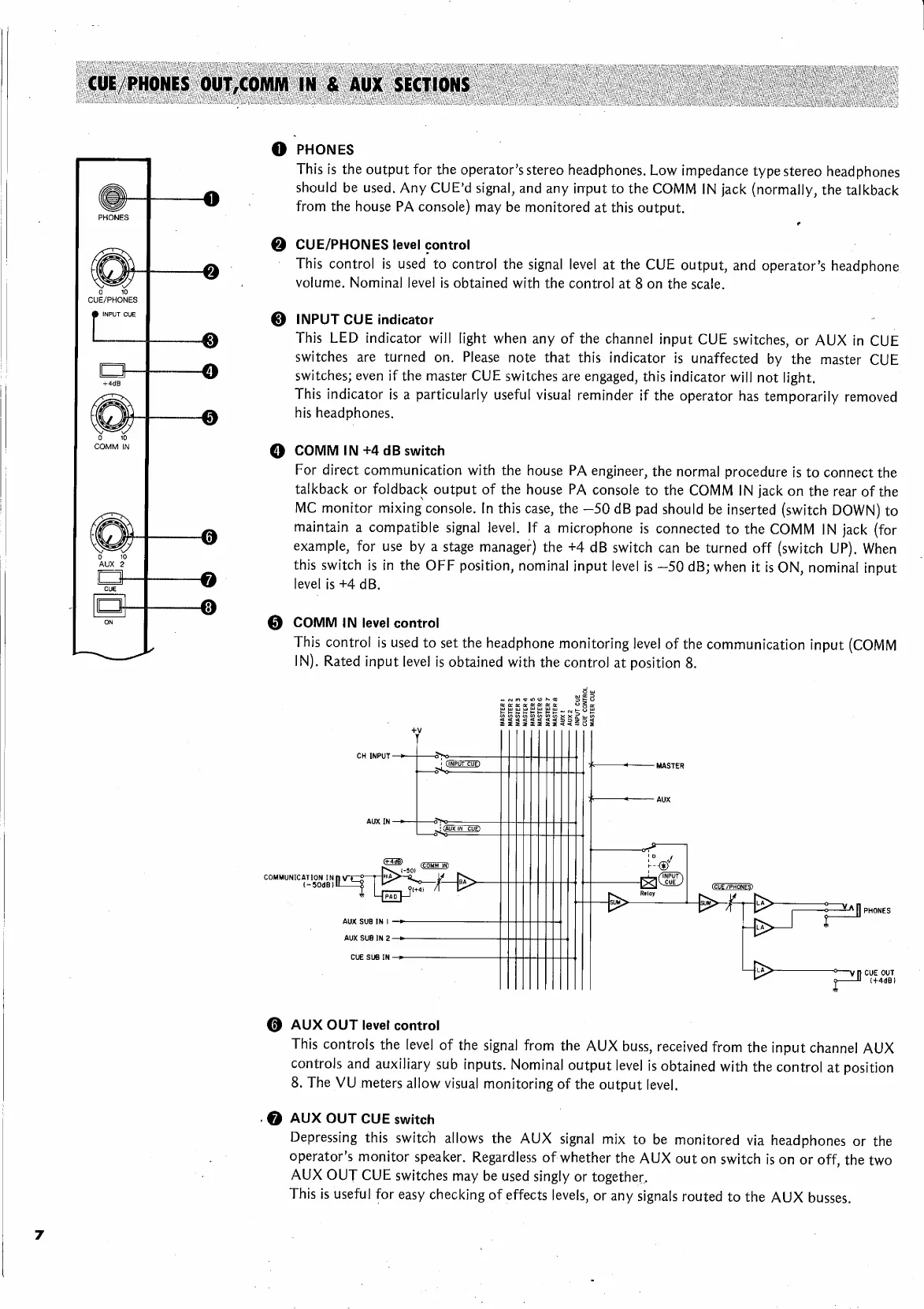
This
is
the
output
for
the
operator's
stereo
headphones.
Low
impedance
type
stereo
headphones
should
be
used.
Any
CUE'd
signal,
and
any
input
to
the
COMM
IN
jack
(normally,
the
talkback
from
the
house
PA
console)
may
be
monitored
at
this
output.
CUE/PHONES
level
control
This
control
is
used
to
control
the
signal
level
at
the
CUE
output,
and
operator's
headphone
volume.
Nominal
level
is
obtained
with
the
control
at
8
on
the
scale.
INPUT
CUE
indicator
|
This
LED
indicator
will
light
when
any
of
the
channel
input
CUE
switches,
or
AUX
in
CUE
switches
are
turned
on.
Please
note
that
this
indicator
is
unaffected
by
the
master
CUE
switches;
even
if
the
master
CUE
switches
are
engaged,
this
indicator
will
not
light.
This
indicator
is
a
particularly
useful
visual
reminder
if
the
operator
has
temporarily
removed
his
headphones.
COMM
IN
+4
dB
switch
For
direct
communication
with
the
house
PA
engineer,
the
normal
procedure
is
to
connect
the
talkback
or
foldback
output
of
the
house
PA
console
to
the
COMM
IN
jack
on
the
rear
of
the
MC
monitor
mixing
console.
In
this
case,
the
—50
dB
pad
should
be
inserted
(switch
DOWN)
to
maintain
a
compatible
signal
level.
If
a
microphone
is
connected
to
the
COMM
IN
jack
(for
example,
for
use
by
a
stage
manager)
the
+4
dB
switch
can
be
turned
off
(switch
UP).
When
this
switch
is
in
the
OFF
position,
nominal
input
level
is
—50
dB;
when
it
is
ON,
nominal
input
level
is
+4
dB.
Q
COMM
IN
level
control
This
control
is
used
to
set
the
headphone
monitoring
level
of
the
communication
input
(COMM
IN).
Rated
input
level
is
obtained
with
the
control
at
position
8.
CH
INPUT
ИНИН
AUX
IN
-
||
Соми
IN)
|
750)
|
она
X
p^
|
MASTER
Г
MASTER
2
MASTER
3
MASTER
4
MASTER
5
MASTER
6
MASTER
7
MASTER
8
AUX
I
AUX
2
INPUT
CUE
CUE
CONTROL
MASTER
CUE
MASTER
LL
|
AUX
aye
о
|
PHONES
AUX
SUB
IN
I
AUX SUB
IN
2
CUE
SUB
IN
У
CUE
OUT
r1
144481
Ө
AUX
OUT
level
control
This
controls
the
level
of
the
signal
from
the
AUX
buss,
received
from
the
input
channel
AUX
controls
and
auxiliary
sub
inputs.
Nominal
output
level
is
obtained
with
the
control
at
position
8.
The
VU
meters
allow
visual
monitoring
of
the
output
level.
‚Ө
AUX
OUT
CUE
switch
Depressing
this
switch
allows
the
AUX
signal
mix
to
be
monitored
via
headphones
or
the
operator’s
monitor
speaker.
Regardless
of
whether
the
AUX
out
on
switch
is
on
or
off,
the
two
AUX
OUT
CUE
switches
may
be
used
singly
or
together.
This
is
useful
for
easy
checking
of
effects
levels,
or
any
signals
routed
to
the
AUX
busses.