Voice Play mode
41
Owner’s Manual
Quick GuidePlaying the MO
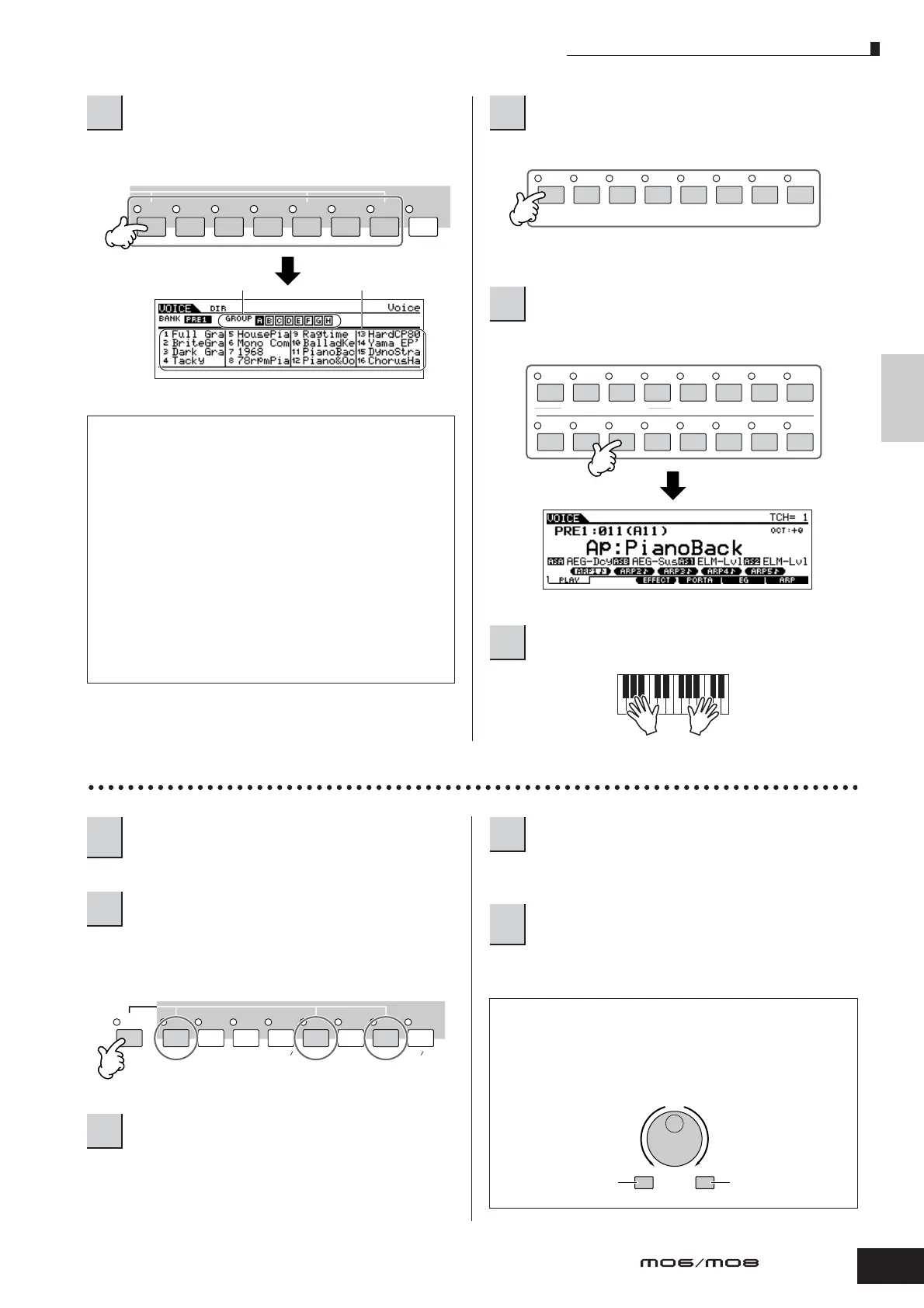
Select one of the Banks from Preset 1 – 4, User 1 – 2, and
GM.
Voices in each Bank are divided into Groups [A] – [H].
Press one of the Number [1] – [16] buttons.
Selecting a Drum Voice
While holding the [DRUM KITS] button, press one of the
following buttons: [PRE 1] (Preset Drum), [USER 1] (User
Drum), or [GM] (GM Drum).
This operation is basically the same as in selecting a
Normal Voice. The numbers of Groups that you can select
depends on the Bank you’ve selected in step 2.
This is the same as in selecting a Normal Voice.
n For details about the instrument assignments for each key, refer to
the separate Data List.
2
Select a Normal Voice Bank.
About the User Banks
The User Banks contain various factory default
Voices.
User Bank 1 (USR1): This Bank contain original
Voices for the User Bank. The same Voices are not
included in the Preset Banks.
User Bank 2 (USR1): This Bank contains
recommended Voices copied from the Preset Banks.
If a Voice in a User Bank (User Voice) is overwritten or
replaced, that User Voice will be lost. When you save
an edited Voice, be careful not to overwrite any impor-
tant User Voices.
PRE 1 PRE 2 PRE 3 PRE 4 USER 1 USER 2 GM
–
Group Voice
3
Select a Normal Voice Group.
4
Select a Normal Voice Number.
5
Play the keyboard.
SYN LEAD
A
BCDEF G
H
SYN PAD/
CHOIR
SYN COMP
CHROMATIC
PERCUSSION
DRUM/
PERCUSSION
SE
MUSICAL FX
COMBI
ELEMENT/PERF. PART/ZONE
8
7
6
5
4
3
21
16
15
14
12 13
11
10
9
1
Press the [VOICE] button to enter the Voice
Play mode.
2
Select a Drum Voice Bank.
3
Select a Drum Voice Group.
PRE 1
A. PIANOFAVORITES
PRE 2
KEYBOARD
PRE 3
ORGAN
PRE 4 USER 1
BASS
USER 2
STRINGS
GM
BRASS
–
DRUM
KITS
GUITAR
PLUCKED
REED PIPE
4
Select a Drum Voice Number.
5
Play the keyboard and check which
instrument is assigned to each key.
Using the [INC/YES], [DEC/NO] buttons and
data dial
In steps 3 and 4 above, you can select a Voice
Number by using the [INC/YES], [DEC/NO] buttons
and data dial.
DEC/NO INC/YES
Increases number
Decreases number Increases number
Decreases number



 To Next Page