Performance Play mode
45
Owner’s Manual
Quick GuidePlaying the MO
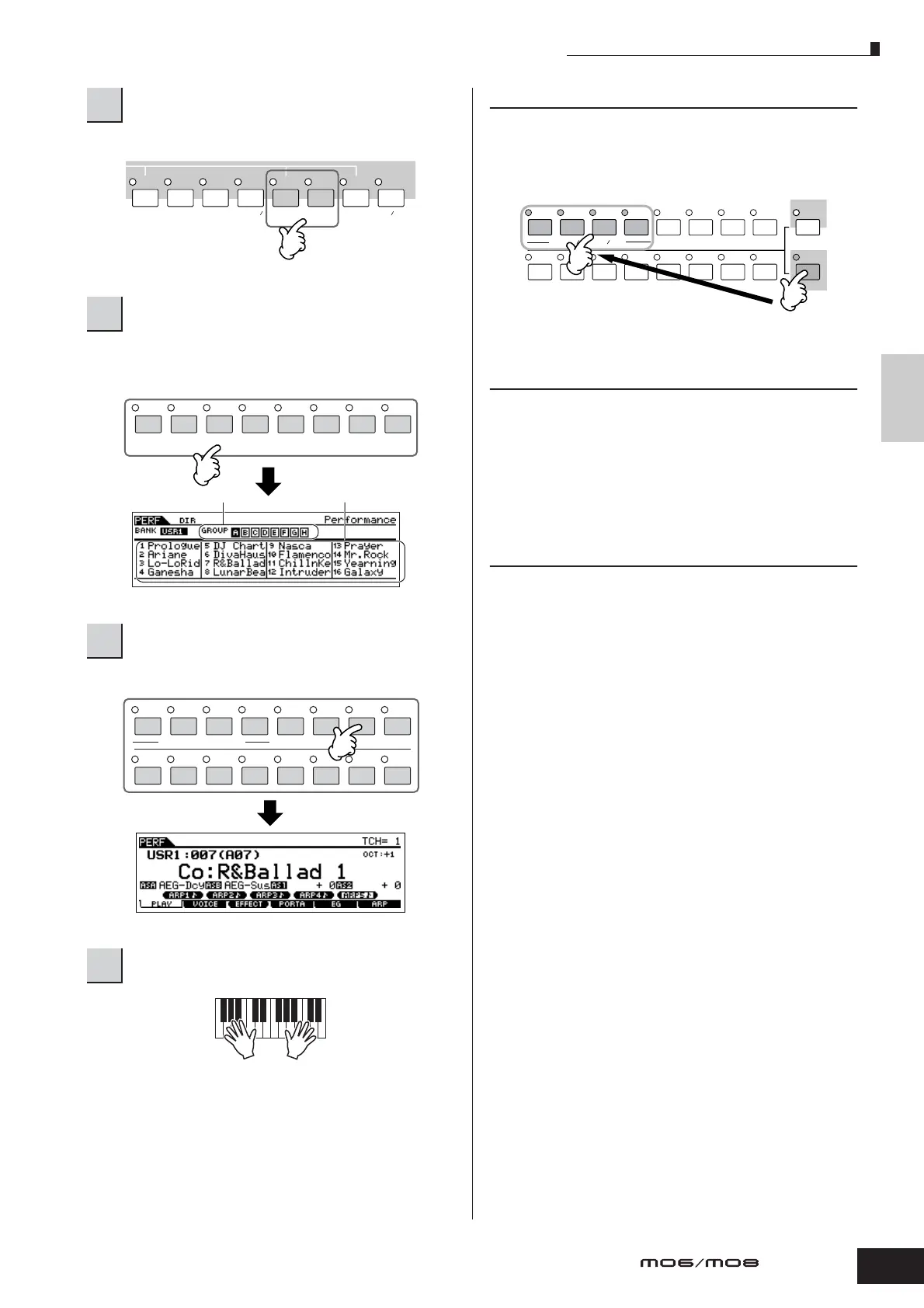
Select one of the Banks from User 1 and 2.
Performances are divided into Groups [A] – [H]. Select a
Group to display a list of the Performances.
Press one of the Number [1] – [16] buttons.
Performance Part mute/solo
Each performance can contain a maximum of four Parts,
each of which can be turned on or off independently.
Muting and soloing of Parts is done in the same way as that
of tracks in a Song/Pattern. See page 75.
Using the Category Search function
As in the Voice Play mode, you can use the Category
Search and Favorite Category functions in the Performance
Play mode. For details on how to use the function, see
page 42.
Keyboard MIDI transmit channel
setting
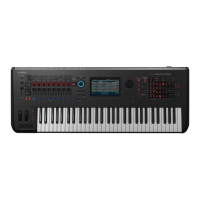
As in the Voice Play mode, you can change the MIDI
transmit channel for the keyboard. Press the [TRACK
SELECT] button (the lamp lights), then press the
appropriate Number button ([1] – [16]). The transmit
channel setting is shown at the top right of the display.
n You can also set the MIDI keyboard transmit channel from the
Utility mode ([UTILITY] → [F5] MIDI → [SF1] CH → KBDTransCh).
This parameter is available for the Voice mode/Performance mode
but not for the Song mode/Pattern mode.
2
Select a Performance Bank.
3
Select a Performance Group.
4
Select a Performance Number.
5
Play the keyboard.
PRE 1
A. PIANO
PRE 2
KEYBOARD
PRE 3
ORGAN
PRE 4 USER 1
BASS
USER 2
STRINGS
GM
BRASS
–
GUITAR
PLUCKED
REED PIPE
SYN LEAD
A
BCDEF G
H
SYN PAD/
CHOIR
SYN COMP
CHROMATIC
PERCUSSION
DRUM/
PERCUSSION
SE
MUSICAL FX
COMBI
Group
Performance
ELEMENT/PERF. PART/ZONE
8
7
6
5
4
3
21
16
15
14
12 13
11
10
9
TRACK
SELECT
SOLO
MUTE
12345678
910111213141516
ELEMENT PERF. PART ZONE



 To Next Page