Edit Search Utility Live SetPerformance
Normal Part (AWM2) Drum Part Normal Part (FM-X) Common/Audio
MODX Reference Manual
Normal Part (AWM2) Edit
Common
Part Settings
General
Pitch
Zone Settings
Zone Transmit
Effect
Routing
Ins A
Ins B
EQ
Ins Assign
Arpeggio
Common
Individual
Advanced
Motion Seq
Common
Lane
Mod / Control
Part LFO
Control Assign
Receive SW
Element
Osc / Tune
Pitch EG
Filter
Type
Filter EG
Scale
Amplitude
Level / Pan
Amp EG
Scale
Element LFO
Element EQ
All Element
Osc
Balance
Copy or Exchange
Elements
85
Reference
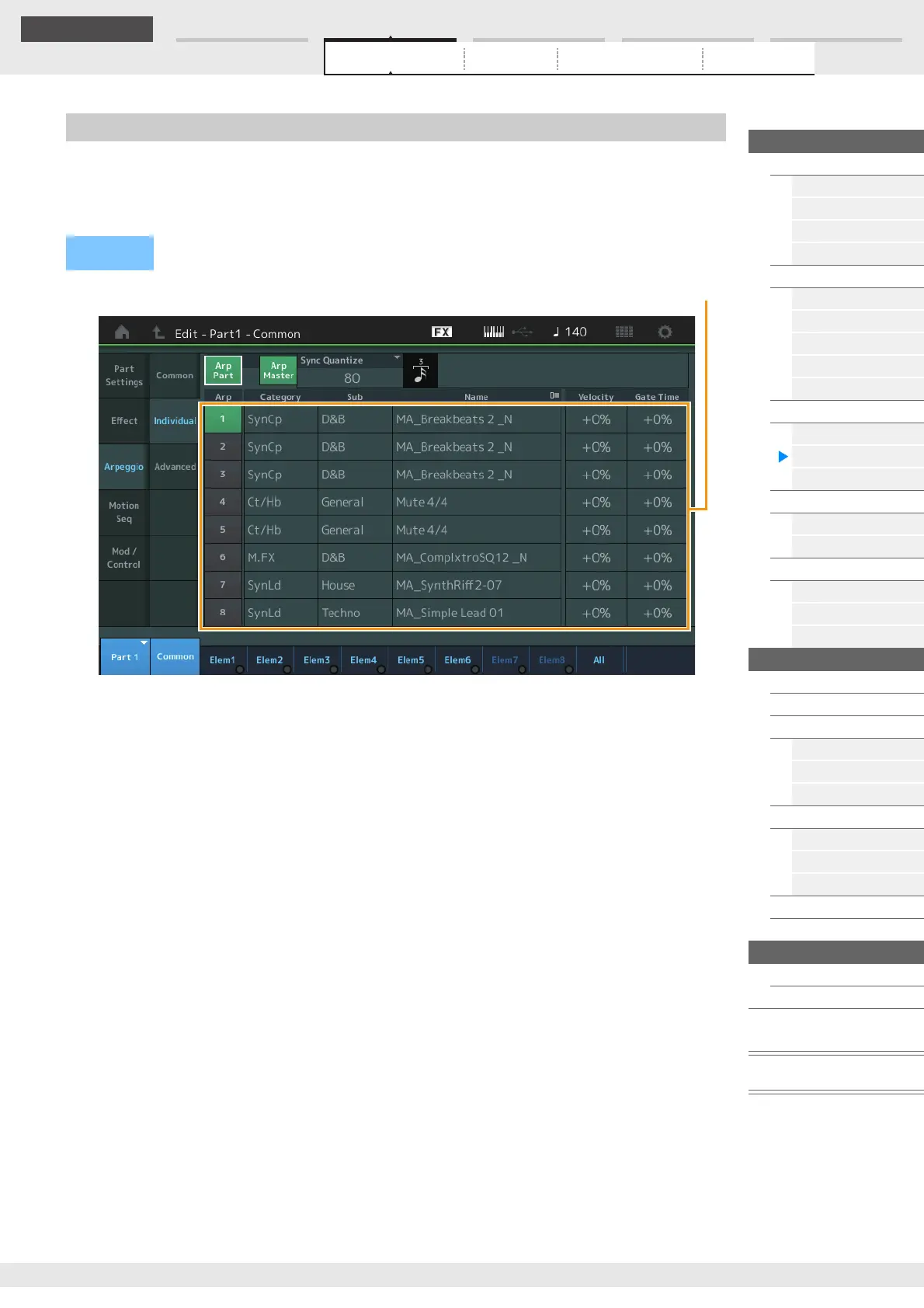
From the Individual display you can set parameters corresponding to Arpeggio Selects 1–8.
Touching the Arpeggio Type Setting calls up a menu. In the displayed menu, touch [Search] to call up the
Arpeggio Category Search display (page 180) and touch [Number] to determine the Arpeggio Type by
specifying the Arpeggio Number.
Arp Part (Part Arpeggio Switch)
Arp Master (Arpeggio Master Switch)
Sync Quantize (Sync Quantize Value)
Same as in the Common display.
Arp (Arpeggio Select)
Selects the desired Arpeggio stored as Arpeggio Select.
By selecting a type and pressing [SHIFT] + [EDIT], you can copy or exchange Arpeggios. For details, see
“Copying or Exchanging Arpeggios” (page 86).
Settings: 1–8
Category (Arpeggio Category)
Indicates the selected Arpeggio Category.
Settings: See the “Arpeggio Category List” on page 11.
Sub (Arpeggio Sub Category)
Indicates the selected Arpeggio Sub Category.
Settings: See the “Arpeggio Sub Category List” on page 11.
Name (Arpeggio Name)
Indicates the selected Arpeggio Name.
Settings: See the Data List PDF document.
Velocity (Velocity Rate)
Determines how much the velocity of Arpeggio playback is offset from the original value. If the resulting
Velocity value is 0, it will be set to 1. If the resulting Velocity value is greater than 128 it will be set to 127.
Settings: -100% – +100%
Individual
Operation
[PERFORMANCE (HOME)] [EDIT] Part selection Element [Common] [Arpeggio]
[Individual]



 To Next Page